
SNK 018484500169
SNK NEOGEO Pocket Color Console User Manual
Modelo: 018484500169
Brand: SNK
1. Iniciación
1.1. Contido do paquete
Upon opening your SNK NEOGEO Pocket Color Console package, please verify that all components are present. The standard package typically includes:
- SNK NEOGEO Pocket Color Console
- Manual de usuario (este documento)
Note: Game cartridges, AA batteries, and any connecting cables are typically sold separately and may not be included with the console.
1.2. Instalación da batería
The SNK NEOGEO Pocket Color Console requires two (2) AA batteries for operation and one (1) CR2032 coin cell battery for memory backup. Follow these steps to install the batteries:
- Localiza o compartimento da batería na parte traseira da consola.
- Slide the battery compartment cover downwards in the direction of the 'OPEN' arrow to remove it.
- Insert two (2) fresh AA batteries into the main compartment, ensuring the positive (+) and negative (-) terminals align with the indicators inside.
- Locate the smaller circular slot for the CR2032 battery. Insert the CR2032 battery with the positive (+) side facing upwards.
- Replace the battery compartment cover by aligning it and sliding it upwards until it clicks securely into place.
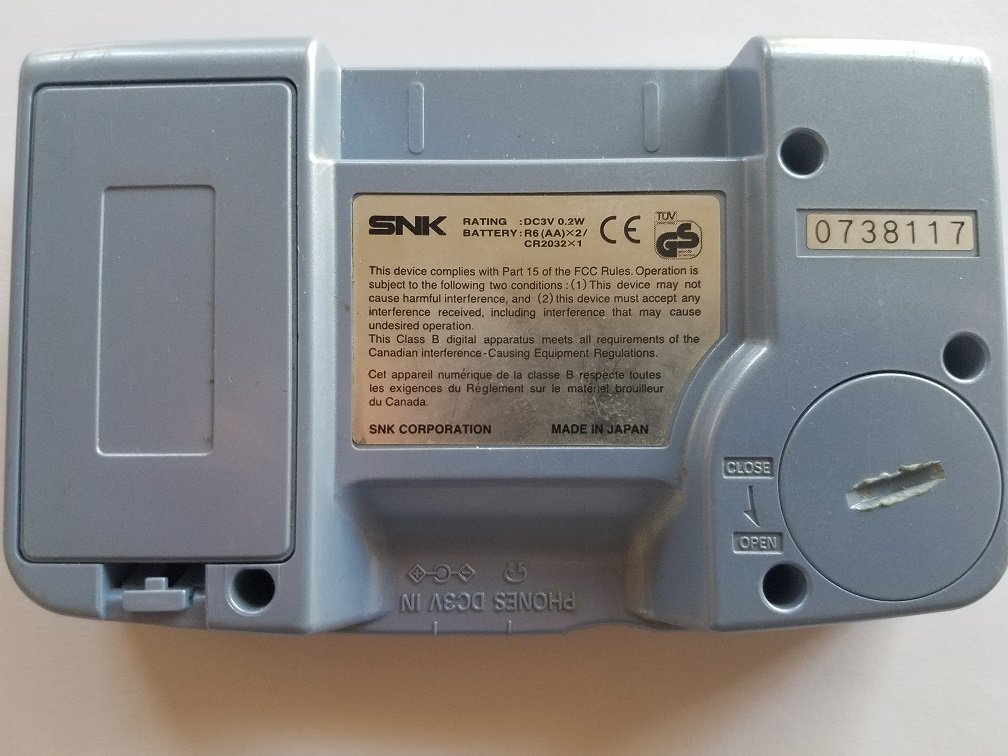
This image shows the rear of the SNK NEOGEO Pocket Color Console. The large rectangular cover for the battery compartment is prominent on the left. A product label with SNK branding, rating information (DC3V 0.2W, BATT: R6(AA)x2 / CR2032x1), and regulatory compliance text is affixed to the center. A serial number '0738117' is visible on the upper right. The 'OPEN' and 'CLOSE' indicators for the battery cover are also visible.
2. Funcionamento básico
2.1. Acendido/apagado
- Para acender: Slide the 'POWER' switch located on the top-left side of the console to the 'ON' position. The screen will illuminate.
- Para apagar: Slide the 'POWER' switch to the 'OFF' position. The screen will turn off.
2.2. Inserting Game Cartridges
Game cartridges are inserted into the slot located at the top edge of the console. Ensure the cartridge is facing the correct direction before gently pushing it in until it clicks into place.
2.3. Controis sobreview
The SNK NEOGEO Pocket Color Console features intuitive controls designed for comfortable gameplay:
- Thumbstick (Left): Used for directional movement in games.
- A Button (Right): Primary action button, typically used for jumping, attacking, or confirming selections.
- B Button (Right): Secondary action button, often used for special actions, canceling, or backing out of menus.
- OPTION Button (Top Right): Used for pausing games, accessing in-game menus, or confirming selections in some titles.
- POWER Switch (Top Left): Controls the console's power.

This image displays the front of the SNK NEOGEO Pocket Color Console. Visible components include the central LCD screen, the circular thumbstick on the left, the 'A' and 'B' action buttons on the right, and the 'POWER' and 'OPTION' buttons located at the top left and right corners respectively. The console's speaker grille is also visible on the lower left.
2.4. Axuste do volume
The volume is controlled via a dial or switch, typically located on the side of the console. Rotate or slide it to increase or decrease the sound output.
3. Coidados e mantemento
3.1. Limpeza da consola
To maintain your console's appearance and functionality:
- Usa un pano suave e seco para limpar o exterior da consola.
- Para manchas difíciles, lixeiramente dampen the cloth with water (do not spray directly onto the console).
- Avoid using harsh chemicals, solvents, or abrasive cleaners, as these can damage the plastic and screen.
- Keep the screen free of dust and fingerprints for optimal viewing.
3.2. Coidado da batería
- Always use high-quality AA batteries.
- Remove batteries if the console will not be used for an extended period to prevent leakage and corrosion.
- Elimina as baterías usadas de forma responsable segundo a normativa local.
3.3. Almacenamento
Store your console in a cool, dry place away from direct sunlight, extreme temperatures, and excessive humidity. Protect it from dust and physical impact.
4 Solución de problemas
If you encounter issues with your SNK NEOGEO Pocket Color Console, refer to the following common problems and solutions:
4.1. A consola non se acende
- Comprobe as baterías: Ensure fresh AA batteries are correctly installed with proper polarity.
- Corrosión da batería: Inspect battery terminals for corrosion. Clean with a cotton swab and rubbing alcohol if necessary.
- Interruptor de alimentación: Confirm the power switch is fully in the 'ON' position.
4.2. Game Not Loading
- Inserción do cartucho: Remove and re-insert the game cartridge firmly into the slot.
- Cartridge Contacts: Gently clean the gold contacts on the game cartridge with a cotton swab and rubbing alcohol. Allow to dry completely before re-inserting.
- Try Another Game: Test with a different game cartridge to determine if the issue is with the console or the specific game.
4.3. Screen Issues (No Display, Flickering)
- Ciclo de enerxía: Turn the console off, wait a few seconds, then turn it back on.
- Condicións de iluminación: The NEOGEO Pocket Color does not have a backlit screen. Ensure you are playing in a well-lit environment.
- Nivel de batería: Low battery power can sometimes affect screen performance. Replace batteries.
4.4. Sound Issues (No Sound, Distorted Sound)
- Control de volume: Adjust the volume dial/switch to ensure it is not set to minimum or muted.
- Jack para auriculares: If headphones are plugged in, sound will typically route there. Unplug headphones to restore speaker sound.
- Game Specific: Test with another game to see if the issue is isolated to one title.
5. Especificacións técnicas
| Característica | Especificación |
|---|---|
| Número de modelo | 018484500169 |
| Fabricante | SNK |
| Peso do elemento | 12 onzas |
| Dimensións do paquete | 5.9 x 5 x 1.8 polgadas |
| Fonte de enerxía | 2 x AA Batteries (for operation), 1 x CR2032 (for memory backup) |
| Mostrar | Color LCD (non-backlit) |
6. Garantía e soporte
For information regarding product warranty, technical support, or service, please refer to the documentation included with your original purchase or visit the official SNK website. Warranty terms and support availability may vary by region and purchase date.
Garda o comprobante de compra para calquera reclamación de garantía.
Ask a question about this manual
Ask about setup, troubleshooting, compatibility, parts, safety, or missing instructions. Manuals+ will review the question and use this page’s manual context to help answer it.