
1. Introdución
This manual provides instructions for the setup, operation, and maintenance of your Bose MediaMate Computer Speakers. These speakers are designed to enhance the audio experience for your computer, whether for music, movies, or gaming. The compact design and upward-angled sound projection optimize audio delivery for desktop use, occupying minimal desk space.
2. Información de seguridade
Please read and follow all safety instructions before using this product to prevent electric shock, fire, or injury. Keep this manual for future reference.
- Non expoñas os altofalantes á auga nin á humidade.
- Do not place the speakers near heat sources such as radiators, heat registers, stoves, or other apparatus (including amplificadores) que producen calor.
- Use só accesorios/accesorios especificados polo fabricante.
- Desenchufe este aparello durante tormentas eléctricas ou cando non se use durante longos períodos de tempo.
- Encargue toda a reparación a persoal de servizo cualificado. O mantemento é necesario cando o aparello resultou danado dalgún xeito, como o cable de alimentación ou o enchufe está danado, se derrama líquido ou caen obxectos no aparello, o aparello estivo exposto á choiva ou á humidade, non funciona normalmente. , ou foi abandonado.
3. Contido do paquete
Verifica que todos os elementos estean presentes no teu paquete:
- Bose MediaMate Computer Speakers (2 units)
- Adaptador de alimentación
- Audio Cable (3.5mm stereo jack)
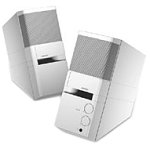
Image: The Bose MediaMate Computer Speakers in Gray. The image shows two compact speakers, one with visible volume and mix controls, and a headphone jack.
4. Configuración
Follow these steps to set up your Bose MediaMate Computer Speakers:
- Colocación: Place the speakers on a flat, stable surface on either side of your computer monitor. Ensure they are angled slightly upward towards your listening position for optimal sound.
- Conectar o cable de audio: Connect the 3.5mm audio cable from the back of the primary speaker (the one with controls) to the audio output jack on your computer.
- Conectar enerxía: Plug the power adapter into the power input on the primary speaker, then plug the adapter into a wall outlet.
- Encendido: Turn on the speakers using the volume knob. The power indicator light should illuminate.
5. Instrucións de funcionamento
Once set up, operating your MediaMate speakers is straightforward:
- Control de volume: Use the large knob labeled "VOLUME" on the front of the primary speaker to adjust the overall sound level.
- Control da mestura: The "MIX" knob allows you to blend audio from two different sources if you have a second device connected to the auxiliary input.
- Jack para auriculares: For private listening, plug your headphones into the headphone jack located on the front of the primary speaker. This will mute the speakers.
- Entradas duais: The speakers feature dual inputs, allowing you to connect and mix two audio sources simultaneously. For example, you can connect your computer and a portable music player.
6. Mantemento
To ensure the longevity and optimal performance of your speakers:
- Limpeza: Use a soft, dry cloth to clean the exterior surfaces of the speakers. Do not use liquid cleaners or aerosols.
- Po: Regularly dust the speaker grilles to prevent accumulation that could affect sound quality.
- Almacenamento: Se vai gardar os altofalantes durante un período prolongado, desconécteos da corrente e gárdeos nun lugar fresco e seco.
7 Solución de problemas
If you encounter issues with your Bose MediaMate speakers, refer to the following common problems and solutions:
| Problema | Causa posible | Solución |
|---|---|---|
| Sen son |
|
|
| Son distorsionado |
|
|
| Só un altofalante funcionando |
|
|
8. Especificacións
- Marca: Bose
- Modelo: MediaMate
- Conectividade: 3.5mm Audio Input, AC Power
- Saída de audio: Estéreo
- Tipo de altofalante: Multimedia
- Material: Metal
- Tamaño do altofalante: 6 Centimeters (Audio Driver)
- Peso do artigo: 3 libras
- Cor: Gris
9. Garantía e soporte
Bose MediaMate Computer Speakers come with a limited warranty. For specific warranty details and duration, please refer to the warranty card included with your product or visit the official Bose websitio.
For technical support, product registration, or service inquiries, please contact Bose customer service:
- Teléfono: 800-444-2673
- Websitio: www.bose.com
Please have your product model number (MediaMate) and purchase date available when contacting support.