
Introdución
This manual provides detailed instructions for the setup, operation, maintenance, and troubleshooting of your Panasonic DMR-E55S Progressive Scan DVD Recorder / Player. This unit allows for recording, editing, and storage on DVD-RAM and DVD-R discs, as well as playback of DVD, CD, CD-R, and MP3-on-CD formats. It features progressive scan video output for enhanced picture quality.
Configuración
1. Desembalaxe e comprobación de compoñentes
Retire con coidado todos os compoñentes da embalaxe. Asegúrese de que estean presentes os seguintes elementos:
- Panasonic DMR-E55S DVD Recorder / Player unit
- Control remoto
- Cable de alimentación
- Cables de audio/vídeo (poden variar segundo a rexión)
Retain all packaging materials for future transport or service needs.
2. Conexión ao televisor
The DMR-E55S offers multiple connection options for video and audio output. Choose the best option supported by your television for optimal quality.

Figura 1: Fronte view of the Panasonic DMR-E55S unit. This image shows the disc tray, display panel, and front controls.
- Saída de vídeo por compoñentes (Y, Pb, Pr): For the highest quality analog video connection, connect component video cables (green, blue, red) from the DMR-E55S to your TV's component video input.
- Saída de S-vídeo: Connect an S-video cable for improved video quality over composite video.
- Composite Video Output (Yellow RCA): Connect a composite video cable for standard video quality.
- Audio Output (Red/White RCA): Connect red and white RCA cables from the DMR-E55S to your TV's audio input or an audio receiver.
- Saída de audio dixital óptico: For digital surround sound, connect an optical cable to a compatible audio receiver.
- RF Coaxial Output: Connect a coaxial cable from the RF OUT jack on the DMR-E55S to your TV's antenna/cable input.

Figure 2: Rear panel of the Panasonic DMR-E55S, illustrating the various audio and video input/output ports for connection to a television or audio system.
3. Conexión de alimentación
Connect the power cord to the AC IN terminal on the rear of the unit, then plug the other end into a standard electrical outlet.
4. Acendido inicial e configuración básica
Press the power button on the unit or remote control. Follow any on-screen prompts for initial setup, such as language selection and automatic channel search if using the RF input.
Instrucións de funcionamento
1. Reprodución de discos
The DMR-E55S supports playback of DVD-Video, DVD-R, DVD-RAM, CD, CD-R/RW, and MP3-on-CD discs.
- Prema o botón OPEN/CLOSE para abrir a bandexa do disco.
- Place a disc on the tray with the label side facing up.
- Press OPEN/CLOSE again to close the tray. Playback will usually begin automatically.
- Use the remote control for playback functions such as Play, Pause, Stop, Fast Forward, and Rewind.

Figure 3: Front panel of the DMR-E55S during operation, showing the illuminated display with disc information.
2. Recording to DVD-RAM and DVD-R
The unit supports recording to both DVD-RAM and DVD-R discs. DVD-RAM discs allow for repeated recording and editing, while DVD-R discs are suitable for permanent recordings.
- Insert a Recordable Disc: Place a blank DVD-RAM or DVD-R disc into the disc tray.
- Seleccione a fonte de entrada: Use the INPUT SELECT button on the remote or front panel to choose the desired input source (e.g., Line 1, Line 2, Tuner).
- Gravación dun toque: Press the RECORD button to start recording immediately. Press it again to stop.
- Modos de gravación: The unit offers 4-mode recording (XP/SP/LP/EP) and Flexible Recording (FR) to optimize recording quality and duration based on available disc space.
- Gravación con temporizador: Access the timer recording menu to schedule recordings at specific times and channels.
- Finalizing DVD-R Discs: After recording to a DVD-R disc, it must be finalized through the menu system to be playable on other DVD players. DVD-RAM discs do not require finalization.
3. Time Slip Features
The DMR-E55S includes Time Slip functions, primarily for DVD-RAM discs:
- Chasing Playback: Begin watching a program from the beginning while it is still being recorded.
- Playlist Playback: Create custom playlists from recorded content on DVD-RAM discs.
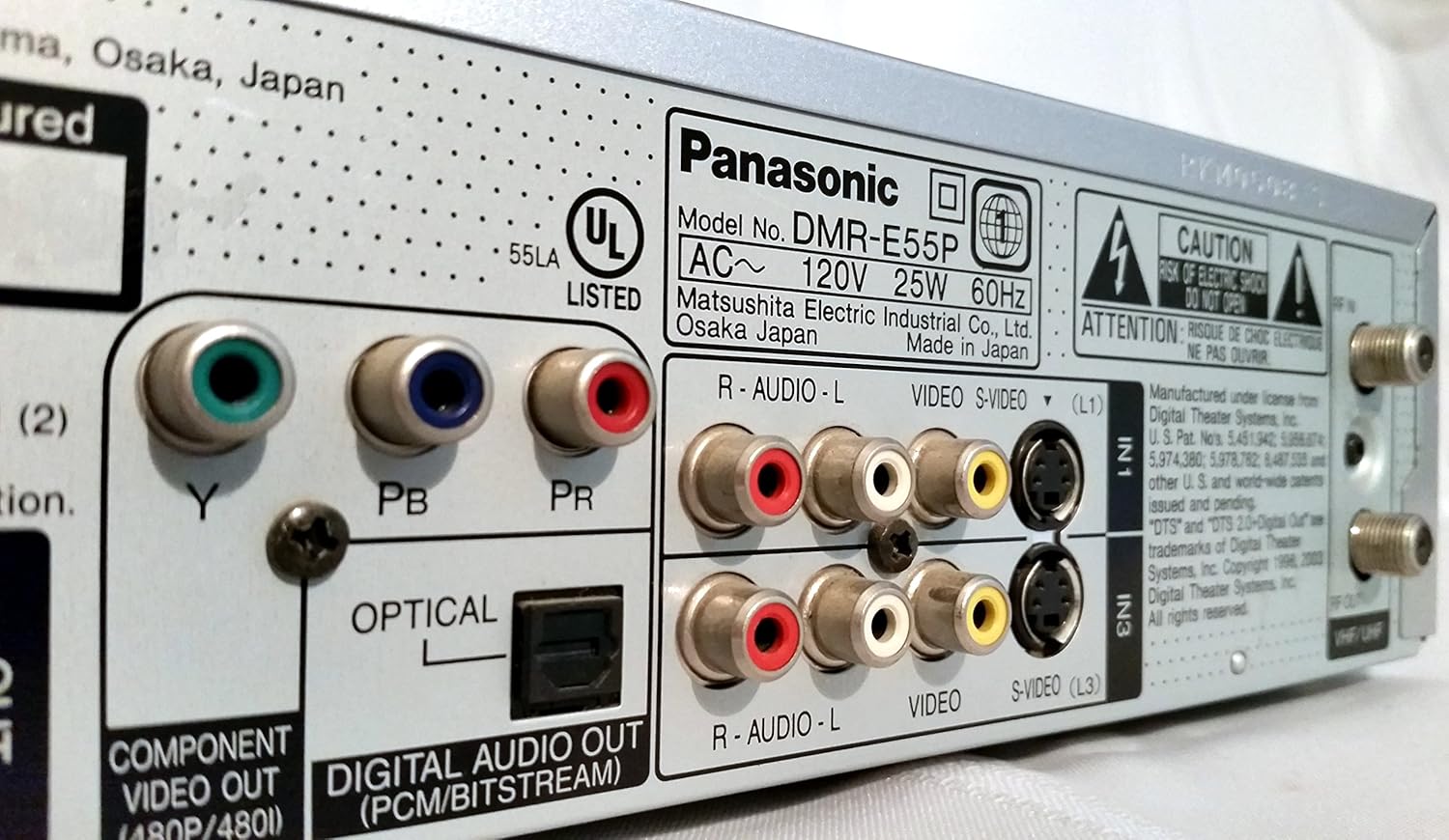
Figure 4: The remote control for the DMR-E55S, showing various buttons for playback, recording, and menu navigation.
Mantemento
1. Limpeza da unidade
Limpa o exterior da unidade cun pano suave e seco. Non empregues produtos de limpeza líquidos ou en aerosol, xa que poden danar o acabado ou os compoñentes internos.
2. Coidado do disco
Handle discs by their edges to avoid fingerprints and scratches. Store discs in their cases when not in use. Clean dirty discs with a soft, lint-free cloth, wiping from the center outwards.
Resolución de problemas
If you encounter issues with your DMR-E55S, refer to the following common problems and solutions:
| Problema | Posible causa/solución |
|---|---|
| Sen poder | Ensure the power cord is securely connected to both the unit and a working electrical outlet. |
| Sen imaxe nin son | Verify all audio and video cables are correctly connected between the DMR-E55S and your TV/audio system. Check that your TV is set to the correct input source. |
| O disco non se reproduce | Check if the disc is inserted correctly (label side up). Ensure the disc type is supported by the unit. Clean the disc if it is dirty or scratched. |
| Non se pode gravar | Ensure a recordable DVD-RAM or DVD-R disc is inserted. Check if the disc has sufficient free space. Verify the input source is correctly selected. |
| Recorded DVD-R disc won't play on other players | The DVD-R disc may not have been finalized. Finalize the disc through the unit's menu system. |
| O control remoto non funciona | Check the batteries in the remote control and replace them if necessary. Ensure there are no obstructions between the remote and the unit's IR sensor. |
Especificacións
| Característica | Descrición |
|---|---|
| Marca | Panasonic |
| Nome do modelo | DMR-E55S |
| Tipo de medios | CD, DVD (DVD-RAM, DVD-R, DVD-Video, CD-R/RW, MP3-on-CD) |
| Característica especial | Escaneo progresivo |
| Resolución | 720 x 480 píxeles |
| Resolución de saída de vídeo | 480 p |
| Tipo de conector | RF, A/V (Composite), S-video, Component Video (Y, Pb, Pr), Optical Digital Audio |
| Modo de saída de audio | Surround (Dolby Digital, DTS compatible via optical output) |
| Formato de audio compatible | DVD-Audio (2-channel), DVD-Video with surround play, MP3 |
| Codificación de vídeo | MPEG-2 (Hybrid Variable Bit Rate) |
| Analog Video Format | NTSC |
| Modos de gravación | XP, SP, LP, EP, FR (Flexible Recording) |
| Dimensións (W x H x D) | 16.9" x 3.13" x 11.2" |
| Peso do elemento | 8.58 libras |
| Accesorios incluídos | Control remoto |
Información da garantía
This Panasonic DMR-E55S unit comes with a one-year warranty covering parts and labor from the date of purchase. Please retain your proof of purchase for warranty claims. For detailed terms and conditions, refer to the warranty card included with your product or contact Panasonic customer support.
Apoio
For further assistance, technical support, or service inquiries, please contact Panasonic customer support. You can find contact information on the Panasonic official websitio web ou na documentación que se inclúe co produto.