
1. Introdución
Welcome to the user manual for your new Singing Machine SMVG-620 CD+G Karaoke System. This system is designed to provide hours of entertainment with its CD+G playback capabilities, built-in camera, 5.5-inch monitor, and AM/FM radio. Please read this manual thoroughly before operating your unit to ensure proper use and to maximize your enjoyment.
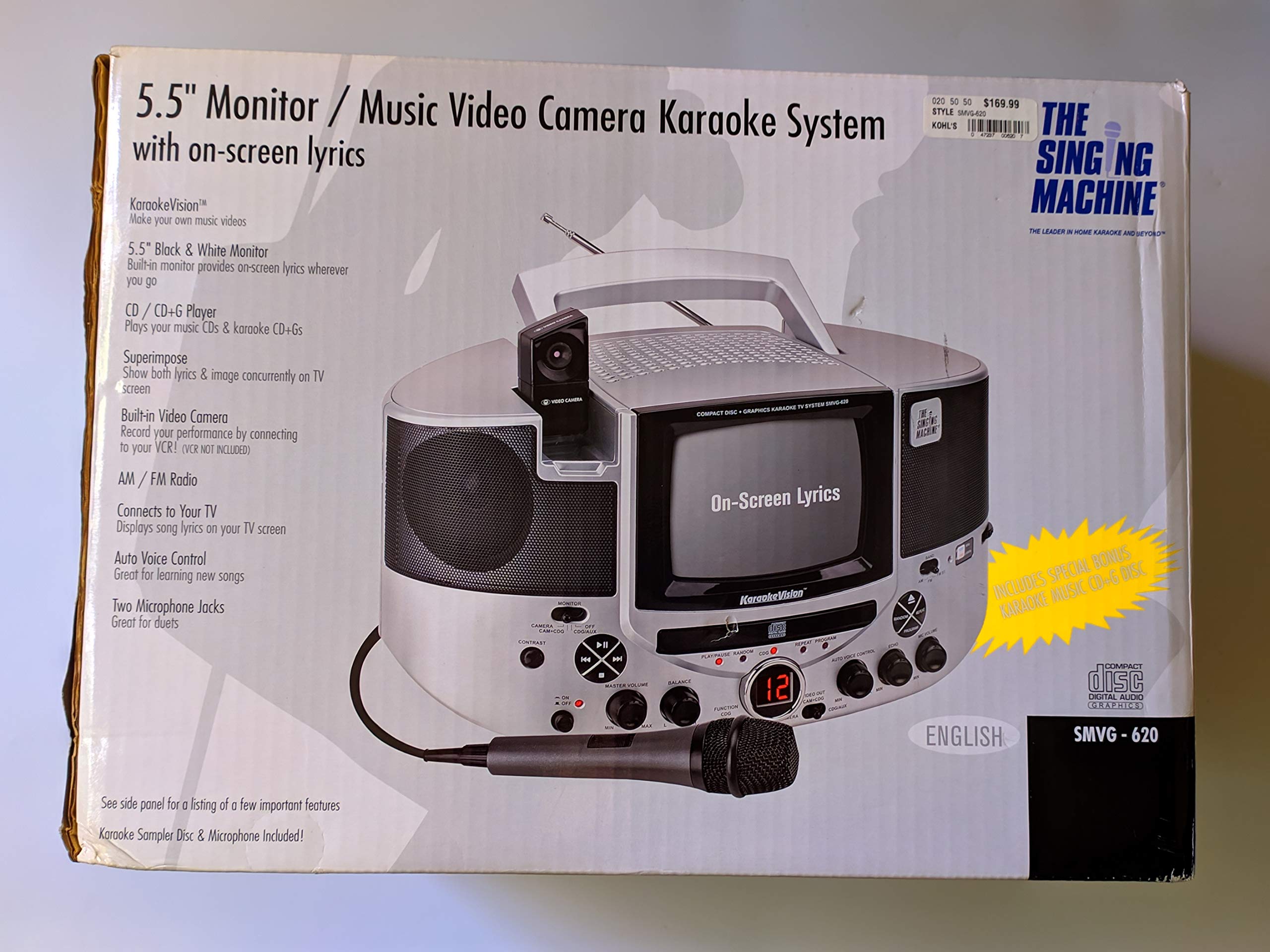
Figura 1.1: The Singing Machine SMVG-620 CD+G Karaoke System.
For optimal performance and safety, always follow the instructions and warnings provided.
2. Información importante de seguridade
- Ler as instrucións: Deben ler todas as instrucións de seguridade e de funcionamento antes de poñer en funcionamento o aparello.
- Instrucións para conservar: As instrucións de seguridade e operación deben conservarse para futuras referencias.
- Atención ás advertencias: Deben cumprirse todas as advertencias do aparello e das instrucións de uso.
- Siga as instrucións: Deben seguirse todas as instrucións de funcionamento e uso.
- Auga e humidade: Non use este aparello preto da auga.
- Limpeza: Limpar só cun pano seco.
- Ventilación: Non bloquee ningunha abertura de ventilación. Instáleo segundo as instrucións do fabricante.
- Calor: Non instale preto de fontes de calor como radiadores, rexistros de calor, cociñas ou outros aparellos (incluíndo amplificadores) que producen calor.
- Protección do cable de alimentación: Protexa o cable de alimentación para evitar que se pise ou se pinche, especialmente nos enchufes, tomas de corrente e no punto de saída do aparello.
- Anexos/Accesorios: Use só anexos/accesorios especificados polo fabricante.
- Lóstrego: Desenchufe este aparello durante tormentas eléctricas ou cando non se use durante longos períodos de tempo.
- Servizo: Remita todo o servizo a persoal de servizo cualificado. O mantemento é necesario cando o aparello sufriu algún dano.
3. Contido do paquete
Carefully unpack your Singing Machine SMVG-620 system and ensure all items listed below are present and in good condition.
- SMVG-620 CD+G Karaoke System
- One (1) Microphone
- Sampler CD+G Disc
- Audio/Video RCA Cables
- Adaptador de alimentación de CA.
- Manual de instrucións

Figura 3.1: Contents of the box, including the microphone, RCA cables, and the instruction manual.
4. Produto rematadoview
Familiarize yourself with the various parts and controls of your SMVG-620 Karaoke System.

Figura 4.1: Traseira view of the product packaging highlighting key features and components of the SMVG-620 system.
Características principais:
- 5.5" Black & White Monitor: For on-screen lyrics from CD+G discs.
- Built-in Color Camera: Allows you to see yourself on the monitor or connected TV.
- Dual Microphone Jacks: Connect two microphones for duets (one microphone included).
- Radio AM/FM: Sintoniza as túas emisoras de radio favoritas.
- Reproductor de CD+G: Plays standard audio CDs and CD+Graphics discs.
- Control automático de voz (AVC): Helps maintain vocal balance by automatically reducing the main vocal track when you sing.
- Control de eco: Adds depth and resonance to your voice.
- Professional Style Microphone: For clear vocal pickup.
- Saída de audio/vídeo: Connects to your TV for larger screen display and enhanced audio.
5. Configuración
5.1 Conexión de alimentación
- Asegúrese de que a unidade estea colocada sobre unha superficie estable e plana.
- Connect the AC power adapter to the DC IN jack on the back of the SMVG-620 unit.
- Conecte o outro extremo do adaptador de corrente alterna a unha toma de corrente estándar (120 V ~ 60 Hz).
5.2 Conexión a un televisor
Para view lyrics on a larger screen and enhance audio, connect the SMVG-620 to your television using the supplied Audio/Video RCA cables.
- Locate the AUDIO OUT (white and red) and VIDEO OUT (yellow) jacks on the back of the SMVG-620.
- Connect the white plug of the RCA cable to the white AUDIO OUT jack on the karaoke system and to the white AUDIO IN jack on your TV.
- Connect the red plug of the RCA cable to the red AUDIO OUT jack on the karaoke system and to the red AUDIO IN jack on your TV.
- Connect the yellow plug of the RCA cable to the yellow VIDEO OUT jack on the karaoke system and to the yellow VIDEO IN jack on your TV.
- Turn on your TV and select the correct A/V input source (e.g., AV1, Video 1) that corresponds to the jacks you used.
5.3 Conexión de micrófono
Plug the microphone into either the MIC 1 or MIC 2 jack on the front of the SMVG-620 unit.
6. Funcionamento
6.1 Acendido/Apagado
Preme o POTENCIA button located on the front panel to turn the unit ON or OFF.
6.2 CD+G Playback
- Open the CD compartment door and carefully place a CD+G disc (or standard audio CD) onto the spindle with the label side facing up. Close the door.
- Seleccione CD+G mode using the FUNCTION selector.
- Preme o REPRODUCIR/PAUSA botón para iniciar a reprodución.
- Axustar o VOLUME MESTRE botón ao nivel de escoita desexado.
- Usa o SALTAR botóns (<< or >>) para navegar entre as pistas.
- Para facer unha pausa, prema REPRODUCIR/PAUSA de novo. Prema de novo para continuar.
- Para deter a reprodución, prema o botón PARA botón.
6.3 Uso do micrófono
- Ensure the microphone is connected to a MIC jack.
- Axustar o VOLUME MIC knob to control the microphone's output level.
- Xire o ECO botón para engadir un efecto de eco á túa voz.
- O AUTO VOICE CONTROL (AVC) switch can be toggled ON/OFF. When ON, the original vocal track on a CD+G disc will be reduced when you sing into the microphone.
Radio AM/FM 6.4
- Seleccione AM or FM mode using the FUNCTION selector.
- Extend the FM antenna for better reception.
- Xire o TUNING botón para seleccionar a emisora de radio desexada.
- Axustar o VOLUME MESTRE botón.
6.5 Función da cámara
The built-in camera allows you to display your image on the 5.5-inch monitor or a connected TV.
- Ensure the unit is powered on and connected to a TV if you wish to use an external display.
- The camera feed will automatically display when the unit is in CD+G or Video mode, or when no other video source is active.
7. Mantemento
7.1 Limpeza da unidade
- Desenchufe sempre a unidade da toma de corrente antes de limpala.
- Use un pano suave e seco para limpar as superficies exteriores.
- Non empregues produtos de limpeza abrasivos, ceras ou disolventes, xa que poden danar o acabado.
- Para a lente do CD, use un disco limpador de lentes de CD especializado.
7.2 Coidado de CD
- Manipule os CD polos bordos para evitar marcas de pegadas na superficie de reprodución.
- Keep discs in their cases when not in use to prevent scratches.
- Limpa os discos cun pano suave e sen fiapos, pasando o limpo dende o centro cara a fóra.
8 Solución de problemas
If you encounter any issues with your SMVG-620, please refer to the following common problems and solutions.
| Problema | Causa posible | Solución |
|---|---|---|
| Sen poder | O cable de alimentación non está conectado correctamente. | Asegúrate de que o adaptador de CA estea conectado correctamente á unidade e a unha toma de corrente que funcione. |
| Non hai son dos altofalantes | Master Volume is too low. Seleccionouse o modo de función incorrecto. | Aumenta o VOLUME PRINCIPAL. Select the correct FUNCTION (CD+G, AM, FM). |
| Non hai son do micrófono | Microphone not connected. MIC VOLUME is too low. O interruptor do micrófono está en posición OFF. | Plug microphone into MIC 1 or MIC 2 jack. Increase the MIC VOLUME. Ensure microphone switch is ON. |
| No video on TV / No lyrics | RCA cables not connected correctly. Seleccionouse a entrada de TV incorrecta. Not a CD+G disc. | Check all RCA cable connections (yellow for video). Select the correct A/V input on your TV. Ensure you are playing a CD+G disc for lyrics. |
| Salto de CD | O disco está sucio ou raiado. A unidade está nunha superficie inestable. | Clean the disc or try another disc. Place the unit on a stable, vibration-free surface. |
9. Especificacións
| Número de modelo | SMVG-620 (SIN SMVG620) |
| Fonte de enerxía | AC 120V ~ 60Hz (via AC Adapter) |
| Monitor | 5.5-inch Black & White |
| Contador de oradores | 2 |
| Dispositivos compatibles | Televisión |
| Tipo de medios | CD, CD+G |
| Dimensións do produto (LxWxH) | 35.8 x 20.8 x 19.3 cm (14.1 x 8.2 x 7.6 polgadas) |
| Peso do elemento | 3.9 kg (8.6 lb) |
10. Garantía e soporte
For warranty information and customer support, please refer to the warranty card included with your product or contact The Singing Machine directly. You may also consult your retailer for details regarding their return and warranty policies.
Fabricante: A MÁQUINA DE CANTO