
1. Introdución
Grazas pola compraasing the GPX CDP6806DT Personal CD Player. This manual provides important safety instructions, operational guidelines, and maintenance procedures to ensure optimal performance and longevity of your device. Please read this manual thoroughly before using the product and retain it for future reference.
2. Información de seguridade
Instrucións de seguridade importantes
- Non expoña a unidade á auga nin á humidade.
- Evite colocar a unidade preto de fontes de calor como radiadores, rexistros de calor, estufas ou outros aparellos (incluídos amplificadores) que producen calor.
- Non intente desmontar nin modificar a unidade. Encomende calquera tarefa de mantemento a persoal de servizo cualificado.
- Use only the specified batteries (2 x AA batteries). Ensure correct polarity when inserting batteries.
- Retire as pilas se a unidade non se utiliza durante un período prolongado.
- Evite escoitar a niveis de volume altos durante períodos prolongados para evitar danos auditivos.
- Limpe a unidade só cun pano seco.
3. Contido do paquete
Carefully unpack your GPX CDP6806DT Personal CD Player and ensure all items are present:
- GPX CDP6806DT Personal CD Player
- Manual de usuario (este documento)
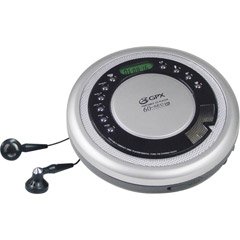
Figure 1: GPX CDP6806DT Personal CD Player. This image illustrates the compact design and general appearance of the device.
4. Controis e características
Familiarize yourself with the controls and features of your GPX CDP6806DT for optimal use.
- Pantalla LCD: 6-digit display for track number, time, and FM frequency.
- REPRODUCIR/PAUSAR (►/−): Press to start or pause CD playback.
- PARAR (■): Press to stop CD playback.
- SKIP/SEARCH (◀◀/▶▶): Press to skip tracks. Hold to search within a track.
- VOLUME (+/-): Axusta o nivel de saída de audio.
- MODE/PROG: Selects playback mode (Repeat, Random) or programs CD tracks.
- FM TUNER (ON/OFF/BAND): Switches to FM radio mode, turns FM on/off, or changes FM band.
- PRESET (+/-): Navigates saved FM radio presets.
- Compartimento de CD: Area for inserting audio CDs.
- Compartimento de batería: Located on the bottom, holds 2 AA batteries.
- Conector para auriculares (3.5 mm): Connects headphones for private listening.
Figure 2: GPX CDP6806DT Controls Layout. This image provides a visual reference for the location of various buttons and ports on the device.
5. Configuración
5.1 Instalación da batería
The GPX CDP6806DT requires two (2) AA batteries (not included) for portable operation.
- Localice o compartimento da batería na parte inferior da unidade.
- Abra a tapa do compartimento da batería.
- Insira dúas pilas AA, asegurándose de manter a polaridade correcta (+ e -) como se indica no interior do compartimento.
- Pecha a tapa do compartimento da batería de forma segura.
5.2 Conectar auriculares
For private listening, connect your 3.5mm stereo headphones (not included) to the headphone jack located on the side of the unit.
6. Instrucións de funcionamento
6.1 Reprodución de CD
The unit supports CD and CD-R/RW disc formats.
- Open the CD compartment lid by gently pressing the OPEN button (if present, or lifting the lid).
- Coloque un CD coa etiqueta cara arriba no eixo central.
- Close the CD compartment lid firmly until it clicks.
- Preme o REPRODUCIR/PAUSAR (►/−) button to begin playback. The track number and elapsed time will appear on the LCD display.
- Para deter a reprodución, prema REPRODUCIR/PAUSAR (►/−). Preme de novo para retomar.
- Para deter a reprodución, prema o botón PARAR (■) botón.
- Para saltar á seguinte pista, prema SKIP/SEARCH (▶▶).
- To go back to the beginning of the current track, press SKIP/SEARCH (◀◀) once. Press twice to go to the previous track.
- To search rapidly forward or backward within a track, hold down SKIP/SEARCH (▶▶) or (◀◀) respectivamente.
- Axuste o volume empregando o VOLUME (+/-) controis.
6.2 Funcionamento da radio FM
The unit features a digital FM tuner with station presets.
- Desliza o SINTONIZADOR FM switch to the ON position or press the BANDA botón para entrar en modo FM.
- Preme o SKIP/SEARCH (▶▶) or (◀◀) botóns para sintonizar manualmente a frecuencia desexada.
- To auto-scan and save stations, hold down the REPRODUCIR/PAUSAR (►/−) button (or refer to specific instructions for auto-scan if available on the device).
- To recall saved presets, use the PRESET (+/-) botóns.
6.3 CD Programming (24-Track)
Podes programar ata 24 pistas para reproducir nunha orde específica.
- Co CD parado, prema o botón MODE/PROG botón. "PROG" parpadeará na pantalla.
- Usa o SKIP/SEARCH (▶▶) or (◀◀) botóns para seleccionar a primeira pista que desexe programar.
- Preme MODE/PROG again to confirm the selection. The display will show the program number and the next available program slot.
- Repita os pasos 2 e 3 para engadir ata 24 pistas ao seu programa.
- Despois de programar todas as pistas desexadas, prema REPRODUCIR/PAUSAR (►/−) para iniciar a reprodución programada.
- Para borrar o programa, prema a tecla PARAR (■) botón dúas veces.
6.4 Anti-Skip Protection (ASP)
The GPX CDP6806DT features a 60-second Anti-Skip Protection system. This system buffers audio data to minimize interruptions caused by minor shocks or vibrations during CD playback. The ASP activates automatically when a CD is playing.
7. Mantemento
7.1 Limpeza da unidade
- Limpe o exterior da unidade cun pano suave e seco.
- Non empregue produtos de limpeza abrasivos, ceras nin solventes.
- If the CD lens needs cleaning, use a specialized CD lens cleaner disc or a soft, lint-free cloth designed for optical lenses.
7.2 Coidado coa batería
- Retire as pilas se non vai usar a unidade durante un período prolongado para evitar fugas.
- Non mesture pilas antigas e novas, nin tipos diferentes de pilas.
- Elimina as baterías usadas de forma responsable segundo a normativa local.
8 Solución de problemas
If you experience issues with your GPX CDP6806DT, please consult the following table for common problems and solutions.
| Problema | Posible causa/solución |
|---|---|
| A unidade non se acende. | Check if batteries are inserted correctly with proper polarity. Ensure batteries are fresh and not depleted. |
| Sen son dos auriculares. | Ensure headphones are fully plugged into the headphone jack. Increase the volume level. Test with another pair of headphones. |
| O CD salta ou a reprodución é interrompida. | Ensure the CD is clean and free of scratches or smudges. Clean the CD with a soft, lint-free cloth. Ensure the unit is on a stable surface or held steadily during use. |
| O CD non se reproduce. | Ensure the CD is inserted correctly with the label side up. Close the CD compartment lid completely. Check if the CD is a supported format (CD, CD-R/RW). |
| A recepción da radio FM é deficiente. | Extend the headphone cable as it acts as the antenna. Try moving to a different location. |
9. Especificacións
- Marca: GPX
- Modelo: CDP6806DT
- Formatos de disco admitidos: CD, CD-R / RW
- Protección Anti-Skip: 60 segundos
- Visualización: LCD de 6 díxitos
- Radio: Digital FM Tuner with Presets
- CD Programming: 24 pistas
- Fonte de enerxía: 2 pilas AA (non incluídas)
- Conectividade: 3.5mm Headphone Jack (Auxiliary)
10. Garantía e soporte
For detailed warranty information, please refer to the warranty card included with your original product packaging. For technical support, service inquiries, or to purchase replacement parts, please visit the official GPX websitio web ou póñase en contacto co seu departamento de atención ao cliente empregando a información de contacto proporcionada na documentación do produto.
Conserve o comprobante de compra para reclamacións de garantía.