
1. Introdución
This manual provides essential information for the safe and efficient operation of your Sharp Aquos LC42D64U 42-Inch 1080p LCD HDTV. Please read these instructions thoroughly before using your television and retain them for future reference. The Sharp Aquos D64 series offers a slim design, Full HD 1080p resolution, and advanced features for an enhanced viewexperiencia ing.
2. Información importante de seguridade
Siga sempre as precaucións de seguridade básicas ao usar este televisor para reducir o risco de incendio, descarga eléctrica e lesións.
- Fonte de enerxía: Conecte o televisor só á fonte de alimentación indicada na etiqueta.
- Ventilación: Asegúrese de que haxa unha ventilación axeitada. Non bloquee as aberturas de ventilación.
- Auga e humidade: Non expoñas o televisor á choiva nin á humidade. Non coloques obxectos cheos de líquidos enriba do televisor.
- Limpeza: Desconecte o televisor da toma de corrente antes de limpalo. Use un pano suave e seco.
- Servizo: Non intente atender este produto vostede mesmo. Remita todo o servizo a persoal de servizo cualificado.
- Montaxe: If wall-mounting, ensure the mount is compatible and installed by qualified personnel.
- Nenos: Vixía os nenos para evitar que suban ou xoguen co televisor.
3. Que hai na caixa
Verifique que estean presentes todos os compoñentes antes de continuar coa configuración.
- Sharp Aquos LC42D64U 42-Inch LCD HDTV
- Control remoto
- Soporte de mesa
- Cable de alimentación
- Manual de usuario (este documento)
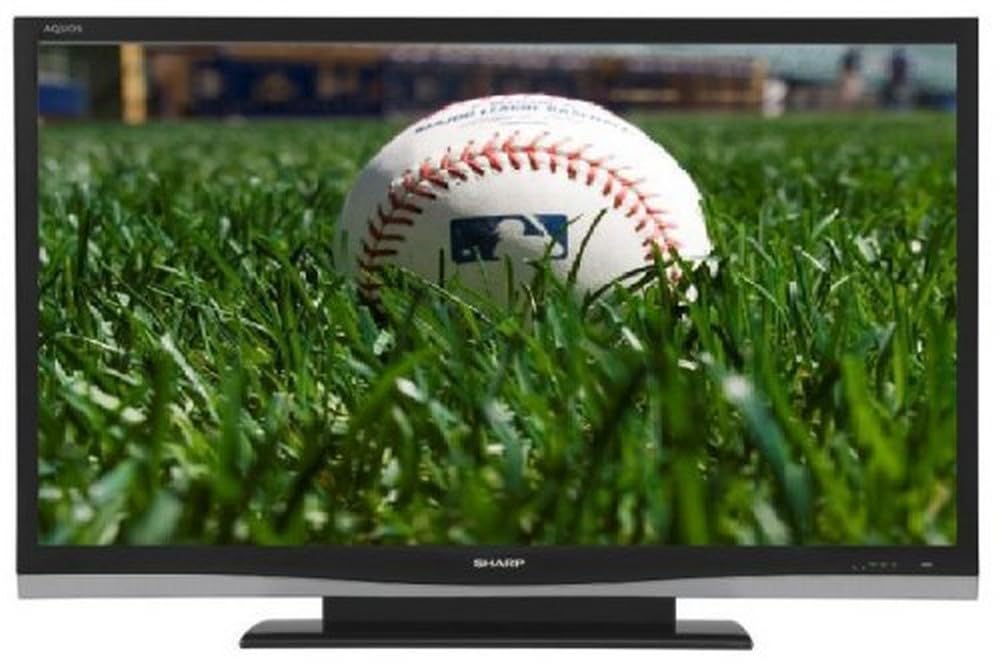
Imaxe: Fronte view of the Sharp Aquos LC42D64U 42-Inch LCD HDTV with its included table stand.
4. Configuración
4.1 Fixación do soporte de mesa
If you are not wall-mounting the television, attach the included table stand. Refer to the separate assembly guide for detailed instructions on securing the stand to the TV. Ensure all screws are tightened securely.
4.2 Conexión de dispositivos externos
Connect your external devices (e.g., cable box, Blu-ray player, game console) to the appropriate input terminals on the rear or side of the TV.
- HDMI: For high-definition digital video and audio. The TV features three HDMI 1.3 inputs (two rear, one side).
- Component Video (Y, Pb, Pr): For high-definition analog video. Two inputs are available.
- Composite Video (A/V): For standard-definition analog video and audio. One side and one rear input.
- Vídeo S: For standard-definition video. One side and one rear input.
- PC Input (D-Sub 15-pin): Conectar un ordenador para usalo como monitor.
- RF Antenna Inputs: Two inputs for connecting an antenna or cable TV.
- Porto Ethernet: For network connectivity (DLNA).
4.3 Conexión de alimentación
After connecting all desired devices, plug the power cord into the TV's power inlet and then into a wall outlet. The TV will enter standby mode.
5. Instrucións de funcionamento
5.1 Initial Power On and Channel Setup
- Preme o POTENCIA botón do mando a distancia ou do televisor para acendelo.
- The first time you power on, the TV will guide you through the initial setup process, including language selection and channel scanning.
- Select your preferred language (English, Spanish, or French).
- Perform an "Easy Setup" or "Channel Setup" scan to detect available digital (ATSC, QAM) and analog (NTSC) channels.
5.2 Funcións básicas do control remoto
- POTENCIA: Acende ou apaga o televisor (modo de espera).
- ENTRADA: Cycles through available input sources (HDMI, Component, PC, etc.).
- CH +/-: Cambia de canle.
- VOL +/-: Axusta o volume.
- MENÚ: Accesses the on-screen menu for settings adjustments.
- BOTÓNS DE FLECHA: Navega polas opcións do menú.
- ENTRAR: Confirma as seleccións.
- EXIT/RETURN: Sae dos menús ou volve á pantalla anterior.
5.3 Navegación polo menú e configuración
Preme o MENÚ button to access various settings categories:
- Imaxe: Adjust brightness, contrast, color, tint, sharpness, and backlight. The OPC function automatically adjusts brightness based on room conditions.
- Audio: Control volume, bass, treble, balance, and select audio modes.
- Canle: Rescan channels, add/delete channels, and set up favorite channels.
- Configuración: General settings like language, time, sleep timer, and parental controls (V-Chip).
- Características avanzadas: Access settings for DLNA, Picture-in-Picture, and AQUOS LINK.
6. Funcións avanzadas
6.1 AQUOS LINK (HDMI-CEC)
AQUOS LINK allows convenient control of compatible Sharp devices connected via HDMI using just your AQUOS TV remote. Ensure connected devices also support HDMI-CEC (Consumer Electronics Control) and are enabled in their respective settings.
6.2 DLNA Compatibility
The TV is DLNA-compatible, enabling interoperability with other DLNA-certified electronics, computers, and mobile devices. Connect the TV to your home network via the Ethernet port to access and share digital content (photos, videos, music) from compatible devices on your network.
6.3 Imaxe dentro da imaxe (PIP)
The Picture-in-Picture function allows simultaneous viewing of a TV program and a video or PC source. Consult the on-screen menu for PIP activation and source selection.
6.4 V-Chip System
The V-Chip system allows you to block TV and movie programs based on their rating, providing parental control over objectionable content. Access V-Chip settings through the TV's setup menu.
7. Mantemento
7.1 Limpeza da pantalla
Limpe a pantalla con suavidade cun pano suave e sen pelusa. Para marcas difíciles, d suavementeampEnxágüe o pano con auga ou cun limpador de pantallas especializado. Non use harsh chemicals, abrasive cleaners, or spray liquids directly onto the screen.
7.2 Limpeza do armario
Wipe the TV cabinet with a soft, dry cloth. Avoid using solvents or abrasive materials.
7.3 Coidados xerais
- Desconecte o televisor durante as tormentas eléctricas ou cando non o use durante períodos prolongados.
- Manteña o televisor lonxe da luz solar directa, de fontes de calor e do exceso de po.
- Ensure adequate space around the TV for proper ventilation.
8 Solución de problemas
Antes de contactar co servizo de atención ao cliente, probe as seguintes solucións para problemas comúns:
| Problema | Posible Solución |
|---|---|
| Sen poder | Check if the power cord is securely plugged into the TV and the wall outlet. Ensure the outlet has power. |
| Sen imaxe, pero hai son | Verifique que estea seleccionada a fonte de entrada correcta. Comprobe as conexións dos cables aos dispositivos externos. |
| Sen son, pero si imaxe | Check the volume level and mute setting. Ensure audio cables are correctly connected. |
| O control remoto non funciona | Substitúa as pilas. Asegúrate de que non haxa obstrucións entre o mando a distancia e o sensor de infravermellos do televisor. |
| "Hotel Mode" issue (as per customer review) | If the TV is stuck in a limited functionality mode, contact Sharp customer support for assistance in disabling "Hotel Mode." This typically requires a specific service menu sequence. |
9. Especificacións
| Característica | Detalle |
|---|---|
| Número de modelo | LC42D64U |
| Tamaño da pantalla | 42 polgadas |
| Tecnoloxía de visualización | LCD |
| Resolución | 1080p (Full HD) |
| Relación de contraste | 10,000:1 Dynamic |
| Tempo de resposta | 4 milisegundos |
| Portos HDMI | 3 (2 traseiras, 1 laterais) |
| Component Video Inputs | 2 |
| Entradas de vídeo composto | 3 (1 laterais, 2 traseiro) |
| S-Video Inputs | 2 (1 laterais, 1 traseiro) |
| Entrada de PC | 1 (D-Sub 15-pin) |
| Porto Ethernet | Si |
| Tipo de sintonizador | ATSC, QAM, NTSC |
| Control parental | V-Chip |
| Peso | 70.2 libras (aprox.) |
| Ano modelo | 2008 |
10. Garantía e soporte
10.1 Garantía limitada
This Sharp Aquos LC42D64U television comes with a 1 Year Parts and 1 Year Labor Warranty from the date of original purchase. This warranty covers manufacturing defects in materials and workmanship under normal use. It does not cover damage caused by misuse, accident, modification, or unauthorized repair.
Conserve o comprobante de compra para reclamacións de garantía.
10.2 Atención ao cliente
For technical assistance, troubleshooting beyond this manual, or warranty service, please contact Sharp Customer Support. Refer to the contact information provided with your product documentation or visit the official Sharp websitio para obter os detalles de soporte máis actuais.
When contacting support, please have your model number (LC42D64U) and serial number ready.