
1. Introdución
Thank you for choosing the TFA Dostmann Digital Weather Station 35.1065. This device provides accurate indoor temperature, humidity, time, date, and a weather trend forecast. Please read this manual carefully before using the device to ensure proper operation and to prevent damage.
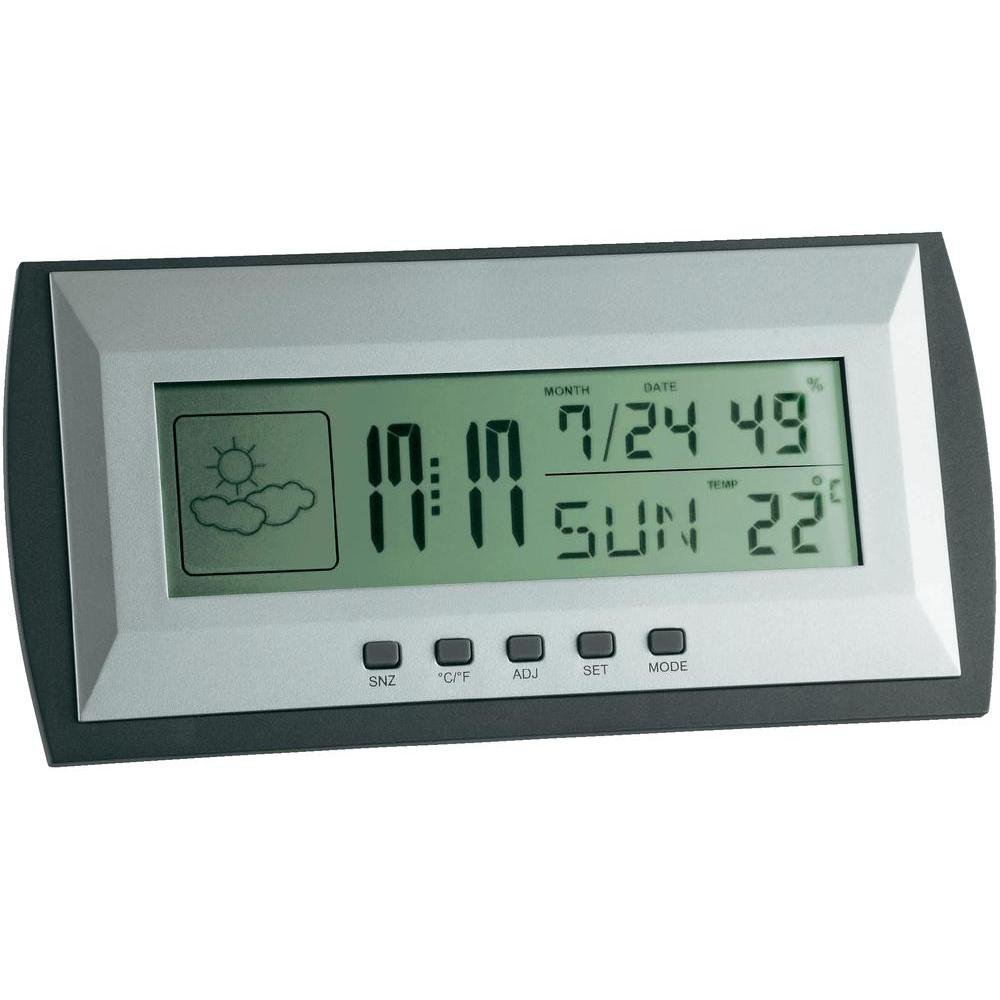
Figure 1: TFA Dostmann Digital Weather Station 35.1065 on a wooden desk. This image shows the weather station displaying time, date, and weather information in a typical home or office setting.
2. Información de seguridade
- Conserve este manual para futuras consultas.
- Non expoña o dispositivo a temperaturas extremas, vibracións ou golpes.
- Evite a luz solar directa e a humidade.
- Non mergullo o dispositivo en auga.
- Non intente reparar nin modificar o dispositivo vostede mesmo. Póñase en contacto con persoal cualificado para o seu servizo.
- Elimina as baterías usadas segundo a normativa local.
3. Configuración
3.1 Contido do paquete
Asegúrate de que estean presentes todos os elementos:
- TFA Dostmann Digital Weather Station 35.1065
- 2 pilas AA
- Manual de usuario (este documento)
3.2 Instalación da batería
- Locate the battery compartment cover on the back of the weather station.
- Deslice a tapa para abrir.
- Insert two (2) AA batteries, observing the correct polarity (+ and - markings).
- Pecha a tapa do compartimento da batería de forma segura.
The device will power on automatically and display initial readings.
3.3 Configuración inicial (hora, data, unidade de temperatura)
Upon first power-on or after battery replacement, you may need to set the time, date, and preferred temperature unit.
- Manteña premido o SET button for a few seconds to enter setting mode. The digit to be set will flash.
- Usa o ADJ button to adjust the flashing value (e.g., hour, minute, year, month, day).
- Preme o SET button again to confirm the setting and move to the next parameter.
- Repeat steps 2 and 3 until all desired settings (time, date) are configured.
- Para alternar entre valores Celsius (°C) e Fahrenheit (°F), prema o botón ° C / ° F botón.
4. Funcionamento da estación meteorolóxica
4.1 Mostrar máisview
The LCD display shows various information:
- Tempo: Hora actual en formato de 12 ou 24 horas.
- Data: Current month, day, and day of the week.
- Temperatura: Indoor temperature, displayed in °C or °F.
- Humidade: Indoor humidity percentage.
- Icona de previsión meteorolóxica: Indicates a trend forecast (e.g., sunny, cloudy, rainy). This is a prediction based on atmospheric pressure changes and may not always reflect actual weather.
4.2 Funcións dos botóns
- SNZ (Snooze): Activates the snooze function for the alarm.
- °C/°F: Alterna entre a visualización da temperatura en graos Celsius e Fahrenheit.
- ADJ (Adjust): Used to adjust values during setting mode.
- CONXUNTO: Enters and confirms settings.
- MODO: Switches between different display modes (e.g., time, alarm time).
4.3 Axustar a alarma
- Preme o MODO button repeatedly until the alarm time is displayed.
- Manteña premido o SET button. The alarm hour will flash.
- Usa o ADJ botón para axustar a hora de alarma desexada.
- Preme SET para confirmar e pasar aos minutos.
- Use ADJ to set the desired alarm minutes.
- Preme SET para confirmar e saír da configuración da alarma.
- Para activar/desactivar a alarma, prema o botón ADJ button while the alarm time is displayed. An alarm icon will appear/disappear.
5. Mantemento
5.1 Limpeza
Limpar o dispositivo cun suave, damp cloth. Do not use abrasive cleaners or solvents. Ensure no water enters the device.
5.2 Substitución da batería
When the display becomes dim or the device stops functioning, replace the batteries. Follow the steps in Section 3.2. Always replace both batteries at the same time with new AA batteries.
5.3 Almacenamento
Se o dispositivo non se vai usar durante un período prolongado, retire as pilas para evitar fugas e danos. Gárdeo nun lugar fresco e seco.
6 Solución de problemas
| Problema | Causa posible | Solución |
|---|---|---|
| Sen pantalla ou pantalla escura. | As baterías están baixas ou instaladas incorrectamente. | Substitúe as pilas por outras novas, garantindo a polaridade correcta. |
| Data/hora incorrecta. | Hora/data non configuradas correctamente. | Refer to Section 3.3 to set the time and date. |
| Lecturas de temperatura/humidade incorrectas. | Dispositivo colocado preto de fontes de calor, saídas de aire ou baixo a luz solar directa. | Relocate the weather station to a stable indoor environment away from extreme temperature fluctuations. Allow time for readings to stabilize. |
| Weather forecast icon seems incorrect. | Weather forecast is a trend prediction based on atmospheric pressure, not a real-time forecast. | Understand that the icon indicates a general trend over the next 12-24 hours, not current conditions. |
7. Especificacións

Figure 2: TFA Dostmann Digital Weather Station 35.1065 with dimensions. This image provides a detailed view of the device, including its width (18 cm), height (9 cm), and depth (3.81 cm).
- Marca: TFA Dostmann
- Modelo: 35.1065
- Fonte de enerxía: Battery-powered (2 x AA batteries, included)
- Material: Plástico
- Características especiais: Trend forecast
- Tipo de visualización: LCD
- Dimensións do artigo (D x W x H): 3.8 cm x 18 cm x 9 cm
- Peso do artigo: 164 gramos
- Compoñentes incluídos: Weather station, batteries, user manual
- Uso recomendado: Casa, Oficina
- Usos específicos: Date, Humidity, Temperature, Time
- País de orixe: China
8. Garantía e soporte
For warranty information, please refer to the documentation provided at the time of purchase or visit the official TFA Dostmann website. For technical support or further assistance, please contact TFA Dostmann customer service through their official channels.
Official TFA Dostmann Websitio: www.tfa-dostmann.de