
Introdución
Thank you for choosing the RadioShack Lightweight Stereo Headphones, Model 33-1116. These headphones are designed for comfortable listening with clear audio. This manual provides essential information for setting up, operating, maintaining, and troubleshooting your headphones to ensure optimal performance and longevity.
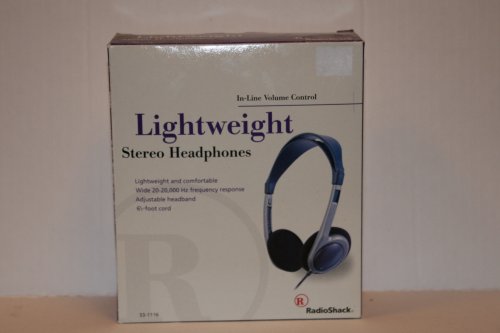
Image: RadioShack Lightweight Stereo Headphones, Model 33-1116. This image displays the headphones with an adjustable headband and a visible audio cable.
Información de seguridade
- Protección auditiva: Evite escoitar a volume alto durante períodos prolongados para evitar danos auditivos.
- Sensibilización ambiental: Non empregues auriculares en situacións nas que a incapacidade de escoitar os sons ambientais poida ser perigosa, como ao conducir, ir en bicicleta ou camiñar polo tráfico.
- Limpeza: Usa un pano suave e seco para limpar. Non empregues produtos de limpeza líquidos nin aerosois.
- Almacenamento: Store headphones in a clean, dry place away from extreme temperatures.
Contido do paquete
Comprobe se o paquete contén os seguintes elementos:
- RadioShack Lightweight Stereo Headphones (Model 33-1116)
Configuración
- Conectar á fonte de audio: Insert the 3.5mm audio jack at the end of the headphone cable into the headphone output port of your audio device (e.g., smartphone, tablet, computer, stereo system).
- Axustar a diadema: Place the headphones on your head. Adjust the sliding headband on both sides until the earcups comfortably cover your ears and the headphones feel secure without excessive pressure.
En funcionamento
- Power On Audio Source: Ensure your audio device is powered on and playing audio.
- Axustar o volume: Use the in-line volume control located on the headphone cable to adjust the listening volume to a comfortable level. You may also need to adjust the volume on your audio source.
- Escoitando: Enjoy your audio.
Mantemento
- Limpeza dos auriculares e da diadema: Use a soft, dry, lint-free cloth to gently wipe the earcups and headband. Do not use abrasive cleaners, solvents, or spray directly onto the headphones.
- Coidado do cable: Avoid sharply bending or twisting the 6.5-foot cable. Store the cable neatly to prevent tangling and damage.
- Almacenamento: Cando non estea en uso, garde os auriculares nun lugar fresco e seco.
Resolución de problemas
Se tes problemas cos teus auriculares, consulta os seguintes problemas e solucións comúns:
- Sen son:
- Asegúrate de que o conector de son de 3.5 mm estea completamente inserido no dispositivo de son.
- Check the volume level on both the in-line control and your audio device. Increase if necessary.
- Proba os auriculares cunha fonte de son diferente para descartar un problema co dispositivo.
- Son distorsionado:
- Lower the volume on both the headphones and your audio device. High volume can cause distortion.
- Asegúrate de que a toma de son estea limpa e libre de residuos.
- Proba con outra fonte de son ou audio file.
- Ajuste incómodo:
- Adjust the headband sliders on both sides to achieve a comfortable and secure fit.
Especificacións
| Marca | RadioShack |
| Número de modelo | 33-1116 |
| Tecnoloxía de conectividade | Con cable |
| Resposta en frecuencia | 20 Hz - 20 kHz |
| Lonxitude do cable | 6.5 pés (aproximadamente 2 metros) |
| Características adicionais | Adjustable Headband, Lightweight Design, In-line Volume Control |
Garantía e Soporte
For warranty information, please refer to the documentation included with your purchase or the retailer's policy where the product was acquired. For further support or inquiries, please visit the official RadioShack brand store or contact their customer service.
RadioShack Brand Store: https://www.amazon.com/stores/RadioShack/page/428CD7AB-87FF-4B6C-B5C3-96B7B297DFC4