
1. Introdución
This manual provides detailed instructions for the setup, operation, and maintenance of your Lomography Diana F+ Medium Format Camera with Flash Kit. The Diana F+ is a reproduction of the classic Diana camera, featuring a plastic lens, two shutter settings (daylight and 'B' for bulb), three aperture settings, and manual focus. It also includes a removable lens for pinhole images, two image formats (12 or 16 square shots on 120 film), an endless panorama feature, and a standard tripod thread with shutter lock for long exposures. The included electronic flash provides additional lighting options.
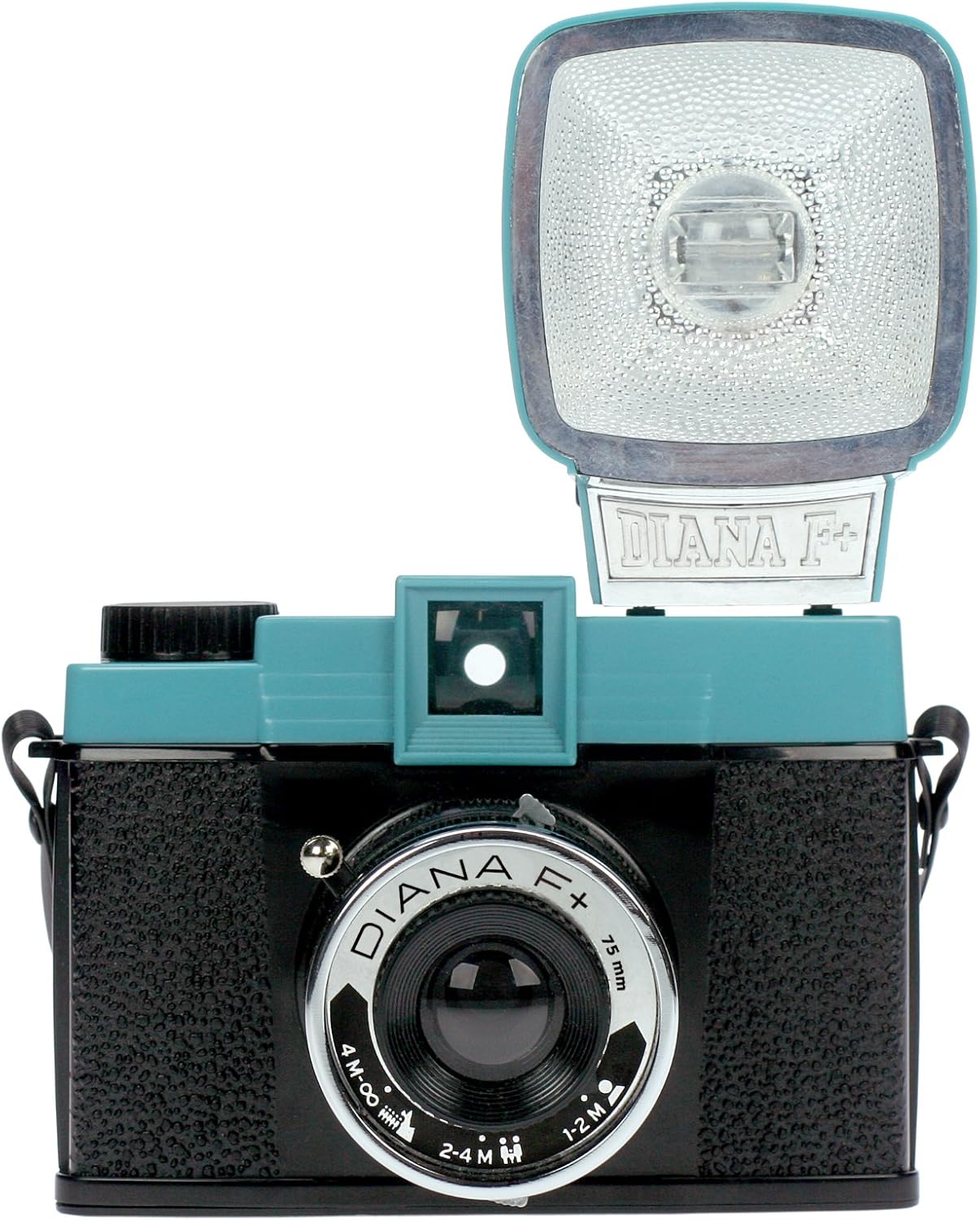
Imaxe 1.1: Fronte view of the Lomography Diana F+ Medium Format Camera with the electronic flash attached.
2. Configuración
2.1 Desembalaxe e compoñentes
Your Diana F+ package includes the following items:
- Diana F+ Camera Body
- Diana F+ Electronic Flash
- Tapa de lente
- Correa para o pescozo
- Manual de instrucións (este documento)
- Adapters for flash compatibility
2.2 Battery Installation for Flash
The Diana F+ Electronic Flash requires one AA battery for operation. To install the battery:
- Localice o compartimento das baterías na unidade de flash.
- Abra a tapa do compartimento.
- Insira unha pila AA, asegurándose de manter a polaridade correcta (+/-).
- Pecha a tapa do compartimento da batería de forma segura.
2.3 Carga de películas
The Diana F+ uses 120 medium format film. Proper film loading is crucial for successful photography. Refer to the video below for a visual guide.
Video 2.1: This video demonstrates the process of loading and shooting medium format film with the Diana F+ camera. It shows how to open the camera back, insert the film spool, thread the film leader onto the take-up spool, and close the camera, followed by advancing the film to the first frame.
General steps for film loading:
- Open the camera back by sliding the latch.
- Insert a fresh roll of 120 film into the supply chamber.
- Tire o líder da película cara á bobina de recepción e fíxao.
- Ensure the film is taut and aligned.
- Peche firmemente a parte traseira da cámara ata que encaixe.
- Advance the film using the winding knob until the first frame number appears in the red window on the camera back.
3. Funcionamento da cámara
3.1 Shutter Settings
The Diana F+ offers two shutter speed settings:
- N (Normal/Daylight): For standard daytime photography.
- B (Bulb): Keeps the shutter open for as long as the shutter button is pressed, ideal for long exposures in low light or for creative light painting.
3.2 Axustes de apertura
Adjust the aperture using the lever around the lens. The Diana F+ typically has three aperture settings:
- Cloudy (f/8): For overcast conditions or slightly brighter scenes.
- Partly Cloudy (f/11): For general outdoor use with some sun.
- Sunny (f/16): For bright, sunny conditions.
3.3 Enfoque manual
The lens features manual zone focusing. Rotate the lens barrel to select the appropriate distance setting:
- 1-2M (1 to 2 meters): For close-up subjects.
- 2-4M (2 to 4 meters): For subjects at medium distance.
- 4M-∞ (4 meters to infinity): For landscapes and distant subjects.
3.4 Using the Electronic Flash
The Diana F+ Flash connects directly to the camera body via a two-pronged plug adapter. It can provide a burst of white or colored light. Color filters may be included for creative effects.

Imaxe 3.1: Lateral view of the Lomography Diana F+ showing the electronic flash attached to the camera body.
3.5 Funcións avanzadas
- Pinhole Photography: The lens is removable, allowing for pinhole photography by exposing the film directly through a small aperture.
- Exposicións múltiples: The Diana F+ allows for multiple exposures on a single frame by simply not advancing the film after taking a shot.
- Endless Panorama: By carefully aligning multiple shots, you can create seamless panoramic images.
- Formatos de imaxe: The camera supports both 12 (5.2x5.2cm) and 16 (4.2x4.2cm) square shots on a standard 120 roll, depending on the frame mask used inside the camera.
4. Mantemento
4.1 Limpeza
- Use a soft, lint-free cloth to gently wipe the camera body.
- For the lens, use a specialized lens cleaning cloth and solution. Avoid harsh chemicals.
- Keep the film compartment free of dust and debris.
4.2 Almacenamento
Store the camera in a cool, dry place away from direct sunlight and extreme temperatures. If storing for an extended period, remove the battery from the flash unit to prevent leakage.
5 Solución de problemas
- A película non avanza: Ensure the film is correctly loaded and threaded onto the take-up spool. Do not force the winding knob, as this can damage the mechanism. If the film jams, open the camera in a darkroom or changing bag, remove the film, and re-spool it carefully.
- Light Leaks: The Diana F+ is known for its characteristic light leaks, which are often considered part of its charm. Ensure the camera back is securely closed. If excessive, check for any cracks or gaps in the camera body.
- O flash non se dispara: Check if the AA battery in the flash unit is correctly inserted and has sufficient charge. Ensure the flash is properly connected to the camera.
- Imaxes borrosas: Verify that the focus distance on the lens is set appropriately for your subject. For sharpest results, ensure adequate lighting for the chosen aperture and shutter speed.
- No Image on Film: Confirm that the film was loaded correctly and advanced after each shot. Ensure the shutter is functioning and not stuck.
6. Especificacións
| Característica | Especificación |
|---|---|
| Dimensións do produto | 7 x 3.25 x 5 polgadas |
| Peso do elemento | 7.8 onzas (220 gramos) |
| Número de modelo | HP 700 |
| Marca | Lomografía |
| Característica especial | Built-In Flash (Electronic Flash) |
| Tipo de formato de película | 120 |
| Velocidade máxima de obturación | B seconds (Bulb) |
| Compoñentes incluídos | Diana F+ Camera, Diana F+ Flash |
7. Garantía e soporte
For warranty information, technical support, or further inquiries regarding your Lomography Diana F+ camera, please visit the official Lomography websitio web ou póñase en contacto directamente co servizo de atención ao cliente. Garde o recibo da compra como proba de compra.
Lomography Official Websitio: www.lomography.com