
1. Introdución
This manual provides instructions for the installation, operation, maintenance, and troubleshooting of the Juniper EX3200-24T Layer 3 Switch. The EX3200-24T is a fixed-configuration switch designed for access-layer deployments in various network environments, offering comprehensive Layer 2 and Layer 3 switching capabilities.
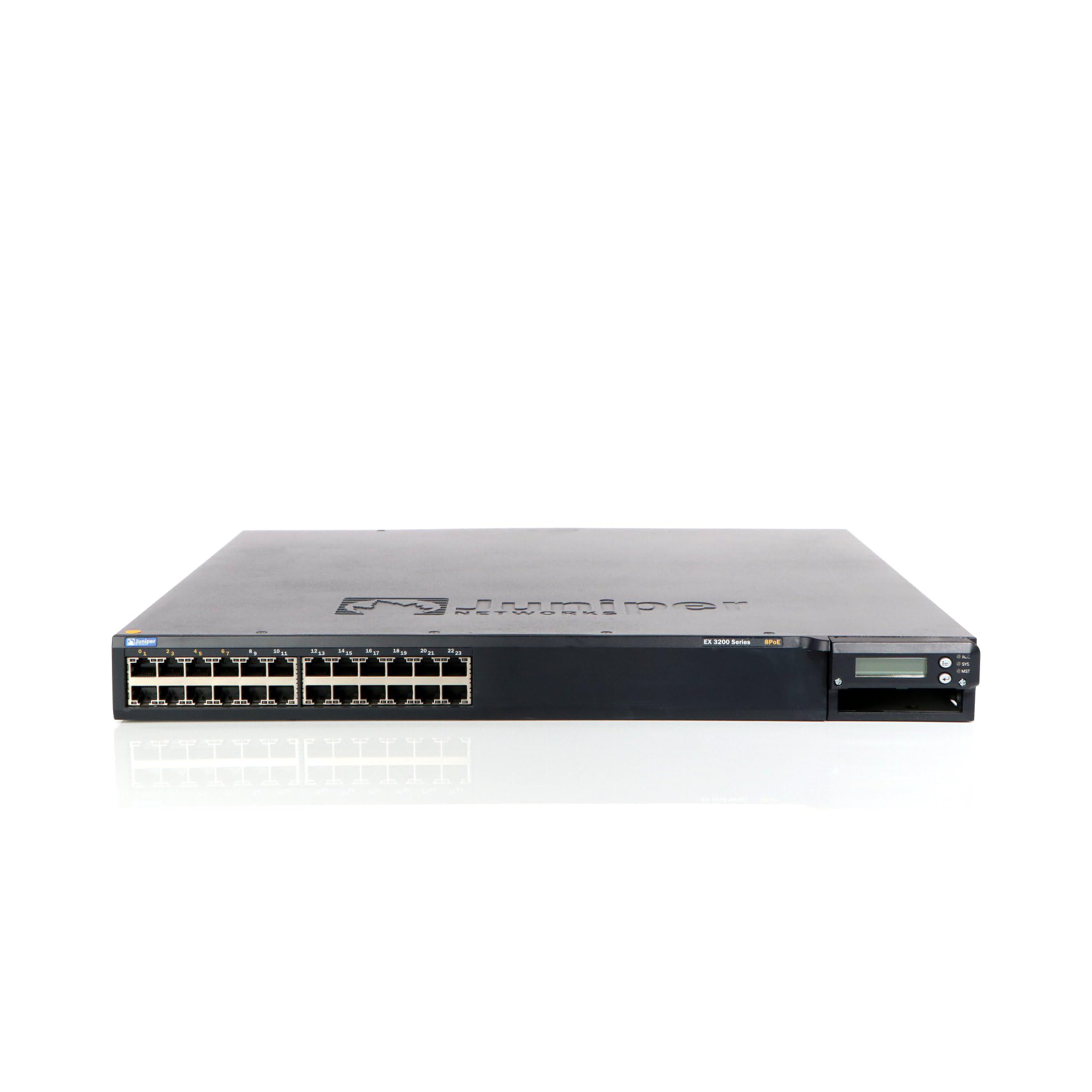
Figura 1: Fronte view of the Juniper EX3200-24T Layer 3 Switch. This image displays the 24 Ethernet ports, along with various status indicator lights and the Juniper Networks branding.
2. Configuración
Follow these steps to properly set up your Juniper EX3200-24T switch.
2.1 Desembalaxe e inspección
- Retire coidadosamente o interruptor da súa embalaxe.
- Inspeccione o interruptor para detectar calquera sinal de dano físico. Se atopa danos, póñase en contacto co seu vendedor inmediatamente.
- Verifique que estean presentes todos os compoñentes listados na lista de embalaxe.
2.2 Montaxe en bastidor (opcional)
The EX3200-24T can be mounted in a standard 19-inch equipment rack. Use the provided rack-mount kit and follow the instructions included with the kit for secure installation.
2.3 Conexión de enerxía
- Ensure the power switch on the rear panel of the switch is in the OFF position.
- Connect the provided AC power cord to the power inlet on the rear of the switch.
- Conecte o outro extremo do cable de alimentación a unha toma eléctrica conectada a terra.
2.4 Conexión de cables de rede
Connect Ethernet cables from your network devices (computers, servers, other switches) to the 10/100/1000Base-T ports on the front panel of the EX3200-24T switch. Ensure cables are securely seated.
3. Instrucións de funcionamento
This section outlines the basic operation of the Juniper EX3200-24T switch.
3.1 Acender o interruptor
After connecting the power cord, flip the power switch on the rear panel to the ON position. The system status LEDs on the front panel will illuminate during the boot process.
3.2 Understanding Status LEDs
The front panel features various LEDs to indicate the operational status of the switch and its ports:
- LED SISTEMA: Indicates system status (e.g., green for normal operation, amber for warning, red for critical error).
- LED ALM: Indica o estado de alarma.
- PPM LED: Indicates power supply module status.
- LED de porto: Each port has LEDs indicating link status and activity (e.g., green for link, blinking green for activity).
3.3 Configuración inicial (acceso á consola)
Para a configuración inicial, conecte un cable de consola (RJ-45 a DB-9) desde a estación de traballo de xestión ao porto de consola do conmutador. Empregue un programa de emulación de terminal (por exemplo, PuTTY, Tera Term) coa seguinte configuración:
- Taxa de transmisión: 9600
- Bits de datos: 8
- Paridade: Ningún
- Bits de parada: 1
- Control de fluxo: ningún
Refer to the Juniper Networks documentation for detailed configuration procedures.
4. Mantemento
Regular maintenance ensures optimal performance and longevity of your EX3200-24T switch.
4.1 Limpeza
- Limpe periodicamente o exterior do interruptor cun pano suave, seco e sen fiapos.
- Ensure ventilation openings are free from dust and obstructions to prevent overheating. Do not use liquid or aerosol cleaners directly on the switch.
4.2 Actualizacións de firmware
Juniper Networks periodically releases firmware updates to improve performance, add features, and address security vulnerabilities. It is recommended to keep the switch firmware updated. Refer to the official Juniper Networks support website for the latest firmware and update procedures.
4.3 Consideracións ambientais
Operate the switch within its specified environmental limits (temperature, humidity) to prevent damage and ensure reliable operation. Avoid exposing the switch to direct sunlight, excessive heat, or moisture.
5 Solución de problemas
This section provides solutions to common issues you might encounter with your EX3200-24T switch.
5.1 Sen enerxía
- Síntoma: No LEDs are illuminated, and the switch does not power on.
- Acción:
- Verifique que o cable de alimentación estea conectado correctamente tanto ao interruptor como á toma de corrente.
- Asegúrese de que o interruptor de alimentación do panel traseiro estea na posición de acendido.
- Check the electrical outlet with another device to confirm it is functional.
- Se usas unha regleta ou un SAI, asegúrate de que estea acendido e funcione correctamente.
5.2 Sen conectividade de rede
- Síntoma: Devices connected to the switch cannot access the network.
- Acción:
- Check the port LEDs on the switch for the connected device. A solid green LED indicates a link. If no link, try a different port or cable.
- Verify the network cable is securely connected at both ends (switch and device).
- Ensure the connected device's network adapter is enabled and configured correctly.
- If multiple devices are affected, check the uplink connection from the EX3200-24T to your core network.
- Consult the switch's configuration for VLANs, IP addressing, and other network settings.
5.3 System Alarm LED (ALM) is Amber/Red
- Síntoma: The ALM LED is illuminated amber or red.
- Acción:
- Log in to the switch via the console or network management interface.
- Check system logs and alarm messages for details on the specific issue.
- Common causes include power supply issues, fan failures, or high temperature.
- Address the root cause as indicated by the logs.
6. Especificacións
Key technical specifications for the Juniper EX3200-24T Layer 3 Switch:
| Característica | Especificación |
|---|---|
| Marca | Redes de enebro |
| Número de modelo | EX3200-24T |
| Número de portos | 24 (16 x 10/100/1000Base-T, 8 x 10/100/1000Base-T) |
| Ranura de expansión | 1 x Expansion Slot |
| Taxa de transferencia de datos | 1 gigabits por segundo |
| Soporte de capas | Capa 3 |
| Peso do elemento | 14.9 libras |
| Cor | Negro |
| Dispositivos compatibles | Escritorio |
| UPC | 832938037793 |
7. Garantía e soporte
7.1 Garantía do produto
The Juniper EX3200-24T Layer 3 Switch is covered by a standard manufacturer's warranty. For detailed information regarding warranty terms, duration, and coverage, please refer to the warranty card included with your product or visit the official Juniper Networks websitio.
7.2 Soporte técnico
For technical assistance, troubleshooting beyond this manual, or to report issues, please contact Juniper Networks technical support. Support resources, including documentation, FAQs, and contact information, are available on the official Juniper Networks support portal:


