
KLH KL-300i
KLH AUDIO KL-300i Nostalgia 5-n-1 System
Model: KL-300i
Introdución
Grazas pola compraasing the KLH AUDIO KL-300i Nostalgia 5-n-1 System. This integrated audio system combines classic and modern audio playback capabilities, including a turntable, CD player, cassette player, AM/FM radio, and an iPod dock. This manual provides essential information for setting up, operating, and maintaining your system to ensure optimal performance and longevity.
Información de seguridade
Please read all safety instructions carefully before operating this product. Keep this manual for future reference.
- Fonte de enerxía: Conecte a unidade só a unha toma de corrente alterna do volume especificadotage.
- Ventilación: Asegúrese de que haxa unha ventilación axeitada. Non bloquee as aberturas de ventilación.
- Auga e humidade: Non expoña a unidade á choiva nin á humidade. Non coloque obxectos cheos de líquidos, como vasos, enriba da unidade.
- Calor: Non coloque a unidade preto de fontes de calor como radiadores, rexistros de calor, estufas ou outros aparellos (incluídos amplificadores) que producen calor.
- Limpeza: Desconecte a unidade da toma de corrente antes de limpala. Use só un pano seco.
- Servizo: Non intente atender este produto vostede mesmo. Remita todo o servizo a persoal de servizo cualificado.
Contido do paquete
Comprobe que todos os elementos enumerados a continuación estean incluídos no paquete:
- KLH AUDIO KL-300i Main Unit
- Control remoto
- Cable de entrada auxiliar
- AM/FM Antenna Wire
- Manual de instrucións (este documento)
Produto rematadoview
Familiarize yourself with the various components and controls of your KLH AUDIO KL-300i system.
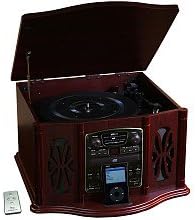
This image displays the KLH AUDIO KL-300i Nostalgia 5-n-1 System. The unit features a dark wood finish. The top lid is open, revealing a turntable. Below the turntable, the front panel includes controls for the CD player, AM/FM radio tuner, and an iPod dock. A small remote control is visible to the left of the main unit.
Controis do panel frontal:
- Botón de encendido: Acende ou apaga a unidade.
- Selector de funcións: Switches between Phono, CD, Radio, iPod, and Aux modes.
- Botón de volume: Axusta o nivel de volume principal.
- CD Player Controls: Play/Pause, Stop, Skip Forward/Backward.
- Sintonizador de radio: AM/FM band selector, Tuning knob.
- iPod Dock: Connector for iPod devices.
- Aux-In Jack: Entrada de 3.5 mm para dispositivos de son externos.
- Jack para auriculares: Saída de 3.5 mm para escoita privada.
Panel superior:
- Plato xiratorio: For playing vinyl records.
- Tapa: Protects the turntable when not in use.
Panel lateral:
- Casete: Para reproducir cintas de casete de audio.
Configuración
Follow these steps for initial setup of your audio system.
- Colocación: Place the unit on a stable, flat surface away from direct sunlight, heat sources, and excessive dust or moisture. Ensure there is adequate space around the unit for ventilation.
- Conectar a antena: For optimal AM/FM radio reception, connect the supplied antenna wire to the antenna terminal on the rear of the unit. Extend the wire fully for better reception.
- Conexión de alimentación: Conecte o cable de alimentación de CA a unha toma de parede estándar.
- Encendido inicial: Press the Power button on the front panel to turn on the unit.
Instrucións de funcionamento
Funcionamento xeral:
- Encendido/apagado: Preme o botón de acendido para acender ou apagar a unidade.
- Selección de funcións: Use the Function Selector knob or buttons to choose your desired audio source (Phono, CD, Radio, iPod, Aux).
- Axuste de volume: Xire o botón de volume para aumentar ou diminuír o nivel do son.
Funcionamento do tocadiscos:
- Lift the lid of the unit.
- Coloque un disco de vinilo no prato do tocadiscos.
- Select the appropriate speed (33 1/3, 45, or 78 RPM) using the speed selector switch. For 45 RPM records, place the included adapter on the spindle if needed.
- Gently lift the tonearm and position the stylus over the desired starting groove of the record.
- Lower the tonearm slowly onto the record. Playback will begin automatically.
- To stop playback, gently lift the tonearm and return it to its rest.
Funcionamento do reprodutor de CD:
- Press the Function Selector to CD mode.
- Press the Eject button to open the CD tray.
- Coloque un CD coa etiqueta cara arriba na bandexa.
- Press the Eject button again to close the tray. The CD will begin playing automatically or display the track count.
- Use os botóns Reproducir/Pausa, Deter e Saltar para controlar a reprodución.
Funcionamento do reprodutor de casete:
- Insert a cassette tape into the cassette slot on the side of the unit.
- Preme o botón Reproducir para comezar a reprodución.
- Use the Fast Forward (FF) button to advance the tape quickly.
- To stop playback, press the Stop/Eject button. Pressing it halfway will eject the tape.
Funcionamento da radio AM/FM:
- Press the Function Selector to Radio mode.
- Select either AM or FM band using the band selector switch.
- Rotate the Tuning knob to search for radio stations.
- Adjust the antenna wire for best reception.
iPod Dock Operation:
- Press the Function Selector to iPod mode.
- Carefully place your compatible iPod device onto the iPod dock connector.
- Use your iPod's controls to select and play music. Audio will be routed through the KLH AUDIO system's speakers.
Aux-In Operation:
- Press the Function Selector to Aux mode.
- Connect an external audio device (e.g., MP3 player, smartphone) to the Aux-In jack on the front panel using the supplied 3.5mm auxiliary cable.
- Play audio from your external device. The sound will be played through the KLH AUDIO system's speakers.
Uso do control remoto:
The remote control primarily operates the CD player functions (Play, Pause, Stop, Skip). Note that the remote cannot turn the unit on or off.
Mantemento
Proper care will ensure the longevity of your system.
- Limpeza da unidade: Limpe o exterior da unidade cun pano suave e seco. Non empregue produtos de limpeza abrasivos, ceras nin disolventes.
- Coidados do stylus: Handle the turntable stylus with extreme care. Clean the stylus periodically with a soft brush, brushing from back to front.
- Coidado de CD/casete: Keep CDs and cassette tapes clean and free of dust. Store them in their cases when not in use.
Resolución de problemas
If you experience issues with your system, refer to the following common problems and solutions.
| Problema | Causa posible | Solución |
|---|---|---|
| Sen Poder | O cable de alimentación non está conectado correctamente. | Comprobe a conexión do cable de alimentación á unidade e á toma de corrente. |
| Sen son | Volume demasiado baixo; Función incorrecta seleccionada; Auriculares conectados. | Increase volume; Select correct function; Disconnect headphones. |
| Tocadiscos non xira | Unit not powered on; Belt dislodged. | Ensure unit is on; Contact service if belt issue suspected. |
| Mala recepción de radio | Antena non estendida ou colocada correctamente. | Extend and adjust the antenna wire for better signal. |
| Non se reproduce o CD | CD inserted incorrectly; CD is scratched or dirty. | Ensure CD is label-side up; Clean or replace CD. |
Especificacións
| Característica | Especificación |
|---|---|
| Fonte de enerxía | CA 120V ~ 60Hz |
| Dimensións (ancho x profundo x alto) | Approx. 17" x 17" x 10.5" (43.2 cm x 43.2 cm x 26.7 cm) |
| Velocidades de tocadiscos | 33 1/3, 45, 78 RPM |
| Rango de frecuencia de radio | AM: 530-1710 kHz, FM: 88-108 MHz |
| Compatibilidade con CD | CD, CD-R / RW |
| Dock para iPod | Compatible with older generation iPods (30-pin connector) |
Garantía e Soporte
This product is covered by a limited manufacturer's warranty. For specific warranty terms and conditions, please refer to the warranty card included with your purchase or contact KLH customer support. If you require technical assistance or have questions not covered in this manual, please contact KLH customer service through their official websitio web ou a información de contacto proporcionada co produto.
Ask a question about this manual
Ask about setup, troubleshooting, compatibility, parts, safety, or missing instructions. Manuals+ will review the question and use this page’s manual context to help answer it.