
1. Introdución
This manual provides essential instructions for the safe and efficient operation, maintenance, and troubleshooting of your Dirt Devil Scorpion Plus QuickFlip Handheld Vacuum Cleaner, Model SD20005RED. Please read this manual thoroughly before using the appliance and retain it for future reference.

Imaxe 1.1: The Dirt Devil Scorpion Plus QuickFlip Handheld Vacuum Cleaner, showcasing its compact design and integrated crevice tool.
2. Instrucións de seguridade importantes
Cando se utilice un aparello eléctrico, sempre se deben seguir as precaucións básicas, incluíndo as seguintes:
- Le todas as instrucións antes de usar esta aspiradora.
- Desconecte sempre o aparello da toma de corrente antes de limpalo ou realizalo mantemento.
- Non use ao aire libre nin en superficies húmidas.
- Non permita que se use como xoguete. É necesario prestar moita atención cando o usen ou preto dos nenos.
- Use só como se describe neste manual. Empregue só os accesorios recomendados polo fabricante.
- Non o empregue cun cable ou enchufe danados. Se o aparello non funciona como debería, se deixou caer, se danou, se deixou no exterior ou caeu na auga, devólvao a un centro de servizo.
- Non tire ou transporte co cable, non use o cable como asa, non peche unha porta sobre o cable nin tire do cable por bordos ou esquinas afiadas. Non pase o aparello sobre o cable. Manteña o cable lonxe de superficies quentes.
- Non desconecte tirando do cable. Para desenchufar, agarre o enchufe, non o cable.
- Non manipule o enchufe ou o aparello coas mans molladas.
- Non coloque ningún obxecto nas aberturas. Non use con ningunha abertura bloqueada; manteña libre de po, pelusa, cabelos e calquera cousa que poida reducir o fluxo de aire.
- Manteña o cabelo, a roupa solta, os dedos e todas as partes do corpo lonxe das aberturas e das partes móbiles.
- Non coller nada que arde ou fume, como cigarros, mistos ou cinzas quentes.
- Non o use para recoller líquidos inflamables ou combustibles, como a gasolina, nin o use en áreas onde poidan estar presentes.
- Non o use sen o vaso de po e/ou os filtros colocados.
- Desactiva todos os controis antes de desconectar.
- Teña coidado extra ao limpar as escaleiras.
3. Características e compoñentes do produto
The Dirt Devil Scorpion Plus QuickFlip Handheld Vacuum Cleaner is designed for quick and efficient cleaning tasks. Key features include:
- QuickFlip Crevice Tool: Integrated into the unit for easy access and storage. Ideal for tight spaces and corners.
- Extended Reach Hose: Provides flexibility to clean high spots and hard-to-reach areas.
- XL Easy-Empty Dirt Cup: Designed for convenient disposal of collected debris with fewer trips to the trash.
- Operación con cable: Ensures consistent, powerful suction without battery limitations.

Imaxe 3.1: Demonstrating the QuickFlip Crevice Tool in use for cleaning vehicle interiors.

Imaxe 3.2: The vacuum's compact size and corded power offer convenient cleaning for various surfaces.
4. Configuración
- Desempaquetar: Retire con coidado o aspirador e todos os accesorios da embalaxe.
- Inspeccionar: Check the unit for any signs of damage. Do not use if damaged.
- Instalación do filtro: Ensure the F5 filter and dirt cup are correctly installed before first use. Refer to the "Maintenance" section for details on filter placement.
- Conexión de alimentación: Plug the power cord into a standard electrical outlet. The vacuum is corded and does not require battery charging.
5. Instrucións de funcionamento
The Dirt Devil Scorpion Plus is designed for dry pick-up only.
- Encendido/apagado: Locate the power switch on the handle. Press it to turn the vacuum on or off.
- Limpeza xeral: Hold the vacuum by the handle and move the nozzle over the area to be cleaned. The powerful suction will pick up dirt and debris.
- Using the QuickFlip Crevice Tool:
- To deploy, simply flip out the integrated crevice tool from the front of the unit until it clicks into place.
- Use this tool for cleaning tight corners, edges, and narrow spaces such as between car seats or couch cushions.
- To retract, press the release button (if applicable) and fold the tool back into its storage position.
- Using the Extended Reach Hose: Attach the hose accessory to the vacuum's suction port. This allows for greater reach to clean elevated surfaces or awkward angles.
- Cleaning Stairs and Car Interiors: The compact size and included tools make this vacuum ideal for these specific applications.
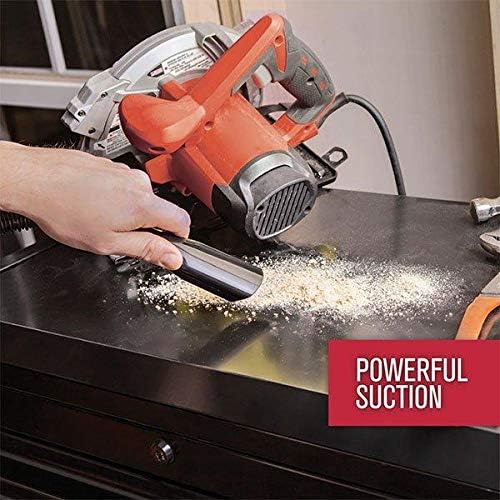
Imaxe 5.1: The vacuum's strong suction effectively removes dust and debris from surfaces.
6. Mantemento
Regular maintenance ensures optimal performance and extends the life of your vacuum cleaner. Always unplug the vacuum before performing any maintenance.
6.1 Baleirar o depósito de sucidade
- Press the dirt cup release button, typically located near the nozzle, to detach the dirt cup from the main unit.
- Hold the dirt cup over a trash receptacle.
- Open the dirt cup lid or release the bottom flap to empty the contents.
- Close the lid/flap and reattach the dirt cup to the vacuum until it clicks securely into place.

Imaxe 6.1: Demonstrating the process of emptying the easy-empty dirt cup.
6.2 Cleaning the Filter (Type F5)
O filtro debe limparse regularmente para manter a potencia de succión.
- Retire o depósito de sucidade como se describe arriba.
- Carefully remove the F5 filter from the dirt cup.
- Tap the filter gently over a trash can to remove loose dirt and debris.
- For a more thorough cleaning, rinse the filter under cool running water. Ensure it is completely dry before reinstalling. Non empregues o aspirador cun filtro húmido.
- Reinsert the dry filter into the dirt cup, then reattach the dirt cup to the vacuum.
7 Solución de problemas
If your vacuum cleaner is not performing as expected, consult the following table for common issues and solutions.
| Problema | Causa posible | Solución |
|---|---|---|
| O baleiro non se acenderá. | O cable de alimentación non está conectado correctamente. | Ensure the power cord is firmly plugged into a working electrical outlet. |
| Perda de succión. | O colector de sucidade está cheo. O filtro está obstruído. A boquilla ou a mangueira están obstruídas. | Baleira a cunca de terra. Clean or replace the F5 filter. Check nozzle and hose for obstructions and remove them. |
| O aspirador sobrequéntase e apágase. | Uso prolongado. Clogged filter or obstruction. | Allow the vacuum to cool down for at least 30 minutes. Ensure the filter is clean and there are no blockages. |
| Ruído insólito. | Obstrución na zona do ventilador ou do motor. | Immediately turn off and unplug the vacuum. Inspect for and remove any foreign objects. If noise persists, contact customer support. |
8. Especificacións
| Característica | Detalle |
|---|---|
| Nome do modelo | Escorpión |
| Número de modelo | SD20005RED |
| Marca | Dirt Devil |
| Fonte de enerxía | Eléctrico con cable |
| Wattage | 150 vatios |
| Ampera | 5 Amps |
| Capacidade | 0.18 litros |
| Tipo de filtro | F5 |
| Lonxitude da mangueira | 2.5 pés |
| Dimensións do produto (L x W x H) | 12" x 5" x 7" |
| Peso do elemento | 4.5 libras |
| Nivel de ruído | 72 decibeis |
| Características especiais | Bagless, Corded, Portable, QuickFlip Crevice Tool |
| Uso recomendado | Car Interiors, Stairs |
9. Garantía e soporte
This Dirt Devil Scorpion Plus QuickFlip Handheld Vacuum Cleaner comes with a 3 ano de garantía limitada. For warranty claims, technical support, or to purchase replacement parts, please contact Dirt Devil Customer Service.
Please visit the official Dirt Devil website for the most up-to-date contact information and support resources. Keep your purchase receipt as proof of purchase for warranty purposes.


