
1. Introdución
This manual provides detailed instructions for the installation, operation, and maintenance of your Motorola SURFboard SB5101U DOCSIS 2.0 Cable Modem. The SB5101U is designed to provide high-speed internet access over your cable television network. It is compatible with major U.S. cable providers and offers reliable connectivity for your home or office network.
Lea este manual detidamente antes de comezar o proceso de instalación para garantir unha configuración axeitada e un rendemento óptimo.
2. Contido do paquete
Upon opening the package, verify that all items are present and in good condition. The standard package for the Motorola SURFboard SB5101U Cable Modem typically includes:
- Motorola SURFboard SB5101U Cable Modem
- Adaptador de alimentación
- Guía de inicio rápido (se se inclúe)
Nota: Coaxial cables, Ethernet cables, or USB cables are typically not included with the modem and must be purchased separately if you do not already have them. A coaxial cable splitter may also be required if you intend to connect both a cable TV and the modem to the same wall jack.
3. Produto rematadoview
3.1 Panel frontal
The front panel of the SB5101U features several LED indicators that provide status information about the modem's operation. These LEDs help in monitoring the connection status and troubleshooting potential issues.
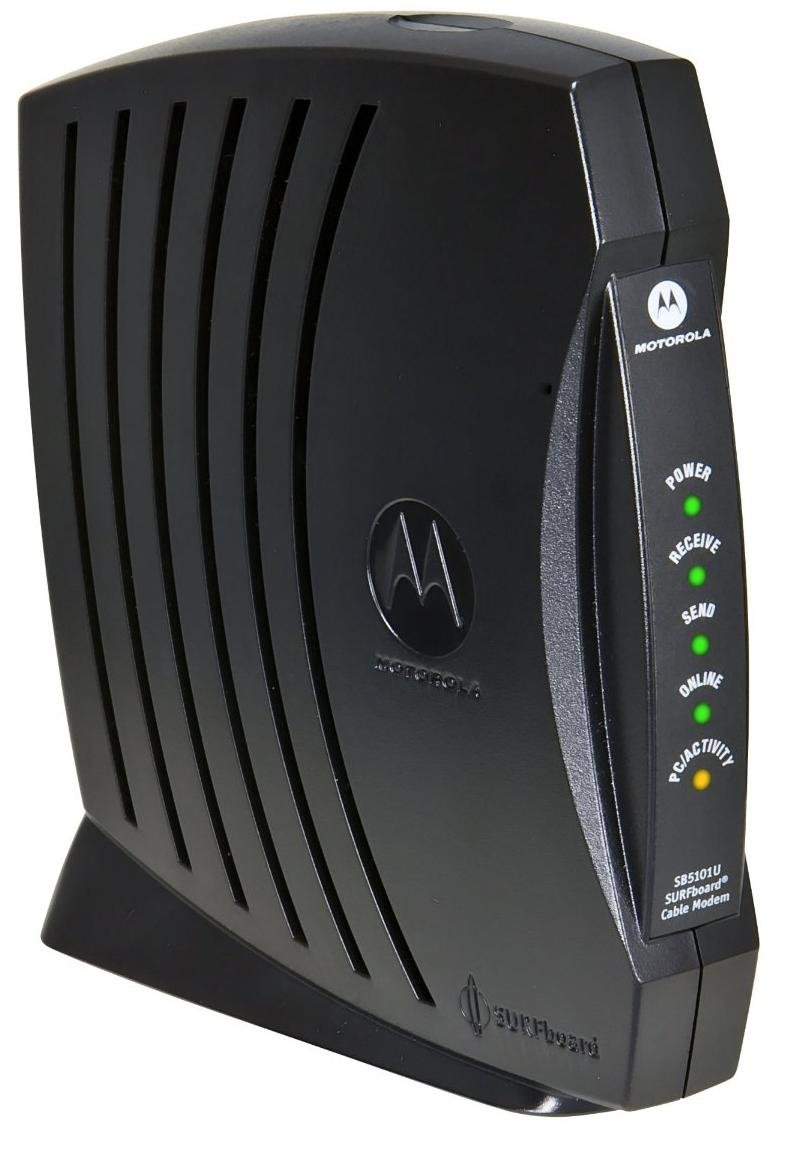
Figura 1: Fronte view of the Motorola SURFboard SB5101U Cable Modem. This image shows the modem's sleek black casing with ventilation grilles and the Motorola logo, indicating its general appearance.
| Nome LED | Estado | Descrición |
|---|---|---|
| Poder | Verde sólido | O módem está acendido. |
| Recibir | Verde sólido | The modem is receiving data from the cable network. |
| Enviar | Verde sólido | The modem is sending data to the cable network. |
| En liña | Verde sólido | The modem is successfully connected to the internet. |
| Ligazón | Verde sólido | Un dispositivo Ethernet está conectado e activo. |
| Actividade | Verde intermitente | Data is being transmitted or received over the Ethernet connection. |
3.2 Panel posterior
The rear panel of the SB5101U contains all the necessary ports for connecting the modem to your cable service and your computer or router.
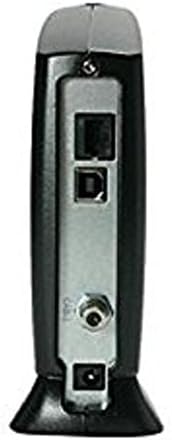
Figura 2: Traseira view of the Motorola SURFboard SB5101U Cable Modem. This image displays the various connection ports, including the coaxial cable input, Ethernet port, USB port, and power input.
- Cable (Coaxial) Port: Connects to your cable wall outlet via a coaxial cable.
- Porto Ethernet (RJ-45): Connects to your computer or a wireless router using an Ethernet cable. Supports 10/100 Mbps speeds.
- Porto USB: An alternative connection option for a computer.
- Porto de alimentación: Conéctase ao adaptador de corrente fornecido.
- Botón de reinicio: Used to restore the modem to factory default settings. (Typically recessed and requires a paperclip to press).
4. Instrucións de configuración
Follow these steps to properly install and activate your Motorola SURFboard SB5101U Cable Modem.
4.1 Connecting the Modem
- Conectar o cable coaxial: Screw one end of a coaxial cable (not included) into the Cable port on the rear of the SB5101U and the other end into a cable wall outlet. Ensure the connection is finger-tight.
- Connect Ethernet/USB Cable:
- For a single computer: Connect one end of an Ethernet cable (not included) to the Ethernet port on the modem and the other end to the Ethernet port on your computer. Alternatively, you can use a USB cable (not included) to connect the modem to your computer's USB port.
- For a router: Connect one end of an Ethernet cable (not included) to the Ethernet port on the modem and the other end to the WAN/Internet port on your wireless router.
- Conectar o adaptador de alimentación: Plug the small end of the provided power adapter into the Power port on the rear of the modem. Then, plug the larger end into an electrical outlet.
- Encendido: The modem will automatically power on. Observe the front panel LEDs. The Power, Receive, Send, and Online LEDs should eventually turn solid green. This process may take several minutes.
4.2 Activating Your Internet Service
After connecting the modem, you will need to contact your Internet Service Provider (ISP) to activate your service. Have the following information ready:
- Your account information.
- The modem's Enderezo MAC (also known as HFC MAC ID or CM MAC). This is typically found on a sticker on the bottom or back of the modem.
- The modem's Número de serie (S/N). This is also found on the same sticker.
Your ISP will guide you through the activation process. Once activated, your Online LED should remain solid green, indicating a successful internet connection.
5. Funcionamento do módem
The Motorola SURFboard SB5101U operates automatically once connected and activated. The front panel LEDs provide a quick visual status of its operation.
5.1 Understanding LED Status
Refer to the table below for a detailed explanation of the LED indicators during normal operation and potential issues.
| Nome LED | Estado | Significado |
|---|---|---|
| Poder | Desactivado | No power. Check power adapter and outlet. |
| Verde sólido | O módem está acendido. | |
| Recibir | Desactivado | No downstream signal detected. Check coaxial cable connection. |
| Verde intermitente | Scanning for downstream channel. | |
| Verde sólido | Downstream channel locked. | |
| Enviar | Desactivado | No upstream signal detected. Check coaxial cable connection. |
| Verde intermitente | Scanning for upstream channel. | |
| Verde sólido | Upstream channel locked. | |
| En liña | Desactivado | Modem not registered with the cable network. |
| Verde intermitente | Modem is registering with the cable network. | |
| Verde sólido | Modem is online and connected to the internet. | |
| Ligazón | Desactivado | No Ethernet or USB device connected, or device is off. |
| Verde sólido | Ethernet or USB device is connected and active. | |
| Actividade | Verde intermitente | Data is being transmitted or received over the Ethernet/USB connection. |
6. Mantemento
To ensure the longevity and optimal performance of your SB5101U cable modem, follow these simple maintenance guidelines:
- Mantéñase limpo: Periodically wipe the modem's exterior with a soft, dry cloth. Avoid using liquid cleaners or aerosols, which can damage the device.
- Asegurar a ventilación: Place the modem in a location with adequate airflow to prevent overheating. Do not cover ventilation openings.
- Evita condicións extremas: Keep the modem away from direct sunlight, excessive heat sources, moisture, and extreme cold.
- Conexións seguras: Occasionally check that all cables (coaxial, Ethernet, power) are securely connected.
- Power Cycle (if needed): Se tes problemas de conectividade, un simple ciclo de acendido e reinicio (desconectar o adaptador de corrente durante 10-15 segundos e logo volvelo conectar) adoita resolver problemas menores.
7 Solución de problemas
If you encounter issues with your Motorola SURFboard SB5101U, refer to the following common troubleshooting steps:
| Problema | Causa posible | Solución |
|---|---|---|
| Sen alimentación (LED de alimentación apagado) | O adaptador de corrente non está conectado ou a toma de corrente está defectuosa. | Ensure power adapter is securely plugged into the modem and a working electrical outlet. Try a different outlet. |
| No Internet Connection (Online LED Off/Flashing) | Coaxial cable issue, ISP service outage, or modem not activated. |
|
| Velocidade de Internet lenta | Network congestion, ISP issue, or outdated modem. |
|
| Ethernet/USB Connection Not Working (Link LED Off) | Cable issue, device off, or driver problem (for USB). |
|
Se os problemas persisten despois de probar estes pasos, póñase en contacto co seu provedor de servizos de Internet para obter máis axuda.
8. Especificacións
| Número de modelo | SB5101U |
| Versión DOCSIS | 2.0 |
| Tecnoloxía de conectividade | Ethernet, USB |
| Velocidade do porto Ethernet | 10/100 Mbps |
| Download Speed (Max) | Up to 38 Mbps (dependent on ISP service) |
| Upload Speed (Max) | Up to 30 Mbps (dependent on ISP service) |
| Dispositivos compatibles | Ordenador persoal, enrutadores |
| ISP compatibles | Cox, Optimum, Spectrum, Xfinity (check with your specific provider) |
| Dimensións do produto (L x W x H) | 6.88 x 2.68 x 10.5 polgadas |
| Peso do elemento | 1.57 libras |
| Cor | Negro |
| Fabricante | Motorola |
9. Garantía e soporte
For specific warranty information regarding your Motorola SURFboard SB5101U Cable Modem, please refer to the warranty card included with your product or visit the official Motorola support websitio. Os termos e condicións da garantía poden variar segundo a rexión e o vendedor.
For technical support, troubleshooting beyond this manual, or service-related inquiries, please contact your Internet Service Provider (ISP) directly. They are responsible for your internet service and modem activation.
You may also find additional support resources and FAQs on the Motorola support websitio.