
Introdución
This manual provides detailed instructions for the operation and maintenance of your Calypso K5558/2 Digital Quartz Watch. Please read this manual thoroughly to ensure proper use and to maximize the lifespan of your watch. This watch features a digital display, backlight, stopwatch, intermediate times, and an alarm function, all housed in a durable plastic case with a multicolored rubber strap.
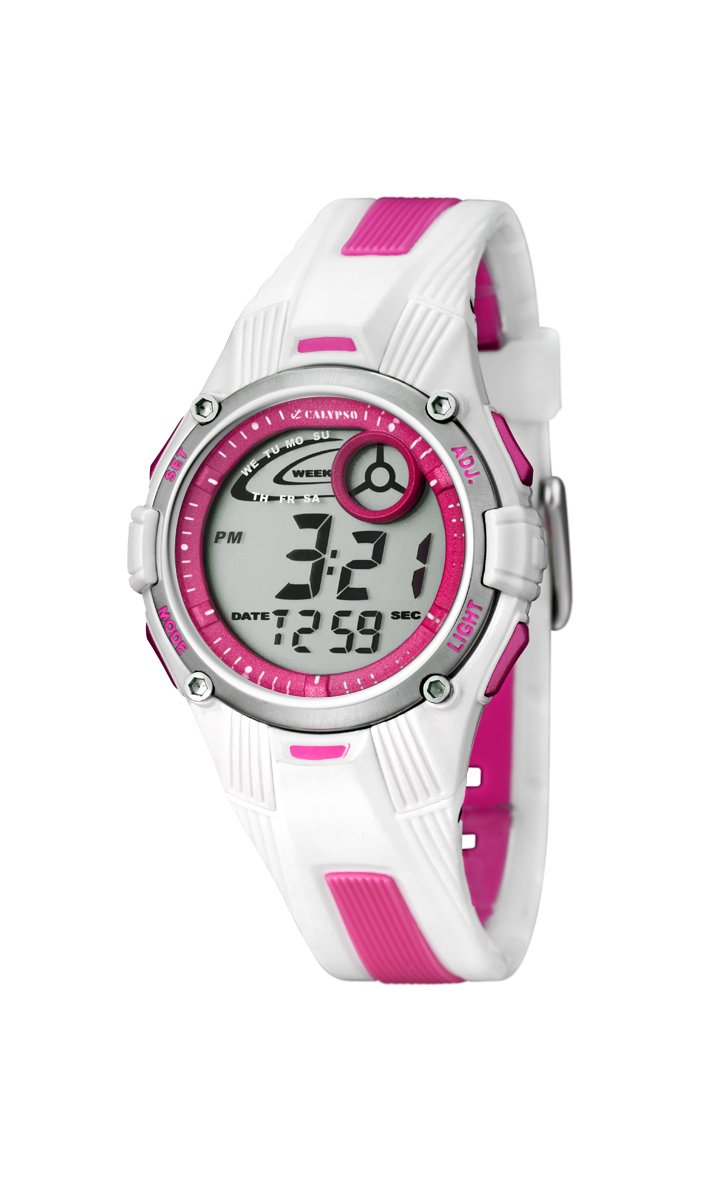
Imaxe: Fronte view of the Calypso K5558/2 Digital Quartz Watch. This image shows the watch's digital display and the overall design.
Configuración
Activación inicial
Your Calypso K5558/2 watch comes with a battery pre-installed. If the display is not active, gently press any button to activate it. If the watch remains inactive, the battery may need to be replaced (refer to the Maintenance section).
Axuste da hora e da data
- Entrar ao modo de configuración: Manteña premido o MODO button (usually located on the bottom left) until the seconds start flashing.
- Axustar segundos: Preme o RESET button (usually top right) to reset the seconds to zero.
- Select Next Item: Preme o MODO button again to move to the next setting item (e.g., hours, minutes, month, date, day).
- Axustar valor: Usa o INICIO button (usually top left) to increase the value of the flashing item.
- Confirmar configuración: Continúa presionando MODO to cycle through all settings. Once all adjustments are made, press MODO unha última vez para saír do modo de configuración.

Imaxe: En ángulo view of the Calypso K5558/2 Digital Quartz Watch, showing the watch face and side buttons.
Instrucións de funcionamento
Time Display Modes
Preme o MODO button to cycle through different display modes: Time, Stopwatch, and Alarm.
Usando a luz de fondo
Para iluminar a pantalla en condicións de pouca luz, prema o botón LUZ button (usually located on the top right). The backlight will remain active for a few seconds.
Stopwatch Function (Chronometer and Intermediate Times)
- Enter Stopwatch Mode: Preme o MODO button until "00:00:00" appears on the display.
- Inicio/Parada: Preme o INICIO botón para comezar a cronometraxe. Próbao de novo para pausalo.
- Tempo de volta/fracción: Mentres o cronómetro está en funcionamento, prema o botón RESET button to record an intermediate (lap/split) time. The display will show the lap time for a few seconds before returning to the running total.
- Restablecer: When the stopwatch is paused, press the RESET button to clear the time to "00:00:00".
Configuración e uso da alarma
- Entrar no modo de alarma: Preme o MODO button until the alarm time is displayed (e.g., "AL").
- Establecer hora de alarma: Manteña premido o RESET button until the alarm hours start flashing. Use the INICIO button to adjust the hours. Press MODO to move to minutes and adjust with INICIO.
- Activar / desactivar a alarma: No modo de alarma, prema INICIO button to toggle the alarm ON/OFF. An alarm icon (e.g., a bell) will appear on the display when activated.
- Stop Alarm Sound: Cando soe a alarma, prema calquera botón para detela.
Resistencia á auga
This watch is water-resistant up to 100 meters (10 ATM). This means it is suitable for swimming and snorkeling. Non premas ningún botón mentres o reloxo estea mergullado na auga. Avoid exposing the watch to hot water or steam, as this can compromise the water resistance seals.
Mantemento
Limpar o reloxo
Limpa a caixa e a correa do reloxo regularmente cun pano suave eamp cloth. For stubborn dirt, a mild soap solution can be used, followed by rinsing with clean water and drying thoroughly. Avoid using harsh chemicals or abrasive cleaners, as these can damage the watch materials.
Coidado da correa
The rubber strap may show signs of discoloration over time, especially lighter colors, due to exposure to dirt, sweat, and UV light. Regular cleaning can help mitigate this. If discoloration becomes significant or the strap shows signs of wear, consider replacing it with an official Calypso replacement strap.
Substitución da batería
When the display becomes dim or the watch stops functioning, the battery may need replacement. This watch uses a "C" type battery. Battery replacement should ideally be performed by a qualified watch technician to ensure proper sealing and maintain water resistance. Attempting to replace the battery yourself may void any implied warranty and compromise the watch's water resistance.
Resolución de problemas
| Problema | Causa posible | Solución |
|---|---|---|
| A pantalla está en branco ou escura. | Batería baixa ou esgotada. | Substitúa a batería (consulte a sección de Mantemento). |
| Os botóns non responden. | O reloxo pode estar nun modo bloqueado ou nun avaría interna. | Try pressing all buttons firmly. If issue persists, consult a technician. |
| O tempo é impreciso. | Axuste de hora incorrecto ou batería baixa. | Reset the time (refer to Setup section). If problem continues, replace battery. |
| Auga dentro do reloxo. | Water resistance compromised (e.g., buttons pressed underwater, seals damaged). | Leve o reloxo inmediatamente a un técnico cualificado para a súa inspección e reparación. Non intente secalo vostede mesmo. |
Especificacións
- Número de modelo: K5558/2
- Tipo de visualización: Dixital
- Tipo de movemento: Cuarzo
- Material da caixa: Plástico
- Material da correa: Rubber (Multicolored)
- Diámetro da caixa: 36 milímetros
- Espesor da caixa: 10 milímetros
- Profundidade de resistencia á auga: 100 metros (10 caixeiros automáticos)
- Características especiais: Alarm, Stopwatch, Backlight, Intermediate Times
- Tipo de peche: Fibela
- Fonte de enerxía: Battery Powered (1 C battery included)
- Peso do artigo: 34 gramos
Garantía e Soporte
Garantía: This product is sold without a manufacturer's warranty ("Pas de garantie"). Please refer to your retailer's return policy for any initial defects.
Soporte: For further assistance or inquiries regarding your Calypso K5558/2 watch, please contact your point of purchase or visit the official Calypso websitio web para obter información de atención ao cliente.