
1. Introdución e finalview
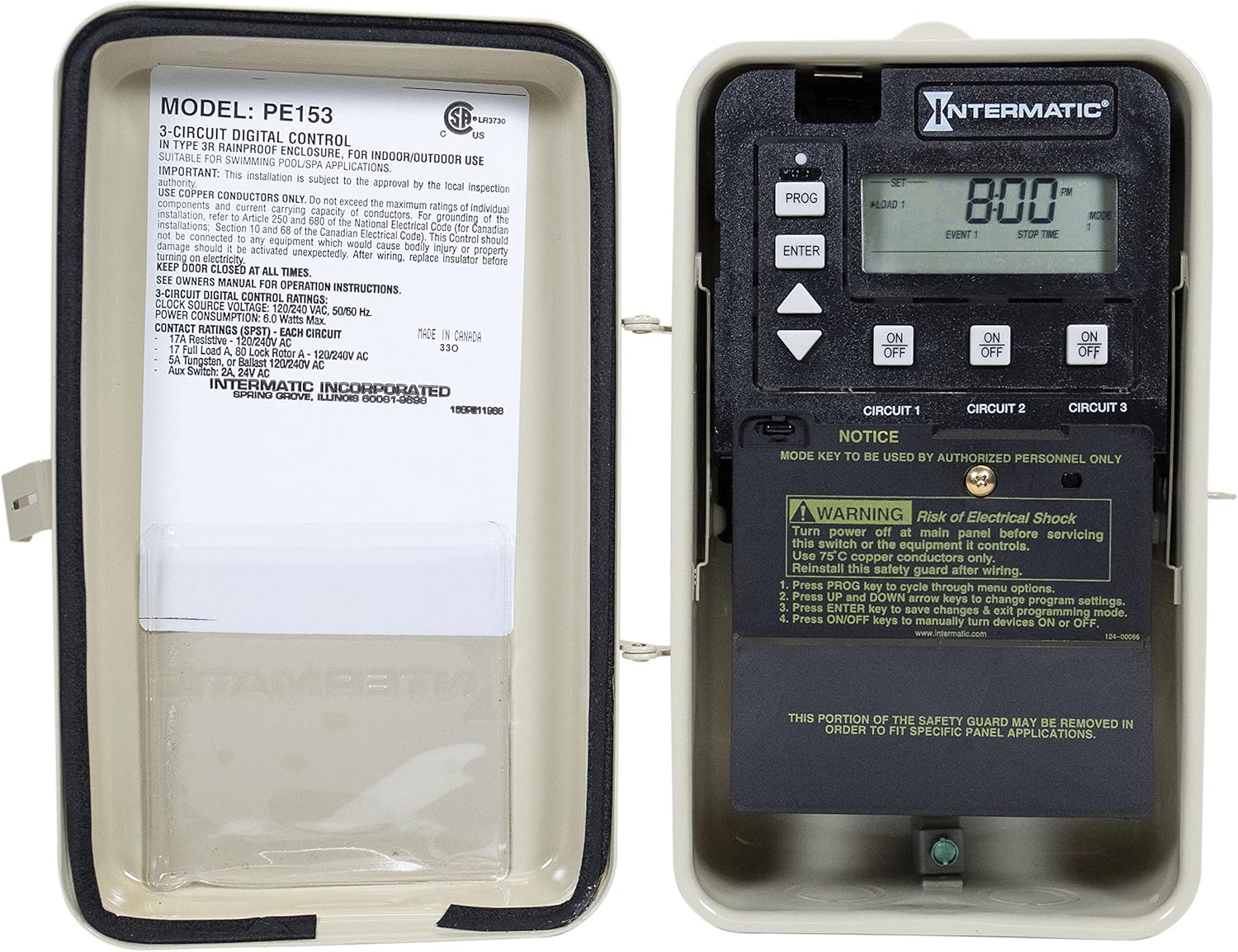
The Intermatic PE153 is a 24-hour electronic time control designed for managing multi-circuit pool and spa equipment. This device features three independent circuits, enabling precise control over single-speed and two-speed pumps, as well as cleaner/booster pumps. It offers versatile programming options, including countdown and override functions, and incorporates essential freeze and heater protection to safeguard your pool or spa system.
The unit is housed in a durable metal enclosure and includes an LCD readout for easy monitoring and adjustment of settings. Its multivoltage input and output capabilities ensure compatibility with various electrical configurations.

2. Información de seguridade
AVISO: RISCO DE DESCARGA ELÉCTRICA.
- Always turn off power at the main electrical panel before servicing this switch or any connected equipment.
- Use only 75°C copper conductors for wiring connections.
- Ensure the safety guard is properly reinstalled after completing any wiring or maintenance.
- This device must be installed by authorized personnel in accordance with all local and national electrical codes.
- Keep the enclosure door closed at all times to maintain its NEMA 3R rainproof rating.
3. Características do produto
- Multi-Circuit Control: Manages up to three independent circuits for various pool/spa equipment.
- Countdown and Override: Allows temporary program overrides with automatic resumption without reprogramming.
- Versatile Programming: Supports three ON/OFF events per circuit per day and seven preprogrammed modes.
- Protección contra conxelación: Automatically activates equipment to prevent freezing in cold conditions.
- Heater Protection: Helps protect heating elements by managing operational cycles.
- Lectura LCD: Provides clear digital display for monitoring and setting adjustments.
- Multivoltage Soporte: Compatible with 120V AC and 240V AC electrical systems.
- Carcasa duradeira: Housed in a NEMA 3R rated metal enclosure for indoor/outdoor use.
4. Configuración e instalación
Installation of the Intermatic PE153 should be performed by a qualified electrician. Ensure all local and national electrical codes are followed. The unit is designed for wall mounting.
Conexións de cableado:
The PE153 features clearly labeled terminals for power input (120V or 240V) and three independent load circuits. Each circuit has terminals for LINE and LOAD connections. Refer to the internal wiring diagram and the safety instructions before making any connections.
- Connect the main power supply to the "TIMER POWER" terminals, ensuring correct voltage (120V ou 240V).
- Connect the equipment to be controlled (e.g., pumps) to the respective "CIRCUIT 1," "CIRCUIT 2," and "CIRCUIT 3" LINE and LOAD terminals.
- Ensure all connections are secure and use appropriate wire gauges for the load.
5. Instrucións de funcionamento
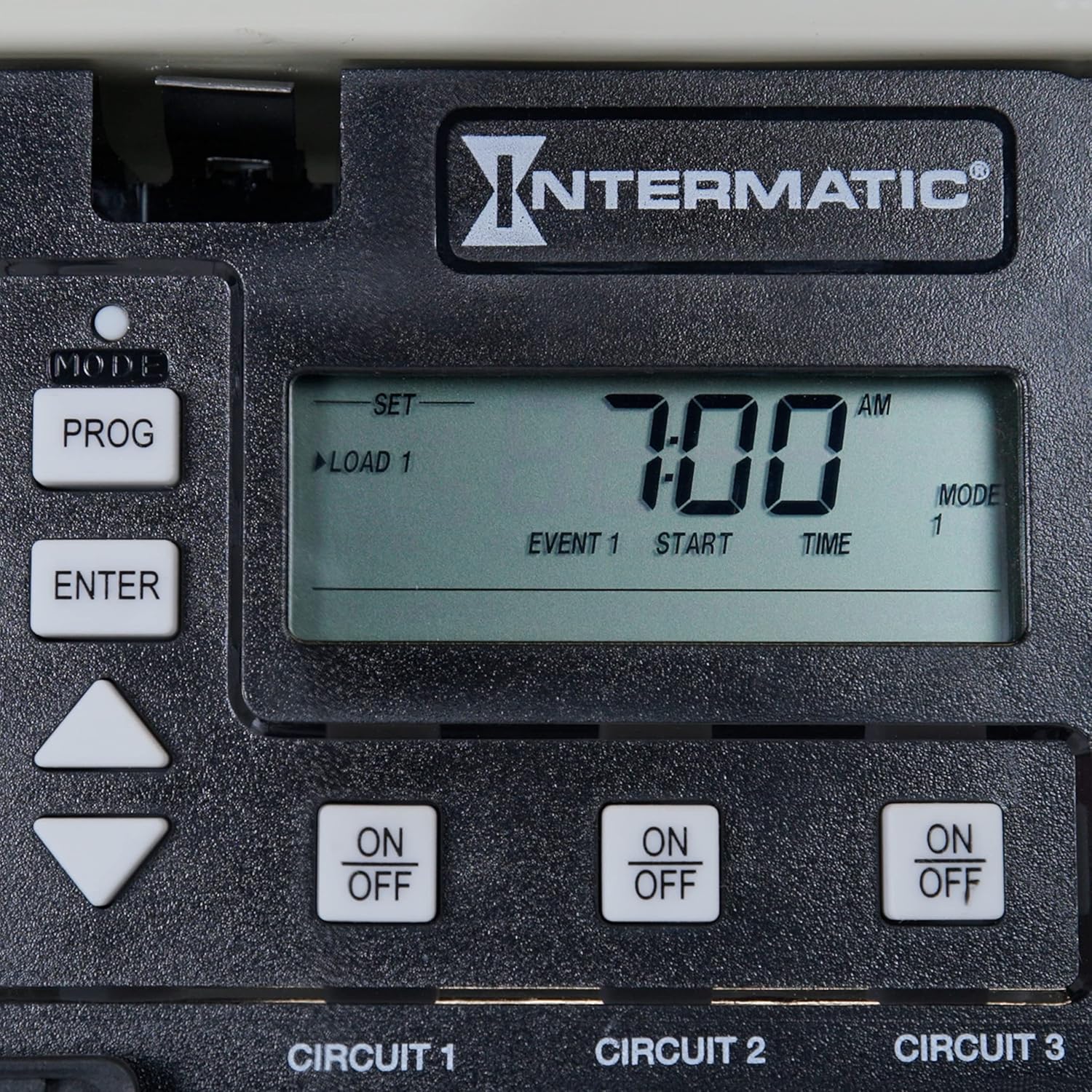
The PE153 features an intuitive control panel for programming and manual operation.

Panel de control rematadoview:
- Botón PROG: Cycles through various menu options for programming.
- Botón ENTER: Saves changes and exits the current programming mode.
- Up/Down Arrow Keys: Used to navigate menus and adjust program settings (e.g., time, event type).
- ON/OFF Buttons (Circuit 1, 2, 3): Manually turn individual circuits ON or OFF.
- Lectura LCD: Displays current time, program events, and settings.
Pasos de programación:
- Preme o PROG key to enter the programming menu. Continue pressing PROG to cycle through available options (e.g., Set Time, Set Date, Program Events).
- Usa o Teclas de frecha arriba/abaixo to adjust values or select specific settings within a menu option.
- Once a setting is adjusted, press the ENTRAR key to save the change and proceed.
- To set ON/OFF events for each circuit, navigate to the "Program Events" section using the PROG chave.
- Select the desired circuit (Load 1, Load 2, Load 3) and then define the ON and OFF times for up to three events per day.
- After setting all desired programs, press ENTRAR para gardar e saír do modo de programación.
Anulación manual:
To manually turn a circuit ON or OFF, simply press the corresponding ON/OFF button for Circuit 1, Circuit 2, or Circuit 3. The timer will automatically resume its programmed schedule after the override period, or when the next programmed event occurs.
6. Mantemento
The Intermatic PE153 is designed for minimal maintenance. Regular checks can help ensure optimal performance and longevity:
- Inspección visual: Periodically inspect the enclosure for any signs of damage, corrosion, or moisture ingress. Ensure the door seal is intact.
- Comprobación do cableado: With power disconnected at the main panel, visually inspect all wiring connections for tightness and signs of wear or overheating.
- Limpeza: Keep the LCD screen and control buttons clean and free of dust or debris using a soft, dry cloth. Do not use abrasive cleaners or solvents.
- Garda de seguridade: Always ensure the internal safety guard is in place, especially after any wiring adjustments.
7 Solución de problemas
If the PE153 is not functioning as expected, consider the following basic troubleshooting steps:
- Sen pantalla/alimentación:
- Check the main circuit breaker for the timer and connected equipment.
- Verify that the power supply wiring to the "TIMER POWER" terminals is secure and correct.
- The unit has a 36-hour backup time for settings during power outages; however, prolonged outages may require resetting the time.
- Equipment Not Turning ON/OFF:
- Confirm that the program settings for the specific circuit are correct (ON/OFF times, days).
- Check the manual ON/OFF button for the circuit to ensure it's not in an overridden state.
- Inspect the wiring connections for the affected circuit (LINE and LOAD) to ensure they are secure.
- Verify that the connected equipment is functioning correctly independently of the timer.
- Hora/data incorrecta:
- Access the programming menu using the PROG button and adjust the time and date settings as needed.
For persistent issues or complex problems, it is recommended to contact Intermatic customer support or a qualified electrician.
8. Especificacións
| Característica | Especificación |
|---|---|
| Número de modelo | PE153 |
| Número de canles | 3 |
| Voltage | 120 / 240V CA. |
| Ampera | 20 A |
| Events Available | 6 (3 ON/OFF events per circuit per day) |
| Material do recinto | Metal |
| Tipo de montaxe | Soporte de parede |
| Clasificación NEMA | 3R (Rainproof) |
| Tempo de copia de seguridade | 36 horas |
| Temperatura de funcionamento | -40 a 155 °F (-40 a 68 °C) |
| Dimensións (D x W x H) | 3.63" x 5.5" x 5.63" |
| Peso do elemento | 3.7 libras |
| Estándares | CSA/C-US |
9. Garantía e soporte
Información da garantía:
The Intermatic PE153 comes with a 1 ano de garantía. This warranty covers replacement of the unit but does not include labor costs associated with removal or reinstallation.
Atención ao cliente:
For technical assistance, warranty claims, or further inquiries, please contact Intermatic customer support. Refer to the official Intermatic websitio web ou a embalaxe do produto para obter a información de contacto máis actualizada.