
Introdución
This manual provides essential information for the safe and efficient operation of your Brookstone iDesign Tower Stereo System. Please read this manual thoroughly before using the product and retain it for future reference.
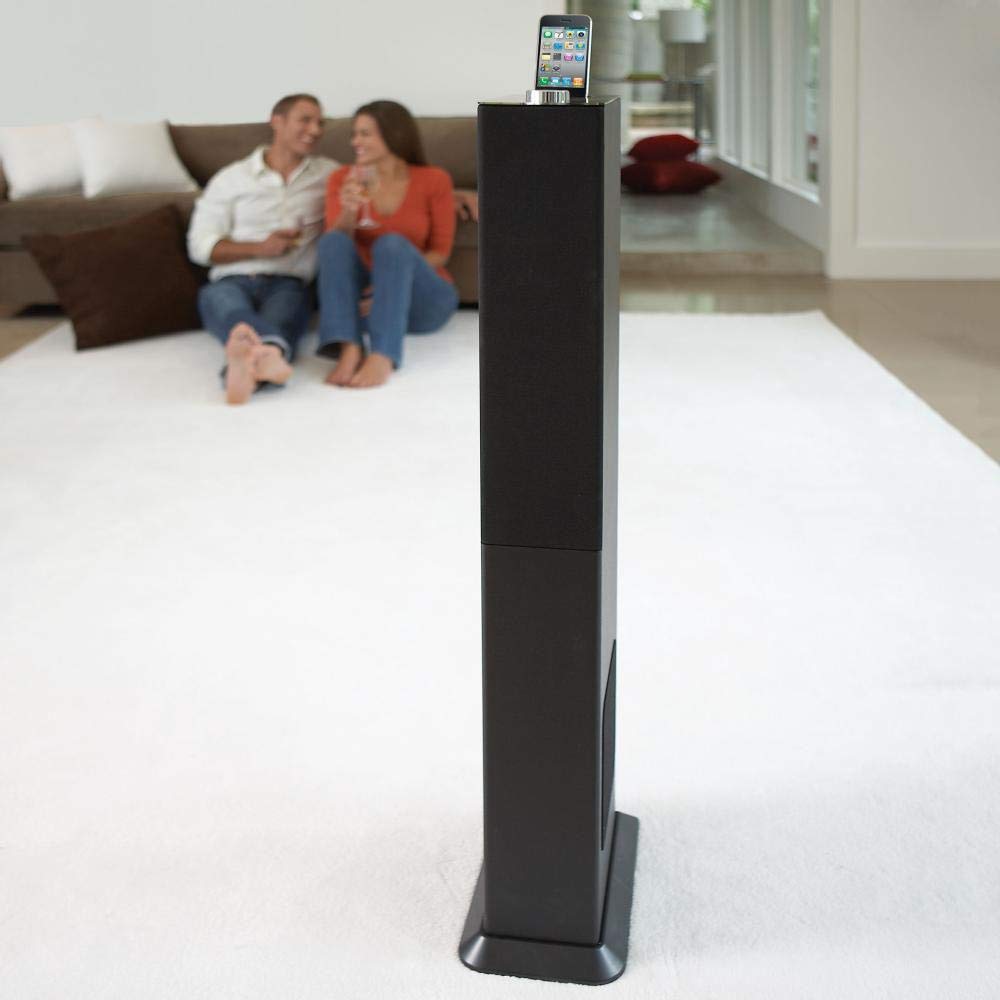
Image: The Brookstone iDesign Tower Stereo System, a tall, slender speaker unit designed for audio playback and device charging.
Información de seguridade
- Fonte de enerxía: Empregue só o adaptador de corrente especificado. Asegúrese de que o volumetage coincide coa súa fonte de alimentación local.
- Ventilación: Non bloquee ningunha abertura de ventilación. Instáleo segundo as instrucións do fabricante.
- Auga e humidade: Non expoña este aparello á choiva nin á humidade. Non coloque obxectos cheos de líquidos, como vasos, enriba do aparello.
- Calor: Non instale preto de fontes de calor como radiadores, rexistros de calor, cociñas ou outros aparellos (incluíndo amplificadores) que producen calor.
- Limpeza: Limpar só cun pano seco.
- Servizo: Remita todo o servizo a persoal de servizo cualificado. O mantemento é necesario cando o aparello sufriu algún dano.
Contido do paquete
Comprobe que todos os elementos estean presentes no paquete:
- iDesign Tower Stereo System
- Control remoto
- Adaptador de alimentación
- Manual de usuario (este documento)
- Note: iPod/iPhone devices are not included.
Produto rematadoview
The iDesign Tower Stereo System features a sleek design with integrated speakers and a docking station for compatible Apple devices. It includes a backlit on/volume knob and a remote control for convenient operation, delivering full, deep bass, crisp, clear highs, and warm middle tones.
Compoñentes principais:
- Reixas dos altofalantes: Multi-angled speakers for room-filling sound.
- Docking Port: For iPod and iPhone devices (1st and 2nd generation iPod touch, iPod classic, 4th and 5th generation iPod nano, iPhone 3GS, iPhone 3G, iPhone).
- On/Volume Knob: Backlit control for power and volume adjustment.
- Entrada auxiliar: For connecting other audio devices (cable not included).
- Entrada de enerxía: Para conectar o adaptador de alimentación.
- Sensor de control remoto: Recibe sinais do mando a distancia.
Configuración
1 Colocación
Place the iDesign Tower Stereo System on a stable, flat surface. Ensure there is adequate space around the unit for proper ventilation. Avoid placing it in direct sunlight or near heat sources.
2. Conexión de alimentación
- Connect the power adapter cable to the Power Input port on the back of the iDesign Tower Stereo System.
- Conecte o adaptador de alimentación a unha toma de corrente estándar.
3. Device Docking (iPod/iPhone)
The system is designed for specific iPod and iPhone models:
- iPod touch (1st and 2nd generation)
- iPod classic
- iPod nano (4th and 5th generation)
- iPhone 3GS
- iPhone 3G
- iPhone
Carefully align your compatible iPod or iPhone device with the docking port and gently push it down until it is securely seated. The device will begin charging automatically when docked and the system is powered on.
4. Auxiliary Input (Optional)
To connect other audio devices (e.g., MP3 players, CD players) that are not compatible with the docking port, use a 3.5mm audio cable (not included) to connect the device's headphone output to the Auxiliary Input port on the iDesign Tower Stereo System.
Instrucións de funcionamento
1. Acendido/apagado
Press the On/Volume knob to turn the system on or off. The knob will illuminate when the system is powered on.
2. Control de volume
Rotate the On/Volume knob clockwise to increase the volume and counter-clockwise to decrease it. You can also adjust the volume using the remote control.
3. Selección da fonte
The system automatically detects a docked iPod or iPhone. If an auxiliary device is connected, you may need to select the input source using the remote control (if available) or by cycling through inputs with a dedicated button (refer to remote control section for details).
4. Uso do control remoto
The included remote control allows you to manage playback functions (play, pause, skip tracks) and volume for your docked iPod or iPhone from a distance. Point the remote control towards the sensor on the front of the tower system.
5. Dispositivos de carga
When a compatible iPod or iPhone is docked and the system is powered on, the device will charge automatically.
Mantemento
Limpeza
Wipe the exterior of the system with a soft, dry cloth. Do not use liquid cleaners or aerosol sprays, as these may damage the finish or internal components. Ensure the system is unplugged before cleaning.
Almacenamento
If storing the system for an extended period, unplug it from the power outlet and store it in a cool, dry place, away from direct sunlight and extreme temperatures.
Resolución de problemas
| Problema | Causa posible | Solución |
|---|---|---|
| Sen poder | O adaptador de corrente non está conectado ou a toma de corrente non funciona. | Ensure power adapter is securely connected to the system and a working wall outlet. |
| Non hai son procedente do dispositivo conectado á base | Device not properly docked; volume too low; device not playing. | Re-seat the device in the dock. Increase system volume and device volume. Ensure music is playing on the device. |
| Sen son da entrada auxiliar | Auxiliary cable not connected; incorrect source selected; volume too low. | Ensure auxiliary cable is securely connected. Select auxiliary input. Increase system and source device volume. |
| O control remoto non funciona | Pilas gastadas; mando a distancia non apuntado ao sensor; obstrución. | Replace remote control batteries. Point remote directly at the sensor. Remove any obstructions between remote and system. |
| O dispositivo non se está cargando | Device not compatible; system not powered on; device not properly docked. | Verify device compatibility (see Setup section). Ensure system is powered on. Re-seat the device in the dock. |
Especificacións
- Modelo: B003YB9T2C
- Marca: Brookstone
- Dimensións do paquete: 42.6 x 14 x 8.6 polgadas
- Peso do artigo: 28.3 libras
- Primeiro dispoñible: 10 de marzo de 2010
- Compatibilidade: iPod touch (1st/2nd gen), iPod classic, iPod nano (4th/5th gen), iPhone 3GS, iPhone 3G, iPhone.
Garantía e Soporte
Para obter información sobre a garantía e a atención ao cliente, consulte a documentación incluída coa súa compra ou visite o sitio web oficial de Brookstone. websitio. Garda o comprobante de compra para reclamacións de garantía.
"Made for iPod" and "Made for iPhone" mean that an electronic accessory has been designed to connect specifically to iPod or iPhone, respectively, and has been certified by the developer to meet Apple performance standards. Apple is not responsible for the operation of this device or its compliance with safety and regulatory standards. Please note that the use of this accessory with iPod or iPhone may affect wireless performance.