
1. Introdución
This manual provides essential information for the safe and efficient operation of your Xantrex Freedom 458 Inverter/Charger, model 81-2010-12. The Freedom 458 is a robust power solution designed to convert DC battery power into AC household power and to charge your batteries from an AC source. It is suitable for various applications, including recreational vehicles (RVs) and marine environments.
Lea este manual detidamente antes da instalación e o uso para garantir o seu correcto funcionamento e evitar danos na unidade ou nos equipos conectados.
Image: Xantrex Freedom 458 Inverter/Charger product banner, showing the brand logo and model name.
2. Características clave
The Xantrex Freedom 458 Inverter/Charger offers a range of features designed for reliable power management:
- Modified Sine Wave (MSW) AC Power Inverter: Provides AC power with high surge capability for various appliances.
- Automático 3-Stage Battery Charger: Ensures optimal charging of deep-cycle batteries, extending their lifespan.
- Temperature Compensation with Equalization Stage: Optimizes charging based on battery temperature and allows for periodic equalization to prevent sulfation.
- Interruptor de transferencia integrado: Automatically switches between inverter power and incoming AC shore power or generator power.
- Compartir enerxía: Prevents tripping of the source AC input circuit breaker by reducing the charge current when AC loads are high.

Imaxe: Fronte view of the Xantrex Freedom 458 Inverter/Charger, showing the main connections and control panel area.
3. Configuración e instalación
Proper installation is crucial for the safe and efficient operation of your inverter/charger. It is recommended that installation be performed by a qualified technician.
3.1 Precaucións de seguridade
- Always disconnect all power sources (AC and DC) before installing or servicing the unit.
- Ensure adequate ventilation around the inverter/charger to prevent overheating.
- Install in a dry, protected area, away from flammable materials and corrosive fumes.
- Use appropriate wire gauges and circuit protection as specified in the full installation guide.
3.2 Montaxe
Mount the unit securely to a solid surface. Ensure there is sufficient clearance for wiring and airflow. The unit can be mounted horizontally or vertically, but refer to the detailed installation manual for specific orientation guidelines and mounting hardware requirements.
3.3 Conexións eléctricas
- Conexións de batería: Connect the DC input cables to the battery bank, observing correct polarity. Ensure connections are tight and secure.
- Conexión de entrada de CA: Connect the incoming AC shore power or generator input to the designated AC input terminals.
- Conexión de saída de CA: Connect your AC loads or distribution panel to the AC output terminals.
- Conexión a terra: Properly ground the inverter/charger chassis to the vehicle or boat's grounding system.
- Control remoto (opcional): If using a remote control panel, connect it to the designated port.
Imaxe: En ángulo view of the Xantrex Freedom 458 Inverter/Charger, showing the side ventilation and terminal connections.
4. Instrucións de funcionamento
Once installed, the Freedom 458 operates largely automatically. However, understanding its modes and controls is beneficial.
4.1 Modos de potencia
- Modo inversor: When no external AC power is present, the unit converts DC battery power to AC power for your appliances.
- Modo de cargador: When external AC power is connected, the unit charges the battery bank using its 3-stagalgoritmo de carga e.
- Modo de transferencia: The built-in transfer switch automatically passes incoming AC power directly to your loads, bypassing the inverter, and simultaneously charges the batteries.
4.2 Control Panel (if applicable)
If your system includes a remote control panel, it allows monitoring of system status, battery voltage, charge current, and AC input/output. It may also provide controls for adjusting settings like charge parameters or enabling/disabling the inverter/charger functions.
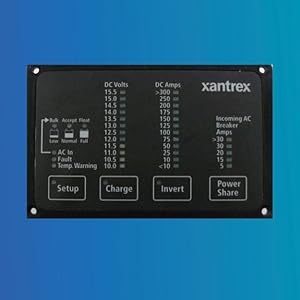
Image: A remote control panel for Xantrex inverters, showing various display readings and control buttons for setup, charge, invert, and power share functions.
4.3 Power Sharing Feature
The Power Sharing feature allows you to limit the total AC current drawn from the shore power or generator. This prevents overloading and tripping of the input circuit breaker, especially when operating high-power appliances. When Power Sharing is active, the charger automatically reduces its output to prioritize AC loads.
5. Mantemento
The Xantrex Freedom 458 Inverter/Charger is designed for minimal maintenance. Regular checks can help ensure long-term reliability.
- Ventilación: Ensure that the ventilation openings are clear of obstructions. Periodically clean dust and debris from the unit's exterior.
- Conexións: Annually inspect all electrical connections (DC and AC) for tightness and corrosion. Loose connections can cause overheating and poor performance.
- Mantemento da batería: Follow the battery manufacturer's recommendations for maintenance, including checking electrolyte levels (for flooded batteries) and terminal cleanliness.
- Ambiente: Asegúrese de que o ambiente de funcionamento se manteña dentro dos rangos de temperatura e humidade especificados.
6 Solución de problemas
This section provides basic troubleshooting steps for common issues. For more complex problems, contact Xantrex customer support or a qualified technician.
| Problema | Causa posible | Solución |
|---|---|---|
| Sen saída de CA do inversor |
|
|
| As baterías non se cargan |
|
|
| A unidade fai un ruído inusual |
|
|
7. Especificacións
Below are the key technical specifications for the Xantrex Freedom 458 Inverter/Charger (Model 81-2010-12):
| Característica | Detalle |
|---|---|
| Marca | Xantrex |
| Nome do modelo | Liberdade 458 |
| Número de modelo | 81-2010-12 |
| Wattage | 2000 vatios |
| Potencia máxima de saída | 2500 vatios |
| Vol. De entradatage | 12 voltios DC |
| Vol. De saídatage | 120 voltios AC |
| Electrical Output Waveform | Onda sinusoidal modificada |
| Frecuencia | 60 hercios |
| Cargador de batería | Automático 3 stage |
| Dimensións do artigo (L x W x H) | 13.2 cm de longo x 7.9 cm de ancho x 11.5 cm de alto |
| Peso do elemento | 55.6 libras |
| Usos recomendados | Vehículo recreativo, Barco, Camping, Travel, Household appliances |
8. Garantía e soporte
8.1 Información da garantía
The Xantrex Freedom 458 Inverter/Charger comes with a manufacturer's warranty. Please contact Xantrex directly or refer to the official warranty documentation for full details regarding coverage, terms, and conditions. For issues within 30 days of receipt, please contact your retailer.
8.2 Atención ao cliente
For technical assistance, troubleshooting beyond this manual, or warranty claims, please contact Xantrex customer support. You can typically find contact information on the Xantrex official webno sitio web ou nos materiais de embalaxe.
Online resources, including FAQs and detailed product manuals, may also be available on the Xantrex websitio.