
Introdución
The GIGABYTE GM-M7600 is a wireless precision optical mouse designed for comfortable and reliable use. This manual provides instructions for setting up, operating, maintaining, and troubleshooting your device.
Contido do paquete
Comprobe o contido do paquete para asegurarse de que estean presentes todos os elementos:
- GIGABYTE GM-M7600 Wireless Optical Mouse
- Portable Nano USB Receiver
- 2 x pilas AAA
Configuración
1. Instalación de baterías
The GM-M7600 mouse requires two AAA batteries for operation. The batteries are included in the package.
- Localiza a tapa do compartimento da batería na parte inferior do rato.
- Deslice ou levante a tapa con suavidade para abrir o compartimento.
- Insira as dúas pilas AAA, asegurándose de que os terminais positivo (+) e negativo (-) estean aliñados correctamente coas marcas do interior do compartimento.
- Pecha a tapa do compartimento da batería de forma segura.
2. Conexión do receptor USB
The mouse connects to your computer via a portable Nano USB receiver.
- Locate the Nano USB receiver. It may be stored inside the mouse's battery compartment or packaged separately.
- Plug the Nano USB receiver into an available USB port on your computer (Laptop or Personal Computer).
- Your operating system (e.g., Windows XP, Linux) should automatically detect and install the necessary drivers. This process may take a few moments.
- Unha vez instalados os controladores, o rato estará listo para usar.
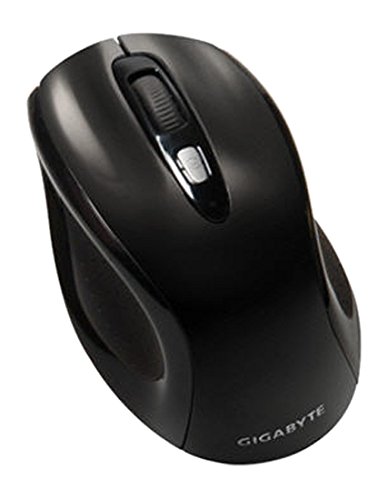
Figura 1: GIGABYTE GM-M7600 Wireless Optical Mouse. This image displays the ergonomic design of the mouse, highlighting its form factor and the location of its buttons. The Nano USB receiver is typically stored within the mouse or connected to a computer's USB port.
Instrucións de funcionamento
1. Acendido/apagado
The mouse typically has a power switch on its underside. Slide the switch to the 'ON' position to activate the mouse. Slide it to 'OFF' when not in use to conserve battery life.
2. Axuste de DPI (sensibilidade)
The GM-M7600 features an adjustable DPI switch, allowing you to change the mouse sensitivity between 800 DPI and 1600 DPI. This switch is usually located near the scroll wheel. Press the DPI button to toggle between the two sensitivity settings.
3. Funcións básicas do rato
- Clic esquerdo: Botón principal para seleccionar elementos, abrir files, e interactuar co software.
- Clic dereito: Botón secundario para acceder aos menús contextuais e a opcións adicionais.
- Roda de desprazamento: Úsase para percorrer documentos e web páxinas. Tamén pode funcionar como un botón central para premer.
Mantemento
1. Limpeza
Para manter un rendemento e unha aparencia óptimos:
- Disconnect the mouse from your computer and turn off the power switch.
- Use un pano suave e sen pelusa lixeiramente dampEnxágüe con auga ou unha solución de limpeza suave para limpar a superficie do rato.
- Avoid using harsh chemicals, abrasive cleaners, or spraying liquids directly onto the mouse.
- Clean the optical sensor area on the underside of the mouse with a dry cotton swab to remove any dust or debris.
2. Substitución da batería
When the mouse performance degrades or it stops responding, it may be time to replace the batteries.
- Turn off the mouse using the power switch.
- Open the battery compartment as described in the 'Installing Batteries' section.
- Retire as pilas AAA vellas.
- Insert two new AAA batteries, observing the correct polarity (+/-).
- Close the battery compartment and turn the mouse back on.
Resolución de problemas
If you encounter issues with your GIGABYTE GM-M7600 mouse, try the following solutions:
- O rato non responde:
- Asegúrese de que o rato estea acendido.
- Comprobe se as baterías están instaladas correctamente e teñen a carga suficiente. Substitúaas se é necesario.
- Ensure the Nano USB receiver is securely plugged into a working USB port on your computer. Try a different USB port.
- Reinicia o teu ordenador.
- Movemento errático do cursor:
- Limpa o sensor óptico da parte inferior do rato.
- Asegúrate de usar o rato sobre unha superficie axeitada. Evita superficies moi reflectantes ou transparentes.
- Check for any wireless interference. Move the mouse closer to the receiver or away from other wireless devices.
- DPI switch not working:
- Asegúrate de que o rato estea acendido e conectado.
- Prema firmemente o botón DPI.
Especificacións
| Nome do modelo | GM-M7600 |
| Marca | GIGABYTE |
| Tecnoloxía de conectividade | 2.4GHz Radio Frequency Wireless |
| Detección de Movemento | Óptica |
| DPI axustable | 800/1600 DPI |
| Número de botóns | 3 (Esquerda, Dereita, Roda de desprazamento/Clic central) |
| Fonte de enerxía | 2 pilas AAA (incluídas) |
| Tipo de receptor | Portable Nano USB Receiver |
| Dispositivos compatibles | Ordenador portátil, ordenador persoal |
| Soporte do sistema operativo | Linux, Windows XP |
| Material do recinto | Plastic with Rubberized Finish |
| Cor | Negro |
Garantía e Soporte
For warranty information and technical support, please refer to the warranty card included with your product or visit the official GIGABYTE websitio. Conserve o recibo de compra para reclamacións de garantía.