1. Introdución e información de seguridade
This manual provides important instructions for the safe installation, operation, and maintenance of your Power Zone ORG320803 3-Outlet GFCI Tap. Please read this manual thoroughly before using the product and retain it for future reference.
Avisos importantes de seguridade
- Risco de descarga eléctrica: Do not expose this product to rain or moisture. Do not use in wet conditions unless specifically rated for such use.
- Interruptor de circuíto de falla a terra (GFCI): This device is designed to protect against electrical shock by detecting ground faults. It is not a substitute for proper wiring or grounding.
- Uso interior/exterior: Verify the product's rating for indoor or outdoor use. The ORG320803 is typically designed for general purpose use.
- Protección contra sobrecarga: Do not exceed the electrical ratings of this product. Overloading can cause overheating and fire.
- Inspección de danos: Before each use, inspect the GFCI tap for any damage to the cord, plug, or housing. Do not use if damaged.
- Nenos: Manter fóra do alcance dos nenos.
2. Produto rematadoview
The Power Zone ORG320803 is a 3-outlet Ground Fault Circuit Interrupter (GFCI) tap with a 3-foot cord. It provides additional outlets and enhanced safety by interrupting power when a ground fault is detected, reducing the risk of electrical shock.
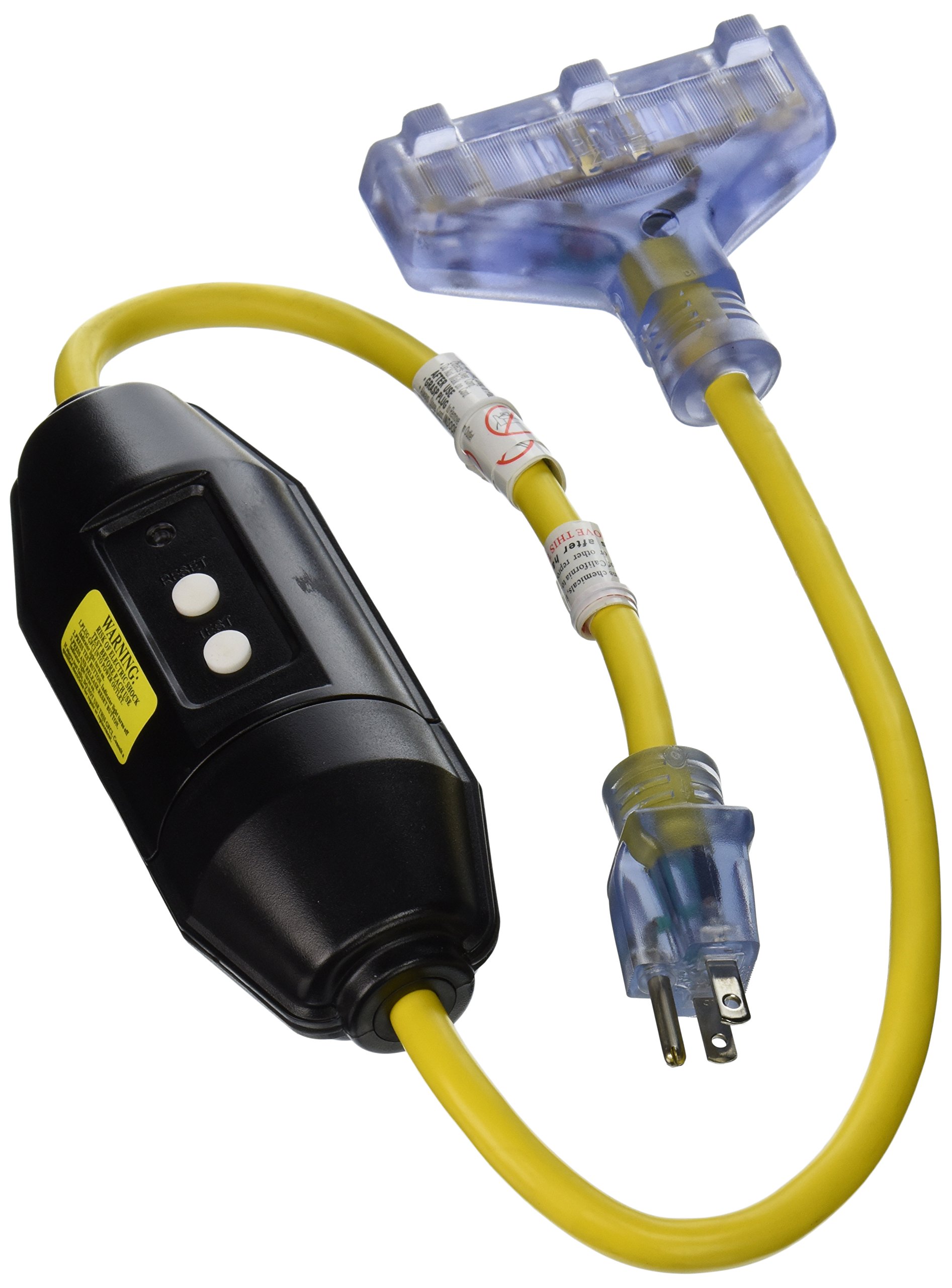
Figure 2.1: Power Zone ORG320803 3-Outlet GFCI Tap. This image shows the yellow GFCI tap with three outlets and the attached power cord. The TEST and RESET buttons are visible on the device.
Características principais:
- Three (3) grounded outlets for multiple device connections.
- Integrated GFCI protection for enhanced electrical safety.
- 3-foot (approximately 0.91 meters) power cord for flexible placement.
- Durable construction, suitable for various applications.
3. Instrucións de configuración
- Desempaquetar: Carefully remove the GFCI tap from its packaging. Inspect for any visible damage.
- Colocación: Position the GFCI tap in a location where it will not be exposed to excessive moisture or physical damage, unless it is specifically rated for such environments. Ensure the 3-foot cord reaches the intended power source without strain.
- Conectar á enerxía: Plug the GFCI tap's male plug into a standard 120V AC grounded wall outlet.
- Proba inicial: Before connecting any devices, perform the GFCI test procedure outlined in Section 4.1.
- Conectar dispositivos: Once the GFCI passes the test, you can plug your electrical devices into the three available outlets on the GFCI tap. Ensure the total current draw does not exceed the tap's maximum rating.
4. Instrucións de funcionamento
4.1. GFCI Test Procedure
It is crucial to test the GFCI device before each use, especially in environments where electrical safety is paramount.
- Plug the GFCI tap into a live, grounded electrical outlet.
- Preme o RESET button. The indicator light (if present) should illuminate, indicating power is available.
- Preme o PROBA button. The GFCI should trip, and the indicator light should turn off. This confirms the GFCI is functioning correctly.
- Preme o RESET button again to restore power. The indicator light should turn back on.
- If the GFCI does not trip when the TEST button is pressed, or if it does not reset after tripping, do not use the device. Contact a qualified electrician or the manufacturer for assistance.
4.2. Uso das tomas de corrente
Once the GFCI has been tested and reset, you can use the three outlets to power your devices. Always ensure that the total power consumption of all connected devices does not exceed the maximum rating of the GFCI tap.
- Insert appliance plugs firmly into the GFCI outlets.
- If the GFCI trips during use (power cuts off), disconnect all appliances, press the RESET button, and then reconnect appliances one by one to identify the faulty device.
5. Mantemento
- Probas regulares: Perform the GFCI test procedure (Section 4.1) monthly, or before each use in critical applications, to ensure proper function.
- Limpeza: Disconnect the GFCI tap from the power source before cleaning. Wipe the exterior with a dry, soft cloth. Do not use liquid cleaners or immerse the device in water.
- Almacenamento: When not in use, store the GFCI tap in a dry, clean environment, away from direct sunlight and extreme temperatures. Coil the cord loosely to prevent damage.
- Inspección: Periodically inspect the cord, plug, and housing for any signs of wear, cuts, or damage. Replace the unit if any damage is found.
6 Solución de problemas
6.1. GFCI Will Not Reset
- Sen enerxía: Ensure the wall outlet supplying power to the GFCI tap is functional. Test the wall outlet with another device.
- Aparello avariado: Disconnect all appliances from the GFCI tap. Try to reset the GFCI. If it resets, one of your appliances may have a ground fault. Reconnect them one by one to identify the faulty appliance.
- Fallo interno: If the GFCI still will not reset after disconnecting all appliances and confirming the wall outlet has power, the GFCI unit itself may be faulty and requires replacement.
6.2. GFCI Trips Frequently
- Fallo a terra: A frequent trip indicates a persistent ground fault. This could be due to a faulty appliance, damaged wiring, or moisture ingress. Disconnect appliances and inspect them.
- Sobrecarga: Ensure the total current draw of all connected devices does not exceed the GFCI tap's maximum rating. Reduce the number of connected devices if necessary.
- Factores ambientais: If used outdoors, ensure the GFCI tap is rated for outdoor use and protected from direct rain or excessive moisture.
6.3. No Power to Outlets
- GFCI disparado: Check if the GFCI has tripped. Press the RESET botón.
- Wall Outlet Issue: Verify the wall outlet providing power to the GFCI tap is working.
- Cable/enchufe danado: Inspect the GFCI tap's power cord and plug for any damage.
7. Especificacións
| Característica | Especificación |
|---|---|
| Número de modelo | ORG320803 |
| Marca | Zona de enerxía |
| Número de puntos de venda | 3 |
| Lonxitude do cordón | 3-Feet (approx. 0.91 meters) |
| Peso do elemento | 1 libra (aprox. 0.45 kg) |
| Dimensións do produto | 14.62 x 10.02 x 7.44 polgadas (aprox. 37.13 x 25.45 x 18.9 cm) |
| Formato de enchufe | Tipo B (estándar dos EUA) |
| País de Orixe | China |
| Compoñentes incluídos | ADAPTER 3 OUTLET GFCI 12/3 YEL |
8. Garantía e soporte
Power Zone products are manufactured to high-quality standards. Specific warranty details may vary. Please refer to the product packaging or the manufacturer's official websitio web para obter a información máis actualizada sobre a garantía.
For technical support, troubleshooting assistance beyond what is provided in this manual, or warranty claims, please contact Power Zone customer service directly. Contact information can typically be found on the product packaging or the official Power Zone websitio.