
Edificador M1360
Edifier M1360 Wired Multimedia Speaker System User Manual
Modelo: M1360
1. Introdución
Grazas pola compraasing the Edifier M1360 Wired Multimedia Speaker System. This 2.1 speaker system is designed to provide a convenient and high-quality audio solution for various multimedia applications, including computers, laptops, gaming consoles, and MP3 players. Featuring upward-angled satellites and a downward-angled subwoofer, the system delivers clear sound with steady bass output. The wired remote control offers easy volume adjustment and includes a headphone jack for private listening.
2. Información importante de seguridade
- Read these instructions thoroughly before operating the product.
- Conserve este manual para futuras consultas.
- Non expoña a unidade á choiva nin á humidade para evitar incendios ou descargas eléctricas.
- Non bloquee ningunha abertura de ventilación. Instáleo segundo as instrucións do fabricante.
- Non instale preto de fontes de calor como radiadores, rexistros de calor, cociñas ou outros aparellos (incluíndo amplificadores) que producen calor.
- Protexa o cable de alimentación para evitar que se pise ou se pinche, especialmente nos enchufes, tomas de corrente e no punto de saída do aparello.
- Use só anexos/accesorios especificados polo fabricante.
- Desenchufe este aparello durante tormentas eléctricas ou cando non se use durante longos períodos de tempo.
- Encargue toda a reparación a persoal de servizo cualificado. O mantemento é necesario cando o aparello resultou danado dalgún xeito, como o cable de alimentación ou o enchufe está danado, se derrama líquido ou caen obxectos no aparello, o aparello estivo exposto á choiva ou á humidade, non funciona normalmente. , ou foi abandonado.
3. Contido do paquete
Comprobe o contido do seu paquete. Se falta algún artigo ou está danado, póñase en contacto co seu vendedor.
- 1x Edifier M1360 Subwoofer
- 2x altofalantes satélite
- 1 x mando a distancia con cable
- 1x 3.5mm Audio Input Cable
- 1x Manual de usuario (este documento)
4. Produto rematadoview
4.1 Compoñentes do sistema
- Subwoofers: Houses the main amplifier and bass driver. Connects to the satellite speakers and the audio source.
- Altofalantes satélite: Two compact speakers for mid-range and high-frequency audio.
- Control remoto con cable: Features a volume dial, power switch, and headphone output.
4.2 Identificación de compoñentes

Figura 1: Fronte view of the Edifier M1360 speaker system, showing the central subwoofer, two angled satellite speakers, and the wired remote control unit.
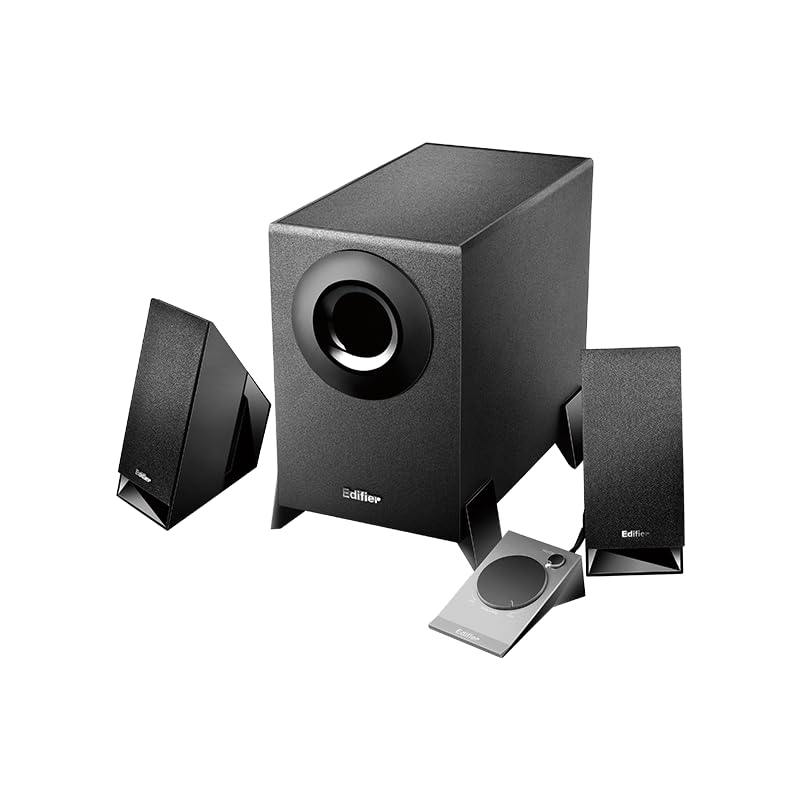
Figure 2: Another perspective of the Edifier M1360 speaker system, highlighting the compact design of the satellite speakers and the wired remote's placement.
5. Configuración
5.1 Colocación
- Place the subwoofer on the floor or a sturdy surface near your computer or audio source.
- Position the satellite speakers on either side of your monitor or listening area, ensuring they are angled towards you for optimal sound.
- Ensure adequate ventilation around all components.
5.2 Conexións
- Connect the satellite speakers to the corresponding output jacks on the back of the subwoofer. Ensure the left and right speakers are connected correctly.
- Connect the wired remote control cable to the dedicated port on the subwoofer.
- Connect the 3.5mm audio input cable from the "AUDIO IN" port on the subwoofer to the audio output (headphone jack) of your computer, laptop, MP3 player, or other audio source.
- Plug the power cord of the subwoofer into a standard AC power outlet.
6. Instrucións de funcionamento
6.1 Encendido/apagado
- To turn on the speaker system, press the power button located on the wired remote control. The power indicator light will illuminate.
- To turn off the speaker system, press the power button again. The power indicator light will turn off.
6.2 Control de volume
- Rotate the large dial on the wired remote control clockwise to increase the volume.
- Rotate the large dial counter-clockwise to decrease the volume.
6.3 Saída de auriculares
- To listen privately, plug your headphones into the 3.5mm headphone jack on the wired remote control.
- When headphones are connected, the speaker output will automatically mute.
- Unplug the headphones to resume audio playback through the speakers.
7. Mantemento e coidados
- Limpeza: Use a soft, dry cloth to clean the surfaces of the speakers and subwoofer. Do not use liquid cleaners or aerosol sprays.
- Ventilación: Ensure that the ventilation openings on the subwoofer are not blocked. Proper airflow prevents overheating.
- Almacenamento: Se vai gardar o sistema durante un período prolongado, desconécteo da corrente e gárdeo nun lugar fresco e seco, lonxe da luz solar directa e de temperaturas extremas.
- Evitar a humidade: Keep the speaker system away from water, humidity, and other liquids.
8 Solución de problemas
| Problema | Causa posible | Solución |
|---|---|---|
| Sen son |
|
|
| Son distorsionado |
|
|
| Un altofalante non funciona |
|
|
9. Especificacións
| Característica | Detalle |
|---|---|
| Nome do modelo | M1360 |
| Tipo de altofalante | Multimedia |
| Configuración da canle de son envolvente | 2.1 |
| Tecnoloxía de conectividade | Wired (3.5mm stereo input) |
| Modo de saída de audio | Estéreo |
| Potencia de saída máxima do altofalante | 8.5 vatios |
| Diámetro do subwoofer | 5 polgadas |
| Diámetro do tweeter | 1 polgadas |
| Relación sinal-ruído | 85 dB |
| Resposta en frecuencia | 20 KHz (Note: This is likely the upper limit, not the full range. Common for speakers to list only max freq.) |
| Dispositivos compatibles | Smartphone, Laptop, Desktop, Gaming Console, MP3 Player |
| Dimensións do produto | 6.4P x 11.2L x 14H centímetros |
| Peso do elemento | 2.5 kg (2500 gramos) |
| Fonte de enerxía | AC |
| Cor | Negro |
| País de Orixe | China |
10. Garantía e soporte
For detailed warranty information and customer support, please refer to the warranty card included with your product packaging or visit the official Edifier websitio.
Fabricante: Edifier
Importer: Nikita Distributors - Green Terrace Building, Lane Number 5, South Koregaon Park, Pune 411001, MH, India
Ask a question about this manual
Ask about setup, troubleshooting, compatibility, parts, safety, or missing instructions. Manuals+ will review the question and use this page’s manual context to help answer it.