
Introdución
The Kaito Voyager Solo KA450 is a versatile emergency radio designed for both daily use and emergency preparedness. It features multiple power options, AM/FM/Shortwave radio reception, and NOAA weather alerts. This manual provides instructions for setup, operation, and maintenance to ensure optimal performance.
Contido do paquete
Verifica que todos os elementos estean presentes no paquete:
- Kaito KA450 Emergency Radio
- AC Adapter with mini-USB male plug
- Auriculares
- Manual de usuario (este documento)
- Bonus cell phone charging kit (USB cable and various tips)
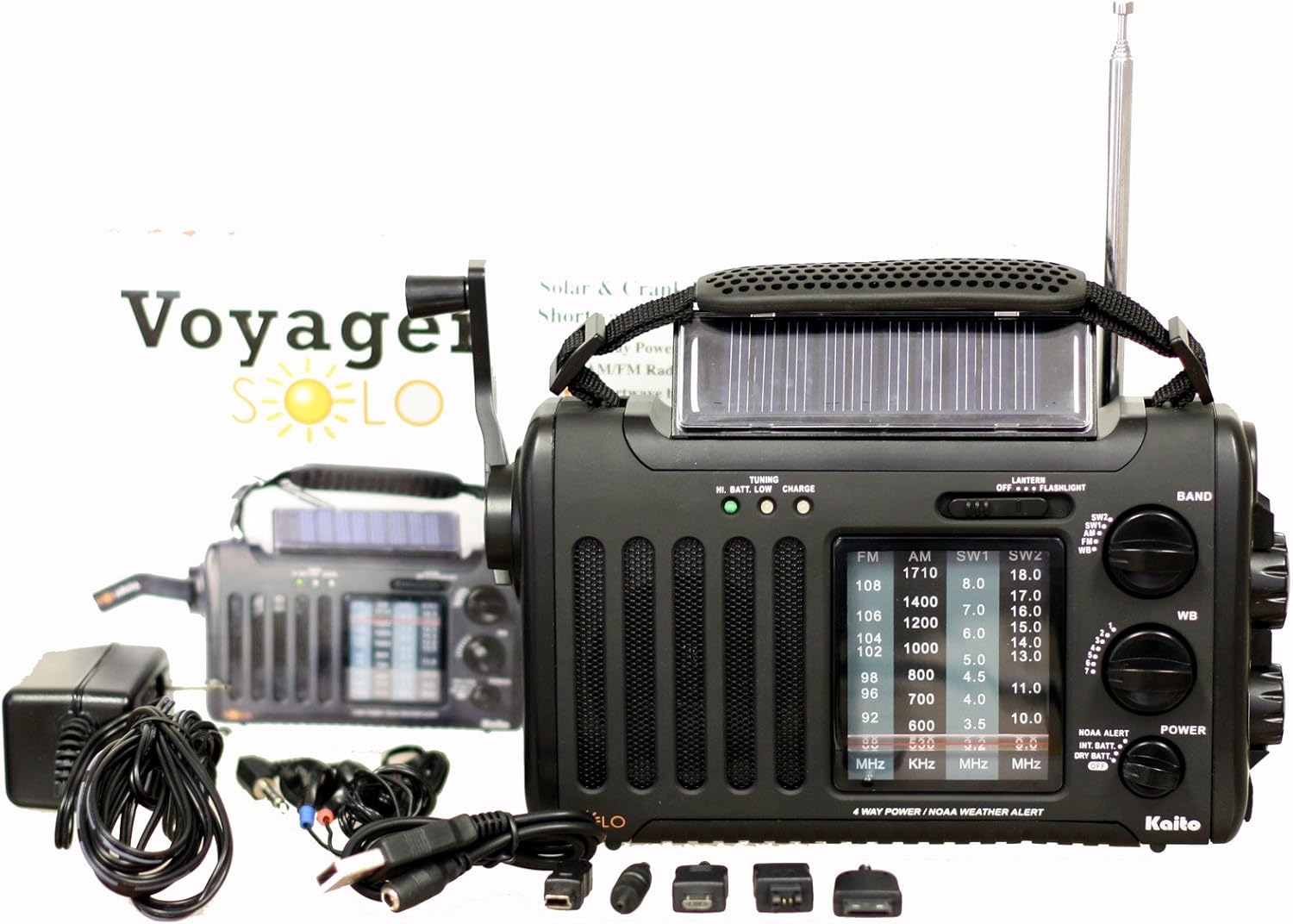
Image: The Kaito KA450 emergency radio displayed with its accompanying accessories, including the AC adapter, earphones, and various cell phone charging cables.
Setup and Powering the Radio
The KA450 offers four methods for power:
- Pilas AA: Insert three (3) AA batteries (not included) into the battery compartment located on the back of the radio. Ensure correct polarity.

Imaxe: Traseira view of the Kaito KA450 radio, highlighting the battery compartment cover and the telescopic antenna in its retracted position.
- Adaptador AC/DC: Connect the included AC adapter to a standard wall outlet and plug the mini-USB end into the "DC IN" port on the side of the radio. This also charges the internal Ni-MH battery.
- Hand Crank Dynamo: Extend the hand crank located on the side of the radio. Rotate the crank clockwise or counter-clockwise for approximately 1-3 minutes to generate power for short-term use or to charge the internal battery.

Imaxe: De arriba abaixo view of the Kaito KA450 radio, clearly showing the foldable hand crank and the integrated solar panel.
- Panel solar: Position the radio with the solar panel facing direct sunlight. The adjustable flip-up solar panel ensures maximum exposure. This method charges the internal Ni-MH battery and can power the radio when no other batteries are installed.
The radio includes a built-in rechargeable Ni-MH battery (600mAh) which can be charged via the AC adapter, hand crank, or solar panel.
Instrucións de funcionamento
Funcionamento da radio (AM/FM/SW)
- Encendido/apagado: Xire o VOLUME knob clockwise to turn the radio on and adjust the sound level. Rotate counter-clockwise to turn off.
- Selección de bandas: Usa o BANDA switch to select between AM, FM, SW1, SW2, or WB (Weather Band).
- Afinación: Xire o TUNING knob to find desired stations. Extend the telescopic antenna for better FM and Shortwave reception. For AM, rotate the radio for optimal signal.
- Jack para auriculares: For private listening, plug 3.5mm earphones into the headset jack socket.

Imaxe: Side profile of the Kaito KA450 radio, illustrating the tuning and volume control knobs, the integrated flashlight, and the DC IN power input port.
NOAA Weather Band and Alert Function
- Weather Band Selection: Establece o BANDA switch to "WB".
- Sintonización de canles: Usa o dedicado WB CHANNEL switch to select one of the 7 pre-programmed NOAA weather channels.
- Modo de alerta: To activate the NOAA Alert feature, set the ALERTA DA NOAA switch to "Alert". In this mode, the radio will automatically activate to broadcast hazardous weather conditions or warnings from the Emergency Alert System (EAS) via the National Weather Radio (NWR) network.
Lanterna e lectura Lamp
- Lanterna: The single LED flashlight is located on the side of the radio. Use the LUZ cambiar para acendelo ou apagalo.
- Lectura Lamp: The 5-LED reading lamp is located on the back of the radio. Use the LUZ cambiar para acendelo ou apagalo.
Cell Phone Charging
- Connect your cell phone or other compatible device to the standard USB female output jack using the appropriate charging cable (included bonus kit).
- Power for charging is drawn from the radio's internal battery or generated via the hand crank/solar panel. Charging efficiency may vary depending on the device and power source.
Mantemento
- Limpeza: Limpe a radio cun suave, damp pano. Non use produtos de limpeza ou disolventes abrasivos.
- Coidado da batería: If using AA batteries, remove them if the radio will not be used for an extended period to prevent leakage. Regularly charge the internal Ni-MH battery to maintain its capacity.
- Almacenamento: Garde a radio nun lugar fresco e seco, lonxe da luz solar directa e de temperaturas extremas.
Resolución de problemas
- Sen enerxía:
- Check if AA batteries are inserted correctly and have sufficient charge.
- Asegúrese de que o adaptador de CA estea conectado correctamente e que a toma de corrente funcione.
- Crank the dynamo for 1-3 minutes or expose the solar panel to direct sunlight to charge the internal battery.
- Mala recepción de radio:
- Extend the telescopic antenna fully for FM and Shortwave bands.
- For AM reception, try rotating the radio to find the best signal.
- Move away from electronic devices that may cause interference.
- Cell Phone Not Charging:
- Ensure the radio has sufficient power (internal battery charged, or actively cranking/solar charging).
- Verify the USB cable and phone adapter are correctly connected and compatible with your device.
- Note that charging speed and compatibility may vary.
Especificacións
| Característica | Detalle |
|---|---|
| Modelo | KA450 |
| Bandas de radio | FM: 88 - 108 MHz AM (MW): 530 - 1710 KHz SW 1: 3.2 - 8.0 MHz SW 2: 9.0 - 18.0 MHz NOAA Weather: 1 - 7 Channels |
| Fontes de enerxía | 3 pilas AA (non incluídas) AC/DC Adapter (included) Dinamo de manivela Panel solar Built-in Rechargeable Ni-MH Battery (600mAh) |
| Relator interno | 0.5 W |
| Jack para auriculares | 3.5 mm |
| Saída USB | Standard USB female jack for charging external devices |
| Dimensións | 8 x 4.5 x 2.5 polgadas (20.3 x 11.4 x 6.35 cm) |
| Peso | 1 lb (0.45 kg) |
| Características especiais | NOAA Weather Alert, 5-LED Reading Lamp, Single LED Flashlight |
Garantía e Soporte
For warranty information and technical support, please refer to the contact details provided with your purchase documentation or visit the official Kaito websitio. Garde o recibo da compra como xustificante da mesma.
Kaito Official Websitio: Visit the Kaito Store on Amazon