
1. Introdución
This manual provides instructions for the VTech ATT-CL80100 DECT 6.0 accessory handset. This handset is designed to expand your existing compatible VTech/ATT DECT 6.0 cordless phone system. It is compatible with ATT models CL81100, CL81200, CL81300, CL82100, CL82200, CL82300, CL82350, CL82400, CL82500, CL82600, CL84100, and CL84200. Please read this manual thoroughly before using your new accessory handset.
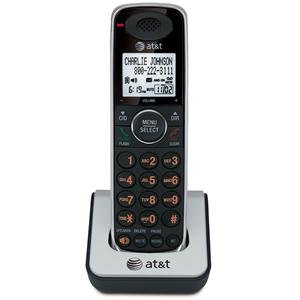
Image 1.1: The VTech ATT-CL80100 accessory handset. This image shows the front view of the cordless handset, typically including the display, keypad, and speaker.
2. Configuración
Before using your new accessory handset, it must be registered to your existing compatible base unit and its battery must be charged.
2.1 Contido do paquete
Asegúrate de que o teu paquete conteña os seguintes elementos:
- ATT-CL80100 Accessory Handset
- Handset Battery Pack
- Handset Charger with Power Adapter
- Manual do usuario (este documento)
2.2 Instalación da batería
- Abra a tapa do compartimento da batería na parte traseira do auricular.
- Conecte o conector da batería firmemente na toma do interior do compartimento.
- Coloque o paquete de baterías no compartimento.
- Deslice a tapa do compartimento da batería de volta ao seu lugar ata que faga clic.
2.3 Carga do teléfono
- Plug the small end of the charger's power adapter into the back of the handset charger.
- Conecta o extremo grande do adaptador de corrente a unha toma de corrente estándar.
- Place the handset face forward into the charger cradle. The charge indicator light on the handset should illuminate, indicating proper charging.
- Allow the handset to charge for at least 12 hours before initial use. A full charge ensures optimal battery performance.
2.4 Rexistro do teléfono
This accessory handset must be registered to your existing base unit to function. Refer to your main system's user manual for specific registration instructions, as procedures may vary slightly between base models (CL81xxx, CL82xxx, CL84xxx series). Generally, the process involves:
- Placing the accessory handset in its charger.
- Initiating a registration sequence on the base unit (often by pressing and holding a "PAGE" or "HANDSET LOCATOR" button).
- Confirming registration on the accessory handset.
If registration is successful, the handset display will show "Registered" or a similar confirmation message.
3. Operating the Handset
Once registered and charged, your accessory handset operates similarly to your primary handsets.
3.1 Facer e recibir chamadas
- Para facer unha chamada: Preme FALA / FLASH or ORADORe, a seguir, marque o número de teléfono.
- Para responder unha chamada: Press any key (Any Key Answer feature) or press FALA / FLASH or ORADOR.
- Para finalizar unha chamada: Preme OFF/BORRAR ou coloque o auricular de novo no cargador.
3.2 Using the Directory
The handset shares the main system's 50-name/number directory. To access:
- Preme MENÚ/SELECT.
- Scroll to "Directory" and press MENÚ/SELECT.
- Scroll through entries or use the keypad to search by name.
- Preme FALA / FLASH to dial a selected entry.
3.3 Remarcación
The handset stores the last 20 numbers dialed. To redial:
- Preme REMARCACIÓN/PAUSA.
- Scroll through the list of recent calls.
- Preme FALA / FLASH para marcar o número seleccionado.
3.4 Handset Settings
You can customize various settings on your handset, including selectable ringer tones and menu language (English/Spanish/French setup menu). Access these options via the MENÚ/SELECT button and navigate to the "Settings" or "Handset Setup" menu.
4. Mantemento
Proper care ensures the longevity of your accessory handset.
- Limpeza: Wipe the handset and charger with a soft, damp pano. Non empregue sprays de limpeza nin produtos químicos agresivos.
- Coidado da batería: Replace the battery pack when its performance significantly degrades. Use only the specified replacement battery.
- Ambiente: Keep the handset away from excessive heat, direct sunlight, and moisture.
5 Solución de problemas
If you experience issues with your accessory handset, try the following solutions:
5.1 No Dial Tone or Cannot Make/Receive Calls
- Asegúrese de que o microteléfono estea rexistrado correctamente na unidade base.
- Check that the handset battery is charged.
- Verify the main base unit is powered on and connected to the telephone line.
5.2 Handset Display is Blank or Not Working
- Place the handset in its charger to ensure it is charging.
- Check the battery connection inside the handset.
- Se o problema persiste, é posible que necesite substituír a batería.
5.3 Mala calidade de audio
- Acérquese máis á unidade base para mellorar a intensidade do sinal.
- Asegúrate de que non haxa obxectos metálicos grandes nin outros dispositivos electrónicos que interfiran co sinal.
- Comprobe se o teléfono ou a unidade base presentan danos físicos.
5.4 Handset Not Registering
- Ensure you are following the registration steps outlined in your main system's user manual.
- Try resetting the base unit by unplugging its power for a few minutes, then plugging it back in.
- Ensure the accessory handset is within range of the base unit during registration.
6. Especificacións
| Característica | Especificación |
|---|---|
| Marca | VTech |
| Modelo | ATT-CL80100 |
| Fonte de enerxía | Corded Electric (for charger) |
| Tipo de marcador | Teclado único |
| Dimensións do artigo (L x W x H) | 2.36 x 4.96 x 7.08 polgadas |
| Tipo de contestador automático | Digital (system dependent) |
| Peso do elemento | 1 quilogramos |
| Identificación do chamador | No (as per product specifications, system dependent) |
| UPC | 172302632910, 132017996028, 168141379444, 650530020506 |
7. Información da garantía
VTech products are manufactured with high-quality components and are designed to provide years of trouble-free operation. For specific warranty details, including duration and coverage, please refer to the warranty card included with your original base unit purchase or visit the official VTech support websitio. Garde o recibo da compra como xustificante da mesma.
8. Atención ao cliente
For technical assistance, product registration, or to order replacement parts, please contact VTech customer support. You can typically find contact information (phone numbers, website, email) on the VTech official websitio web ou na documentación que se inclúe co sistema telefónico principal.
Os recursos en liña poden incluír:
- Preguntas frecuentes (FAQ)
- Product Support Documents
- Software/Firmware Updates (if applicable)
When contacting support, please have your product model number (ATT-CL80100) and purchase date available.