
Introdución
Welcome to the user manual for the Lindy 4x2 HDMI 1.4 Switching Splitter, Model 38054. This device allows you to connect up to four HDMI or DVI source devices to two HDMI display devices, distributing signals simultaneously or switching between sources. Please read this manual thoroughly to ensure proper installation and operation.
Información de seguridade
Please observe the following safety guidelines to prevent damage to the unit and ensure user safety:
- Do not expose this unit to rain, moisture, or liquids.
- Do not attempt to open the unit casing. Non hai pezas que o usuario poida reparar no interior.
- Use only the provided power adapter. Using an unauthorized adapter may damage the unit and void the warranty.
- Asegúrese de que haxa unha ventilación axeitada arredor da unidade. Non bloquee ningunha abertura de ventilación.
- Disconnect power before cleaning. Clean the unit with a soft, dry cloth only.
Contido do paquete
Verifique que o seu paquete conteña os seguintes elementos:
- Lindy 4x2 HDMI 1.4 Switching Splitter (Model 38054)
- Adaptador de alimentación
- Control remoto por infravermellos
- Manual de usuario (este documento)
Características do produto
- Connects up to 4 HDMI/DVI source devices to 2 HDTV displays or projectors.
- Supports 1080p resolution and 3D video formats.
- Compatible with digital video formats in deep color mode (up to 36 bit).
- Supports lossless compressed digital audio formats, including Dolby TrueHD and DTS-HD Master Audio.
- Each selected input signal is simultaneously sent to both connected display devices.
- Includes an infrared remote control for convenient switching.
- Features signal re-timing, compensation, and regeneration for output signal transmission up to 10 meters.
Produto rematadoview
The Lindy 4x2 HDMI 1.4 Switching Splitter is designed for efficient signal management in home theater or professional AV setups.
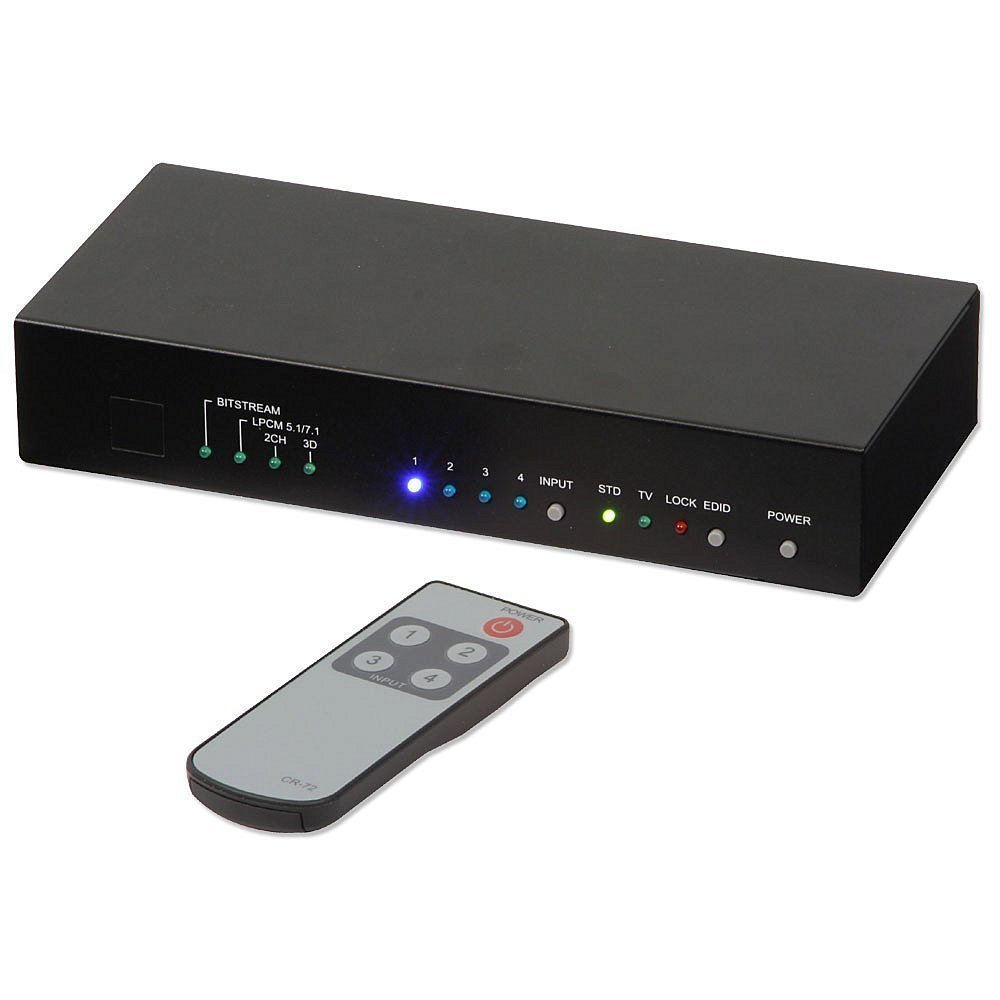
This image shows the front and top view of the Lindy 4x2 HDMI 1.4 Switching Splitter. The front panel typically features LED indicators for active inputs and outputs, along with buttons for manual switching. The rear panel, not fully visible, would contain the HDMI input and output ports, and the power input.
Panel frontal
The front panel typically includes:
- Botóns de selección de entrada: For manually selecting the desired HDMI input source (e.g., Input 1, Input 2, etc.).
- Indicadores LED: To show which input is currently active and which outputs are connected.
- Receptor IR: For receiving signals from the infrared remote control.
Panel traseiro
O panel traseiro adoita incluír:
- Portos de entrada HDMI (x4): Connect your source devices (e.g., Blu-ray player, game console, PC).
- HDMI Output Ports (x2): Connect to your display devices (e.g., HDTV, projector).
- Entrada de alimentación DC 5 V: Para conectar o adaptador de corrente fornecido.
Configuración e instalación
Follow these steps to set up your Lindy 4x2 HDMI 1.4 Switching Splitter:
- Ensure all devices (source, display, and splitter) are powered off and unplugged from their power outlets.
- Connect your HDMI source devices (e.g., DVD player, game console, PC) to the HDMI Input ports (HDMI IN 1-4) on the rear of the splitter using high-quality HDMI cables.
- Connect your HDMI display devices (e.g., HDTV, projector) to the HDMI Output ports (HDMI OUT 1-2) on the rear of the splitter using high-quality HDMI cables.
- Connect the provided power adapter to the DC 5V Power Input on the splitter, then plug the adapter into a suitable power outlet.
- Power on your display devices, then your source devices, and finally the Lindy 4x2 HDMI 1.4 Switching Splitter.
- Select the desired input source using the buttons on the front panel or the infrared remote control.
Instrucións de funcionamento
Cambio manual
To switch between input sources manually, press the corresponding input selection button on the front panel of the splitter. The LED indicator for the active input will illuminate.
Operación de control remoto
Use the provided infrared remote control to select input sources. Point the remote control towards the IR receiver on the front panel of the splitter.
- Input 1-4 Buttons: Press the button corresponding to the desired HDMI input source (1, 2, 3, or 4).
- Botón de encendido: (If available on your remote) To power the unit on or off.
The selected input will be displayed on both connected output devices simultaneously.
Mantemento
To ensure optimal performance and longevity of your Lindy 4x2 HDMI 1.4 Switching Splitter:
- Keep the unit in a cool, dry place, away from direct sunlight and heat sources.
- Clean the unit with a soft, dry cloth. Do not use liquid or aerosol cleaners, as they may damage the finish or internal components.
- Ensure proper ventilation and do not block any vents on the unit.
Resolución de problemas
If you encounter issues with your Lindy 4x2 HDMI 1.4 Switching Splitter, refer to the following common solutions:
| Problema | Causa posible | Solución |
|---|---|---|
| Sen imaxe nin son na pantalla. | Loose cable connections, incorrect input selection, power issue, incompatible resolution. |
|
| Sinal intermitente ou parpadeo. | Poor quality HDMI cables, signal interference, long cable runs, HDCP issues. |
|
| O control remoto non funciona. | Dead battery, obstructed IR path, remote too far. |
|
Especificacións
| Característica | Detalle |
|---|---|
| Número de modelo | 38054 |
| Marca | Lindy |
| Entradas | 4 x HDMI |
| Saídas | 2 x HDMI |
| Estándar HDMI | HDMI 1.4 |
| Resolucións admitidas | Ata 1080 p |
| Soporte 3D | Si |
| Cor profunda | Ata 36 bits |
| Soporte de audio | Dolby TrueHD, DTS-HD Master Audio |
| Max Output Cable Length | 10m (32.8 ft) |
| Peso do elemento | 2.9 libras (1.32 kg) |
Garantía e Soporte
This Lindy product comes with a 2 ano de garantía desde a data de compra.
For technical support, troubleshooting assistance, or warranty claims, please contact your local Lindy customer service or visit the official Lindy website for further assistance. Please retain your proof of purchase for warranty validation.