
Edificador M3200
Manual do usuario do sistema de altofalantes multimedia para ordenador Edifier M3200 2.1
Modelo: M3200
1. Introdución
Grazas pola compraasing the Edifier M3200 2.1 Multimedia Computer Speaker System. This manual provides detailed instructions for setting up, operating, maintaining, and troubleshooting your new speaker system. Please read this manual thoroughly before use to ensure optimal performance and longevity of your product.
2. Instrucións de seguridade
- Fonte de enerxía: Asegúrese de que a fonte de alimentación voltage coincide co voltage indicated on the speaker system.
- Ventilación: Non bloquee ningunha abertura de ventilación. Manteña espazo suficiente arredor dos altofalantes para unha correcta circulación do aire.
- Auga e humidade: Do not expose the speakers to water, rain, or excessive moisture. Keep away from liquids.
- Fontes de calor: Avoid placing the speakers near heat sources such as radiators, heat registers, stoves, or other heat-producing apparatus.
- Limpeza: Use a soft, dry cloth for cleaning. Do not use liquid cleaners or aerosol cleaners.
- Servizo: Non intente reparar o produto por si mesmo. Encargue toda a reparación a persoal de servizo cualificado.
- Colocación: Place the speakers on a stable, flat surface to prevent accidental falls.
3. Contido do paquete
Ao abrir o paquete, comproba que inclúa todos os seguintes elementos:
- Edifier M3200 Subwoofer
- Dous altofalantes satélite
- Control remoto por cable
- Audio Input Cables (3.5mm to 3.5mm, RCA to 3.5mm)
- Manual de usuario (este documento)
4. Produto rematadoview
The Edifier M3200 system consists of a powerful subwoofer, two elegantly designed satellite speakers, and a convenient wired remote controller.
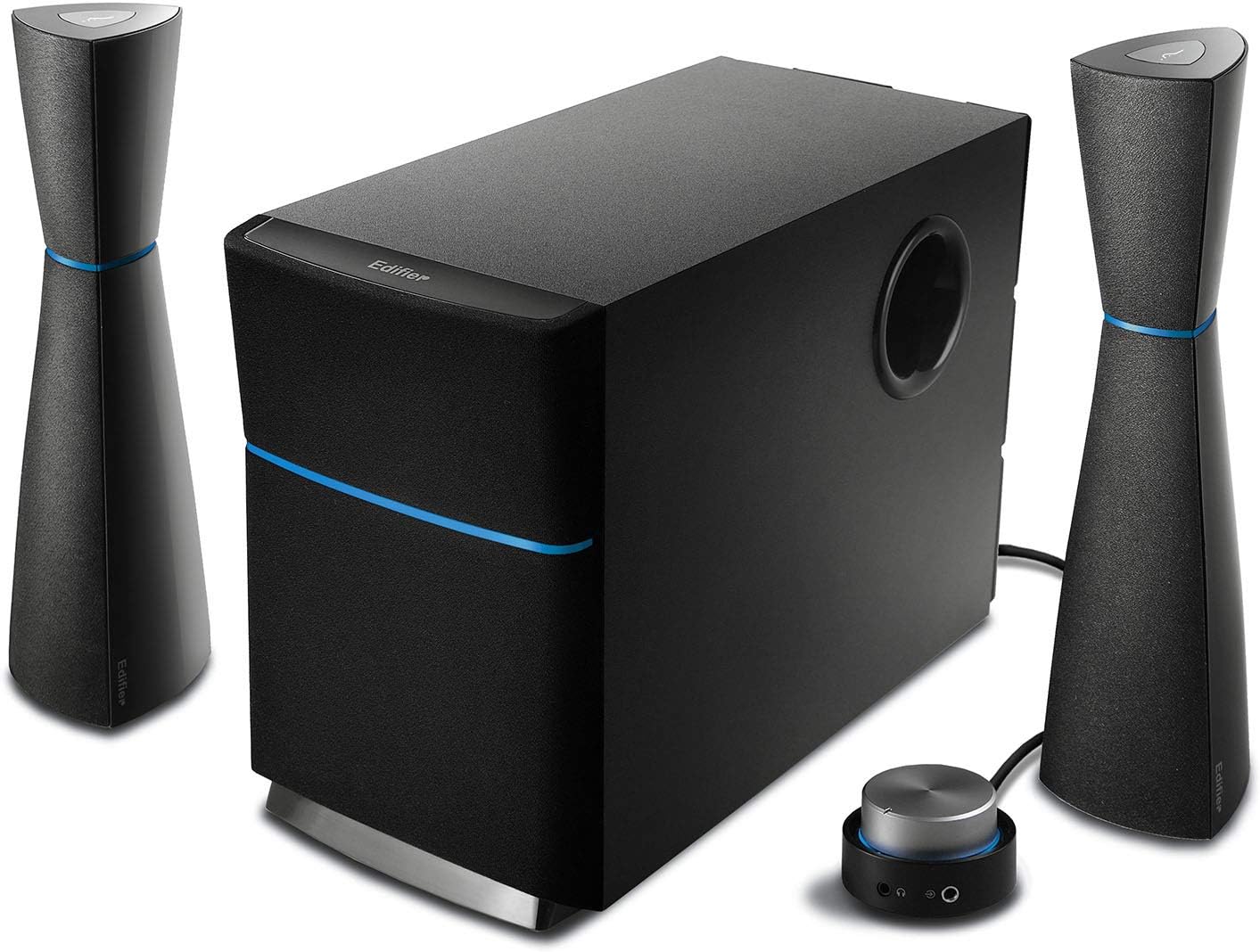
Figure 4.1: Complete Edifier M3200 2.1 Speaker System. This image displays the central subwoofer unit, two tall, slender satellite speakers, and the compact wired remote control, all in a sleek black finish with blue accents.
4.1 subwoofer
The wooden enclosed subwoofer houses a 5 1/2 inch (140mm) magnetically shielded driver, providing deep and rich bass. It also serves as the central hub for all connections.

Figura 4.2: Lateral view of the Edifier M3200 subwoofer, highlighting its robust wooden enclosure and the bass reflex port.
4.2 altofalantes satélite
The two satellite speakers are elegantly designed and magnetically shielded 2-way units. Each satellite contains a midrange unit (2 inch x 3 1/2 inch / 50mm x 90mm) and a treble unit (¾ inch / 20mm PV domed tweeter), delivering clear highs and balanced mids.

Imaxe 4.3: Primeiro plano view of an Edifier M3200 satellite speaker, showcasing its sleek design and the speaker drivers.
4.3 Wired Remote Controller
The wired rotary master volume controller features a distinctive "red-halo" glowing effect. It includes an on/off feature, a headphone jack for private listening, and a 3.5mm auxiliary input for connecting additional audio devices.

Figure 4.4: The wired remote controller for the Edifier M3200, showing the large volume knob, headphone jack, and auxiliary input.
5. Configuración
Follow these steps to set up your Edifier M3200 speaker system:
- Colocación: Place the subwoofer on the floor or a sturdy surface near your computer or audio source. Position the satellite speakers on either side of your monitor or listening area, ensuring they are equidistant for optimal stereo imaging.
- Conectar altofalantes satélite: Connect each satellite speaker to the corresponding output ports on the back of the subwoofer using the integrated RCA cables.
- Conectar a fonte de audio: Connect your audio source (PC, laptop, CD player, etc.) to the subwoofer using the provided 3.5mm to 3.5mm audio cable or RCA to 3.5mm cable. The main audio input is typically on the back of the subwoofer.
- Connect Wired Remote: Plug the wired remote controller cable into the designated port on the subwoofer.
- Conectar enerxía: Plug the power cord from the subwoofer into a wall outlet.

Figure 5.1: The Edifier M3200 speaker system set up with a computer monitor, illustrating typical desktop placement and connections.

Figura 5.2: un example of the Edifier M3200 speaker system integrated into a home office or study desk environment.
6. Instrucións de funcionamento
6.1 Encendido/apagado
To power on the system, rotate the master volume knob on the wired remote controller clockwise until you hear a click and the red-halo light illuminates. To power off, rotate the knob counter-clockwise until it clicks and the light turns off.
6.2 Control de volume
Adjust the overall system volume by rotating the large knob on the wired remote controller. Rotate clockwise to increase volume and counter-clockwise to decrease it.
6.3 Control de graves
The subwoofer features a dedicated bass control knob located on its rear panel. Adjust this knob to fine-tune the bass level to your preference.
6.4 Conector para auriculares
A 3.5mm headphone jack is located on the wired remote controller. Plugging in headphones will automatically mute the speakers, allowing for private listening.
6.5 Entrada auxiliar
The wired remote controller also includes a 3.5mm auxiliary input. This allows you to quickly connect portable audio devices like smartphones or MP3 players without needing to access the main input on the subwoofer.
7. Mantemento
Proper maintenance ensures the longevity and performance of your Edifier M3200 speaker system:
- Limpeza: Regularly wipe the speaker surfaces with a soft, dry, lint-free cloth. Do not use abrasive cleaners, waxes, or solvents.
- Po: Use a soft brush or a vacuum cleaner with a brush attachment to gently remove dust from speaker grilles and ports.
- Ventilación: Ensure the subwoofer's ventilation openings remain clear and unobstructed to prevent overheating.
- Cables: Periodically check all cables for any signs of damage or fraying. Replace damaged cables immediately.
- Almacenamento: If storing the speakers for an extended period, disconnect them from power and store them in a cool, dry place, preferably in their original packaging.
8 Solución de problemas
If you encounter issues with your Edifier M3200 speaker system, refer to the following common problems and solutions:
| Problema | Causa posible | Solución |
|---|---|---|
| Sen son | Power not connected or turned on O cable de audio non está conectado correctamente O volume moi baixo Incorrect audio source selected on device | Ensure power cord is securely plugged in and the system is powered on. Check all audio cable connections between the source, remote, and subwoofer. Increase the master volume on the remote controller. Verify your computer or audio device's output settings. |
| Son distorsionado | Volume demasiado alto Audio source distortion Cable danado | Reduce o volume principal. Check the audio quality from your source device. Inspect audio cables for damage and replace if necessary. |
| Sen baixo | Subwoofer bass knob too low Subwoofer not powered on (if separate) Incorrect audio settings on source | Adjust the bass control knob on the back of the subwoofer. Asegúrate de que o subwoofer estea a recibir enerxía. Check your audio device's equalizer or sound settings. |
| One satellite speaker not working | Conexión solta Damaged satellite cable | Check the RCA connection for the affected satellite speaker at the subwoofer. Inspect the satellite speaker cable for damage. |
Se o problema persiste despois de probar estas solucións, póñase en contacto co servizo de atención ao cliente de Edifier para obter máis axuda.
9. Especificacións
Detailed technical specifications for the Edifier M3200 speaker system:
| Característica | Especificación |
|---|---|
| Tipo de altofalante | 2.1 channel multimedia speaker system |
| Potencia total | 34 vatios (RMS) |
| Controlador de subwoofer | 5 1/2 inch (140mm), magnetically shielded |
| Midrange Unit | 2 inch x 3 1/2 inch (50mm x 90mm), magnetically shielded |
| Unidade de agudos | ¾ inch (20mm) PV domed, magnetically shielded |
| Impedancia | 4 ohmios |
| Relación sinal-ruído | ≥85 dB |
| Conectividade | 3.5mm Auxiliary Input, PC Input, CD Input |
| Cor | Negro |
| Dimensións do produto (subwoofer) | 10.5" D x 10" W x 16" H |
| Peso do elemento | 11.7 libras |

Figure 9.1: Dimensions of the Edifier M3200 subwoofer, showing its approximate depth, width, and height.
10. Garantía e soporte
The Edifier M3200 speaker system comes with a limited warranty. Please refer to the warranty card included in your product packaging for specific terms and conditions.
For technical support, troubleshooting assistance beyond this manual, or warranty claims, please contact Edifier customer service through their official websitio web ou a información de contacto proporcionada coa documentación da compra.
Ask a question about this manual
Ask about setup, troubleshooting, compatibility, parts, safety, or missing instructions. Manuals+ will review the question and use this page’s manual context to help answer it.