
Introdución
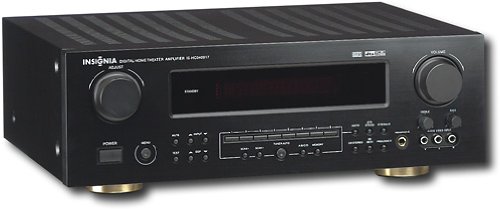
This manual provides essential instructions for the setup, operation, maintenance, and troubleshooting of your Insignia 6.1-Channel 600W Digital Home Theater Receiver, model IS-HC040917. Please read this manual thoroughly before using the receiver to ensure proper and safe operation.
Instrucións de seguridade importantes
- Non bloquee ningunha abertura de ventilación. Instáleo segundo as instrucións do fabricante.
- Non instale preto de fontes de calor como radiadores, rexistros de calor, cociñas ou outros aparellos (incluíndo amplificadores) que producen calor.
- Protexa o cable de alimentación para evitar que se pise ou se pinche, especialmente nos enchufes, tomas de corrente e no punto de saída do aparello.
- Use só anexos/accesorios especificados polo fabricante.
- Desenchufe este aparello durante tormentas eléctricas ou cando non se use durante longos períodos de tempo.
- Remita todo o servizo a persoal de servizo cualificado. O mantemento é necesario cando o aparello sufriu algún dano.
Guía de configuración
1. Desembalaxe
Carefully remove the receiver and all accessories from the packaging. Ensure all components are present:
- Insignia IS-HC040917 Receiver
- Control remoto
- Antena de bucle AM
- Antena de fío FM
- Manual de usuario (este documento)
2. Conexión de altofalantes
The IS-HC040917 receiver supports a 6.1-channel speaker configuration. Connect your speakers to the corresponding terminals on the rear panel. Ensure correct polarity (+ to + and - to -) for each speaker.
- Dianteira esquerda/dereita: Para o son estéreo principal.
- Centro: Para o diálogo.
- Envolvente esquerda/dereita: For ambient sound effects.
- Envolvente traseiro: For additional rear channel effects in 6.1 setups.
- Subwoofer (Pre-out): Connect to a powered subwoofer's LFE input.
Note: The receiver is designed for speakers with an impedance of 8 ohms.
3. Conexión de fontes de son/vídeo
Connect your external devices (e.g., DVD player, Blu-ray player, game console, cable box) to the appropriate input jacks on the receiver.
- HDMI: Use HDMI cables for high-definition audio and video signals. The receiver has 3 HDMI input ports.
- Audio dixital (óptico/coaxial): For digital audio from devices like CD players or set-top boxes.
- Analog Audio (RCA): For standard stereo audio connections from devices like VCRs or older CD players.
- Vídeo S: For video signals from compatible devices.
4. Conexión de antena
Connect the supplied AM loop antenna and FM wire antenna to their respective terminals on the rear panel for radio reception.
5. Conexión de alimentación
Once all audio/video and speaker connections are made, plug the receiver's power cord into a standard AC wall outlet.
Imaxe: Rear panel of the Insignia IS-HC040917 receiver, showing various input and output connections for speakers, audio/video sources (HDMI, RCA, S-Video, Digital), and antenna terminals. This diagram is crucial for correctly wiring the home theater system.
Instrucións de funcionamento
1. Acendido/apagado
Preme o POTENCIA botón do panel frontal ou do control remoto para acender ou apagar o receptor.
2. Selección de entrada
Usa o SELECCIONADOR DE ENTRADAS knob/buttons on the front panel or the remote control to choose the desired audio/video source (e.g., HDMI 1, DVD, CD, Tuner).
3. Control de volume
Axuste o volume principal usando o botón grande VOLUME botón no panel frontal ou no VOLUME +/- botóns do control remoto.
4. Audio Modes
The receiver supports various audio modes, including 6.1-channel surround sound. Use the MODO or DSP buttons on the remote to cycle through available sound modes (e.g., Stereo, Dolby Digital, DTS, Pro Logic).
5. Tuner Operation (AM/FM Radio)
Select the "Tuner" input. Use the BANDA button to switch between AM and FM. Use the TUNE +/- buttons to manually tune to stations or PRECONFIGURACIÓN +/- to select stored stations. Refer to the remote control for specific tuner functions.
Mantemento
1. Limpeza
Wipe the exterior of the receiver with a soft, dry cloth. Do not use liquid cleaners or aerosol sprays, as they may damage the finish or internal components. Ensure the unit is unplugged before cleaning.
2. Ventilación
Ensure that the ventilation openings on the top and sides of the receiver are not blocked. Proper airflow is essential to prevent overheating and ensure long-term performance.
3. Xestión de cables
Periodically check all cable connections to ensure they are secure. Loose connections can lead to poor audio or video quality.
Resolución de problemas
| Problema | Causa posible | Solución |
|---|---|---|
| Sen poder | Cable de alimentación desconectado; toma de corrente non activa. | Comprobe a conexión do cable de alimentación; probe cunha toma de corrente diferente. |
| Sen son | Entrada incorrecta seleccionada; cables do altofalante soltos; volume demasiado baixo; silenciamento activado. | Selecciona a entrada correcta; comproba as conexións dos altofalantes; aumenta o volume; desactiva o silencio. |
| Sen vídeo | Incorrect input selected; video cables loose or incorrect. | Select correct input; check video cable connections (HDMI, S-Video, RCA). |
| O control remoto non funciona | Pilas esgotadas; obstrución entre o mando a distancia e o receptor; modo incorrecto do mando a distancia. | Replace batteries; remove obstructions; ensure remote is in the correct operating mode. |
Especificacións
- Modelo: IS-HC040917
- Marca: INSIGNIA
- Potencia de saída: 600 vatios
- Número de canles: 6.1 canles
- Modo de saída de audio: Envolvente
- Total de portos HDMI: 3
- Tipos de conectores: 3.5mm Jack, HDMI, RCA, USB
- Dispositivos compatibles: Orador
- Método de control: Mando a distancia
- Cor: Negro
- UPC: 799530659962
- ASIN: B0075C3DN2
Garantía e Soporte
For warranty information and customer support, please refer to the warranty card included with your product or visit the official Insignia websitio. Conserve o recibo de compra para reclamacións de garantía.
For further assistance, you may contact Insignia customer service. Contact details are typically available on the manufacturer's websitio ou na embalaxe do produto.