Introdución
Thank you for choosing the Sunlite TL-L200 Griplite Tail Light. This manual provides essential information for the proper installation, operation, and maintenance of your new tail light. Designed for enhanced visibility and safety, this light features bright LEDs and a durable, water-resistant silicone body. Please read this manual thoroughly before use and retain it for future reference.
Información de seguridade
- Asegúrate sempre de que a luz traseira estea ben montada antes de conducir.
- Do not look directly into the LED light as it may cause temporary vision impairment.
- While the light is water-resistant, avoid prolonged submersion.
- Regularly check battery life to ensure consistent performance.
- This light is intended to increase visibility to others; it does not replace the need for safe riding practices.
Contido do paquete
Verifica que todos os elementos estean presentes no paquete:
- 1 x Sunlite TL-L200 Griplite Tail Light
- 2 x CR2032 Lithium Batteries (pre-installed)
Configuración
Battery Installation (If not pre-installed or for replacement)
- Gently open the silicone casing to access the battery compartment.
- Insert two CR2032 lithium batteries, ensuring correct polarity (+/-).
- Close the silicone casing securely to maintain water resistance.
Mounting the Tail Light
The Sunlite Griplite Tail Light features an integrated silicone mounting strap for versatile attachment.
- Identify a suitable mounting location on your bicycle, such as the seat post, seat stay, or rear rack. Ensure the light will be visible from the rear.
- Wrap the integrated silicone strap around the desired mounting point.
- Hook the end of the strap onto the designated tab on the light's body, pulling it taut to secure the light firmly in place.
- Adjust the light's angle to ensure optimal visibility.

Image: The Sunlite TL-L200 Griplite Tail Light securely mounted on a bicycle seat post, demonstrating its flexible silicone strap attachment.
Instrucións de funcionamento
The Sunlite TL-L200 Griplite Tail Light operates with a simple one-button control located on the top of the light.

Imaxe: Fronte view of the Sunlite TL-L200 Griplite Tail Light, highlighting the prominent power button on its top surface.
- Encendido/apagado: Press the button once to turn the light on. Press and hold the button for approximately 2 seconds to turn the light off.
- Cambiar modos: With the light on, press the button repeatedly to cycle through the available lighting modes:
- Modo estable: Provides a continuous beam of red light for constant visibility.
- Modo intermitente: Emits a pulsating red light, designed to attract attention and enhance safety.
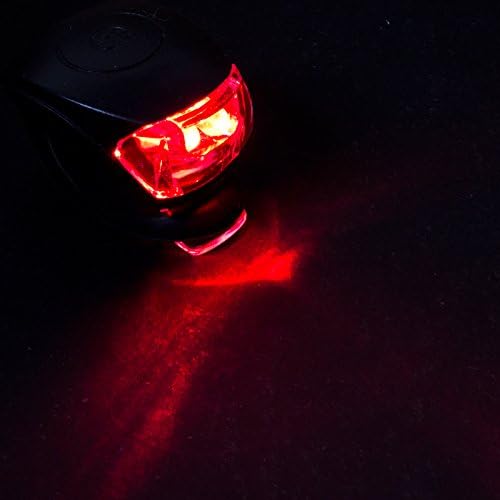
Image: The Sunlite TL-L200 Griplite Tail Light illuminated in a dark environment, demonstrating its bright red light output and visibility.
Mantemento
Limpeza
To clean your tail light, wipe the silicone body and lens with a soft, damp cloth. Avoid using abrasive cleaners or solvents, as these may damage the material or lens.
Substitución da batería
When the light appears dim or stops functioning, it's time to replace the batteries. Refer to the "Battery Installation" section under "Setup" for detailed instructions. Always use two new CR2032 lithium batteries for optimal performance.
Resolución de problemas
| Problema | Causa posible | Solución |
|---|---|---|
| A luz non acende. | Pilas gastadas ou instalación incorrecta das pilas. | Replace batteries with new CR2032 cells, ensuring correct polarity. |
| A luz é débil. | Batería baixa. | Substitúe as pilas. |
| Luz parpadea. | Loose battery connection or low battery power. | Check battery compartment for secure fit; replace batteries if necessary. |
| Light falls off during ride. | Montaxe incorrecta. | Ensure the silicone strap is pulled taut and securely hooked onto the tab. |
Especificacións
- Modelo: Sunlite TL-L200 Griplite Tail Light (Part Number: 97525)
- Fonte de luz: 2 x Bright Nichia LEDs
- Fonte de enerxía: 2 x CR2032 Lithium Batteries (included)
- Tempo de execución: Up to 100 hours (depending on mode and battery quality)
- Modos: 1 Steady, 1 Flashing
- Material: Water-resistant Silicone Body
- Tipo de montaxe: Integrated Silicone Strap (Seat Mount)
- Peso do artigo: Aproximadamente 0.94 libras
- Dimensións (LxWxH): Aproximadamente 4.7 x 3.25 x 1.45 polgadas
- Nivel de resistencia á auga: Resistente á auga
- UPC: 072774975259
Garantía e Soporte
Sunlite products are manufactured to high standards. For specific warranty information or technical support, please refer to the product packaging or visit the official Sunlite websitio. Garde o recibo da compra como xustificante da mesma.
For further assistance, please contact Sunlite customer service through their official channels.