
Produto rematadoview
The iSound Twist Portable Bluetooth Wireless Speaker offers a unique design combined with superior sound quality. Its compact form factor allows for portability, while its advanced features enable wireless music streaming and hands-free calling. The speaker features full stereo sound with 6 watts total output from two 40mm drivers and a passive radiator for enhanced bass.
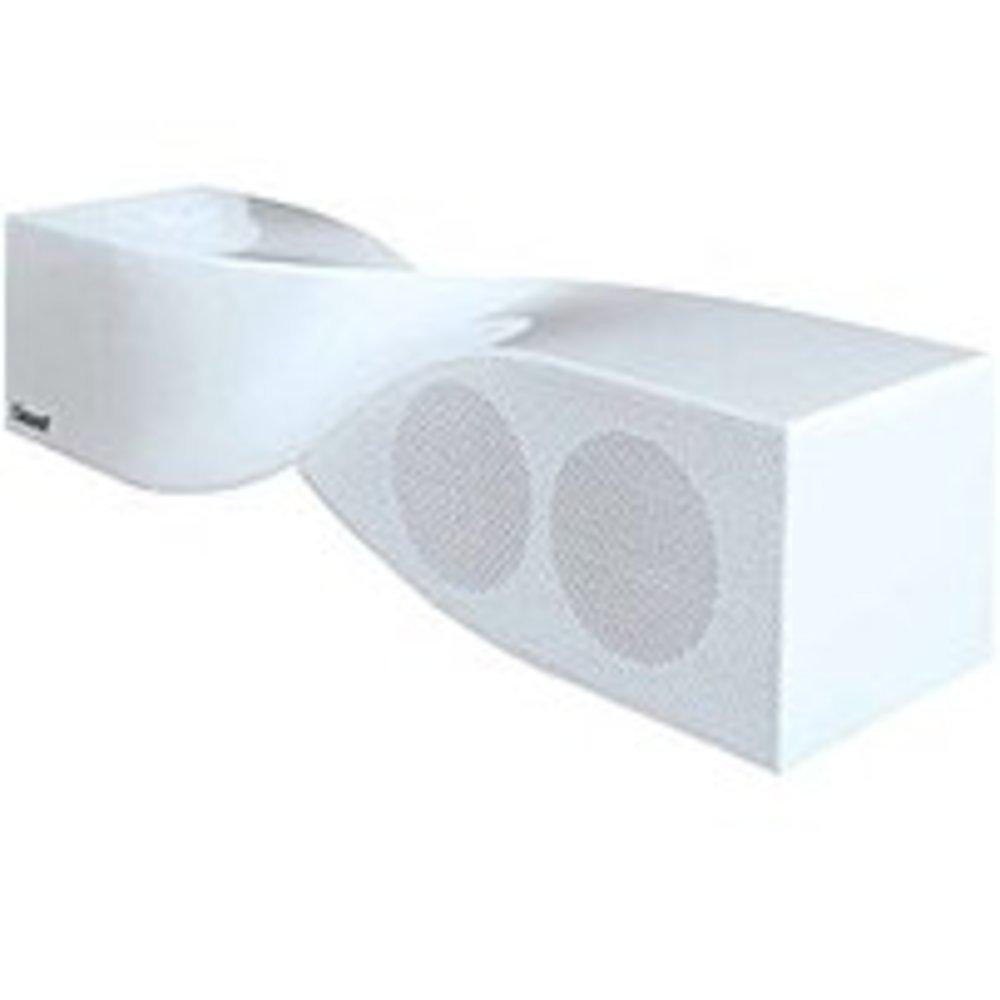
Image: The iSound Twist Portable Bluetooth Wireless Speaker in white, showcasing its unique twisted design.
Contido do paquete
- iSound Twist Portable Bluetooth Wireless Speaker
- Cable de carga USB
- 3.5mm AUX Input Cable
- Manual de usuario (este documento)
Configuración
1. Cargando o altofalante
Before initial use, fully charge the iSound Twist speaker. Connect the provided USB charging cable to the speaker's USB charging port and the other end to a powered USB source (e.g., computer, USB wall adapter). The charging indicator light will illuminate during charging and turn off when fully charged. A full charge provides up to 5 hours of continuous play.

Image: Rear panel of the speaker, highlighting the USB charging port, ON/OFF switch, and AUX IN port.
2. Acendido/apagado
Locate the ON/OFF switch on the rear panel of the speaker. Slide the switch to the "ON" position to power on the device. Slide it to the "OFF" position to power off.
3. Emparellamento Bluetooth
- Ensure the speaker is powered on and within close proximity to your Bluetooth-enabled device (e.g., smartphone, tablet, laptop).
- The speaker will automatically enter Bluetooth pairing mode. A blue indicator light will flash, indicating it is discoverable.
- On your device, navigate to the Bluetooth settings and enable Bluetooth.
- Busca available devices. The iSound Twist speaker should appear in the list, typically named "iSound Twist" or similar.
- Select the speaker from the list to initiate pairing. If prompted for a password, enter "0000".
- Once successfully paired, the blue indicator light on the speaker will stop flashing and remain solid. You will hear an audible confirmation.
- Your device is now connected, and you can stream audio wirelessly.
4. AUX Input Connection
For devices without Bluetooth capability, or if you prefer a wired connection, use the provided 3.5mm AUX cable.
- Connect one end of the 3.5mm AUX cable to the AUX IN port on the rear of the speaker.
- Connect the other end of the cable to the headphone jack or audio output port of your audio device.
- The speaker will automatically switch to AUX input mode.
Instrucións de funcionamento
Funcións do panel de control
The speaker features onboard controls located on its top surface for convenient operation.
- Botón de alimentación / modo: Press and hold to power on/off. Short press to switch between Bluetooth and AUX modes.
- Botón Reproducir/Pausar/Chamar: Short press to play or pause music. During an incoming call, short press to answer or end the call. Press and hold to reject an incoming call.
- Botón para subir o volume/seguinte pista: Short press to increase volume. Press and hold to skip to the next track.
- Botón para baixar o volume/pista anterior: Prema brevemente para baixar o volume. Manteña premido para ir á pista anterior.
Chamadas mans libres
When connected via Bluetooth, the iSound Twist speaker's built-in microphone allows for hands-free phone calls.
- Respondendo a unha chamada: When a call comes in, the music will pause. Press the Play/Pause/Call button once to answer.
- Finalizando unha chamada: During a call, press the Play/Pause/Call button once to end the call.
- Rexeitar unha chamada: Press and hold the Play/Pause/Call button to reject an incoming call.
Mantemento
- Manteña o altofalante lonxe da auga, da humidade e das temperaturas extremas.
- Limpa o altofalante cun pano suave e seco. Non empregues produtos de limpeza abrasivos nin disolventes.
- Evite deixar caer ou someter o altofalante a fortes impactos.
- Cando non o use durante períodos prolongados, gárdeo nun lugar fresco e seco e cárgueo periodicamente para manter a batería en bo estado.
Resolución de problemas
| Problema | Solución |
|---|---|
| O altofalante non se acende. | Asegúrate de que a batería estea cargada. Conecta o altofalante a unha fonte de alimentación mediante o cable USB e inténtao de novo. |
| Non se pode emparellar por Bluetooth. |
|
| Sen son ou volume baixo. |
|
| A calidade da chamada é mala. |
|
Especificacións
| Característica | Detalle |
|---|---|
| Nome do modelo | ISOUND-1691 |
| Marca | iSound |
| Tipo de altofalante | Torre |
| Característica especial | Micrófono incorporado |
| Usos recomendados | For Smartphones or Tablets, Music Players |
| Dispositivos compatibles | Computadora de escritorio, portátil, reprodutor de MP3, proxector, teléfono intelixente, tableta, televisión |
| Configuración da canle de son envolvente | 2.0 |
| Cor | Branco |
| Peso do elemento | 13.6 onzas |
| É Impermeable | FALSO |
| Tecnoloxía de comunicación sen fíos | Bluetooth |
| Tamaño do altofalante | 0.75 polgadas |
| Fonte de enerxía | Alimentado por batería |
| Número de baterías | 1 pilas de iones de litio necesarias. (incluído) |
| Tipo de controlador de audio | Driver dinámico |
| Tamaño do controlador de audio | 40 milímetros |
| Dimensións do produto | 5 x 4 x 11.75 polgadas |
| Potencia de saída máxima do altofalante | 6 vatios |
| Tecnoloxía de conectividade | Sen fíos |
| Modo de saída de audio | Estéreo |
| Tipo de montaxe | Soporte de mesa |
Vídeo oficial do produto
Video: Official product video for the iSound Twist Bluetooth Speaker, demonstrating its features and design. This video showcases the speaker's ability to stream audio from various devices and handle calls.
Garantía e Soporte
The iSound Twist Portable Bluetooth Wireless Speaker comes with a Garantía limitada. For specific warranty terms, conditions, and support inquiries, please refer to the warranty card included in your product packaging or visit the official iSound websitio.
For further assistance, please contact iSound customer support.