
Produto rematadoview
The Focusrite ISA Two is a classic dual mono transformer-based microphone preamplifier designed for professional audio recording. It incorporates the renowned Lundahl LL1538 mic input transformer, originally selected by Rupert Neve for the ISA 110, ensuring exceptional audio quality.
As características principais inclúen:
- Lundahl LL1538 Transformer: Utilizes the high-quality Lundahl LL1538 mic input transformer for superior sound.
- High Gain and Low Noise: Offers up to 80 dB of clean gain on the microphone input with minimal noise.
- Impedancia de entrada variable: Four selectable input impedance settings, including the original ISA 110 value, allow for optimal matching with various microphones.
- User-Calibrated Metering: Each channel features an eight-LED array for clear level display, with a rear panel calibration knob to match DAW converters.
- Entradas versátiles: Two 1/4-inch front panel DI inputs for instruments and rear panel TRS line inputs.
- Filtro paso alto: An 18dB/octave high-pass filter, based on the ISA 110 module, is built-in for precise low-frequency control.
- Balanced Inserts: Each channel includes balanced insert points (1/4-inch TRS send and receive) for integrating external hardware processors.
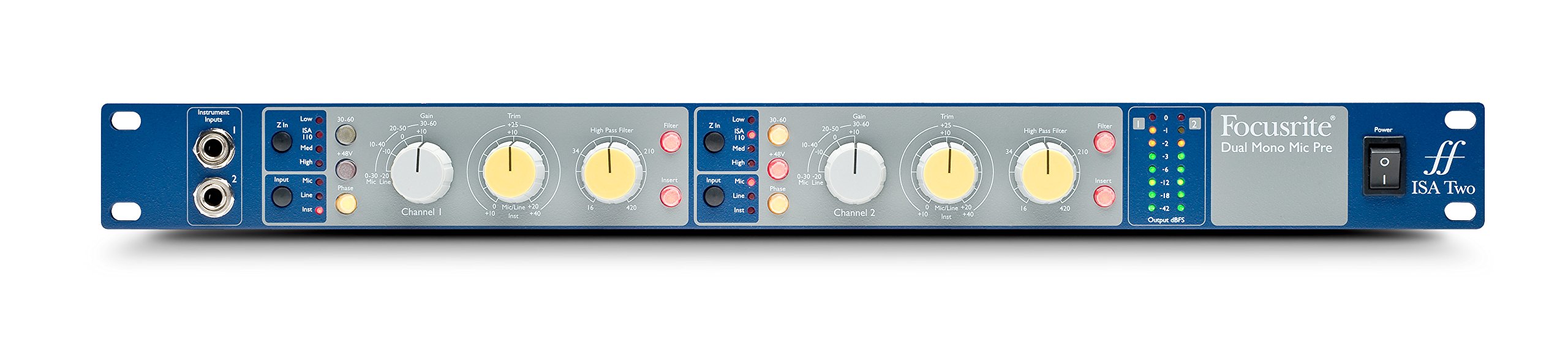
Figura 1: Fronte view of the Focusrite ISA Two preampvidador, mostrarasing its controls and metering.
Contido do paquete
Verifica que todos os elementos estean presentes no paquete:
- Focusrite ISA Two Unit
- Cable de alimentación IEC
Guía de configuración
Follow these steps to set up your ISA Two preampmáis vivo:
- Instalación en rack: The ISA Two is designed for standard 19-inch rack mounting. Secure the unit using appropriate rack screws.
- Conexión de alimentación: Connect the supplied IEC power cable to the rear panel power inlet and then to a suitable AC power source. Ensure the power switch is in the OFF position before connecting.
- Conexión de micrófonos: Use balanced XLR cables to connect your microphones to the 'MIC INPUT' XLR connectors on the rear panel for each channel.
- Connecting Line Sources: For line-level signals, use balanced TRS cables to connect to the 'LINE INPUT' TRS connectors on the rear panel.
- Instrumentos de conexión: For instruments such as guitars or basses, use 1/4-inch jack cables to connect to the 'Instrument Inputs' on the front panel.
- Conexións de saída: Connect the 'OUTPUT' XLR connectors on the rear panel to your audio interface, mixer, or other recording equipment using balanced XLR cables.
- Insert Connections: If using external hardware processors, connect them to the 'SEND' and 'RETURN' 1/4-inch TRS jacks on the rear panel for each channel.

Figure 2: Rear panel of the Focusrite ISA Two, showing microphone, line, output, and insert connections.
Instrucións de funcionamento
This section details the operation of the ISA Two preamplifier's controls:
- Encendido: After all connections are made, switch the power button on the front panel to the ON position.
- Selección de entrada: Use the 'Input' buttons (Mic, Line, Inst) to select the appropriate input source for each channel. Ensure only one input type is active per channel.
- Control de Ganancia: The large 'Gain' knob adjusts the primary gain level (e.g., 0-30 dB, 30-60 dB). The smaller 'Trim' knob provides fine-tuning (+/-10 dB) for precise level setting.
- Variable Input Impedance (Z In): For microphone inputs, select one of the four impedance settings (Low, ISA 110, Med, High) to optimize the interaction with your microphone. Experiment to find the best sonic match.
- Alimentación fantasma (+48 V): Activate the +48V button for condenser microphones that require phantom power. Ensure the microphone is connected before engaging phantom power.
- Filtro paso alto (HPF): Engage the 'Filter' button and use the 'High Pass Filter' knob to remove unwanted low-frequency rumble or proximity effect. The filter offers an 18dB/octave slope.
- Insert Function: Press the 'Insert' button to engage any external hardware processors connected to the rear panel insert points.
- Medición: Monitor your signal levels using the eight-LED array. Adjust gain and trim to achieve optimal levels without clipping (red LEDs). The VU meter provides an average level indication.
For a visual demonstration of the ISA Two in action, watch the official product video:
Video 1: Focusrite ISA Two Classic Dual Mono Transformer-Based Microphone Preamplifier in use during a recording session. This video demonstrates the preamplifier's features and sound quality in a practical studio environment.
Mantemento
To ensure the longevity and optimal performance of your Focusrite ISA Two, follow these maintenance guidelines:
- Limpeza: Usa un pano suave e seco para limpar o exterior da unidade. Evita produtos de limpeza abrasivos, solventes ou ceras.
- Ventilación: Ensure adequate airflow around the unit, especially if rackmounted, to prevent overheating.
- Almacenamento: When not in use for extended periods, store the unit in a cool, dry environment away from direct sunlight and extreme temperatures.
- Xestión de cables Manteña os cables organizados e libres de dobras ou tensión excesiva para evitar danar os conectores e a unidade.
Resolución de problemas
If you encounter issues with your ISA Two, consider the following common troubleshooting steps:
- Sen enerxía: Check the power cable connection to both the unit and the wall outlet. Ensure the power switch is ON.
- Sen saída de audio: Verify all input and output cables are securely connected. Check the input selection (Mic, Line, Inst) and ensure phantom power is engaged if using a condenser microphone. Confirm gain levels are appropriately set.
- Audio distorsionado: Reduce the input gain and trim levels. Check for proper impedance matching with your microphone. Ensure no cables are damaged.
- Sinal intermitente: Inspect all cable connections for looseness or damage. Try swapping cables to isolate a faulty one.
- Ruído/Zumbido: Ensure all equipment is properly grounded. Check for nearby sources of electromagnetic interference.
If problems persist after these steps, contact Focusrite support for further assistance.
Especificacións técnicas
| Especificación | Valor |
|---|---|
| Marca | Focusrite |
| Nome do modelo | ISA Dous |
| Tecnoloxía de conectividade | Analóxico |
| Tipo de conector | 2 entrada/2 saída |
| Cor | Blue / Gray |
| Peso do elemento | 7 libras |
| Dimensións do artigo (L x W x H) | 5.55 x 15.16 x 26.06 polgadas |
| Material | Aceiro inoxidable |
| Plataforma de hardware | Micrófono Preamp |
| Número de canles | 2 |
| Resposta en frecuencia | 20 kHz |
| Material do recinto | Aceiro inoxidable |
| Número de modelo | AMS-ISA-2 |
| Número de identificación comercial global (GTIN) | 815301005148 |
| UPC | 815301005148 |
| Número de peza do fabricante | ISA Dous |
Garantía e Soporte
The Focusrite ISA Two comes with a 2 ano de garantía desde a data de compra, cubrindo defectos de fabricación e avarías de funcionamento en condicións de uso normal.
Para asistencia técnica, rexistro de produtos ou para view the full warranty terms and conditions, please visit the official Focusrite websitio. Tamén podes atopar preguntas frecuentes e recursos adicionais alí.
Soporte en liña: www.focusrite.com/apoio