
1. Introdución
This manual provides comprehensive instructions for the installation, operation, maintenance, and troubleshooting of your D-Link DGS-1100-08 8 Port Easy Smart Managed Gigabit Network Internet Desktop Switch. Please read this manual thoroughly before using the device to ensure proper functionality and to prevent damage.
2. Información de seguridade
Observe the following safety guidelines to ensure safe operation of the device:
- Ensure the power adapter is connected to a compatible power source.
- Non expoñas o dispositivo á auga nin a humidade excesiva.
- Non abra o dispositivo casing; encomende todo o mantemento a persoal cualificado.
- Place the device on a stable, flat surface with adequate ventilation.
- Evite colocar o dispositivo preto de fontes de calor ou baixo a luz solar directa.
3. Contido do paquete
Verifique que o seu paquete conteña os seguintes elementos:
- D-Link DGS-1100-08 8 Port Easy Smart Managed Gigabit Network Internet Desktop Switch
- Adaptador de alimentación
- Documentation (Quick Installation Guide, Warranty Card)
4. Produto rematadoview
The DGS-1100-08 is an 8-port Gigabit Ethernet switch designed for small and medium businesses, offering essential management functions.
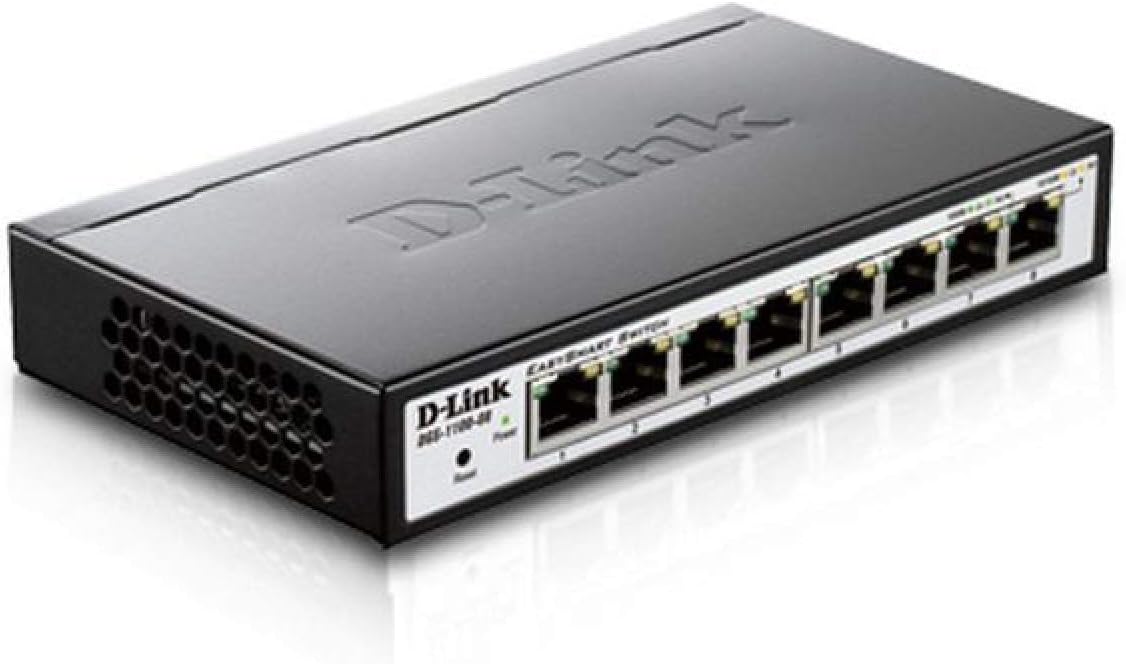
Figura 4.1: En ángulo view of the D-Link DGS-1100-08 switch, showing the D-Link logo, model number, power and reset buttons, and the eight Gigabit Ethernet ports with their corresponding LED indicators.

Figura 4.2: Fronte view of the D-Link DGS-1100-08 switch, clearly displaying the eight Gigabit Ethernet ports labeled 1 through 8, along with the Power LED and Reset button.
4.1 Panel frontal
- Portos Ethernet (1-8): Eight 10/100/1000BASE-T Gigabit Ethernet ports for network connections.
- LED de alimentación: Indica o estado de alimentación do dispositivo.
- Botón de reinicio: Úsase para restablecer o dispositivo á configuración predeterminada de fábrica.
4.2 Indicadores LED
| LED | Estado | Descrición |
|---|---|---|
| Poder | Verde sólido | O dispositivo está acendido. |
| Ligazón/Acción (Por Porto) | Verde sólido | A valid network connection is established at Gigabit speed. |
| Ligazón/Acción (Por Porto) | Ámbar macizo | A valid network connection is established at 10/100 Mbps speed. |
| Ligazón/Acción (Por Porto) | Parpadeante | Os datos están a ser transmitidos ou recibidos no porto. |
5. Configuración
Follow these steps to set up your DGS-1100-08 switch:
- Conexión física: Connect your network devices (computers, servers, network printers) to the Ethernet ports (1-8) on the switch using standard Ethernet cables.
- Conexión de alimentación: Connect the provided power adapter to the power input on the switch and then plug it into a power outlet. The Power LED should illuminate.
- Acceso inicial: The switch has a default IP address of 10.90.90.90 and a default username/password of admin/admin. Para acceder ao web management interface, you may need to temporarily configure your computer's IP address to be in the same subnet (e.g., 10.90.90.100 with a subnet mask of 255.0.0.0).
- Web Acceso á interface: Abrir a web navegador e ingresa
http://10.90.90.90in the address bar. Log in with the default credentials. - Actualización de firmware: It is recommended to check for and install the latest firmware version from the D-Link support website to ensure optimal performance and access to the latest features and bug fixes.
6. Instrucións de funcionamento
The DGS-1100-08 is a managed switch, offering various features configurable via its web interface de xestión:
- VLAN (redes de área local virtual): Configure 802.1Q VLANs for network segmentation and enhanced security.
- Calidade de servizo (QoS): Prioritize network traffic for critical applications like voice and video.
- Bandwidth Limiting: Control the maximum bandwidth for specific ports to manage network congestion.
- Agregación de ligazóns: Combina varias ligazóns físicas nunha única ligazón lóxica para aumentar o ancho de banda e a redundancia.
- IGMP Snooping: Optimize multicast traffic delivery, preventing unnecessary flooding to all ports.
- Duplicación de portos: Copy traffic from one or more source ports to a destination port for network monitoring and analysis.
Refer to the online help within the web management interface for detailed configuration steps for each feature.
7. Mantemento
Para garantir a lonxevidade e o rendemento óptimo do seu interruptor:
- Manteña o dispositivo limpo e libre de po. Use un pano suave e seco para limpalo.
- Asegúrate de que as aberturas de ventilación sexan axeitadas, mantendo as saídas de aire libre de obstrucións.
- Comprobe regularmente o soporte de D-Link website for firmware updates and apply them as recommended.
- Perform periodic backups of your switch configuration to a local file.
8 Solución de problemas
If you encounter issues with your DGS-1100-08 switch, consider the following:
- Sen enerxía: Ensure the power adapter is securely connected to both the switch and a working power outlet. Check the Power LED.
- Sen ligazón no porto: Verify that the Ethernet cable is properly connected at both ends. Test with a different cable or port. Ensure the connected device is powered on and functioning correctly.
- Non se pode acceder Web Interface: Double-check your computer's IP address configuration to ensure it is in the same subnet as the switch (default 10.90.90.90). Clear your browser's cache or try a different browser.
- Problemas de rendemento da rede: Check for excessive network traffic, loopbacks (ensure loopback detection is enabled), or incorrect QoS configurations.
- Restablecer os valores predeterminados de fábrica: If issues persist, use the reset button on the front panel to restore the switch to its original factory settings. This will erase all custom configurations.
9. Especificacións
| Característica | Detalle |
|---|---|
| Número de modelo | DGS-1100-08 |
| Número de portos | 8 x 10/100/1000BASE-T Gigabit Ethernet |
| Taxa de transferencia de datos | 1000 megabits por segundo |
| Dimensións do produto (LxWxH) | 6.75 x 3.94 x 1.13 polgadas |
| Peso do elemento | 15 onzas |
| Tipo de xestión | Easy Smart Managed |
| Aforro de enerxía | D-Link Green Technology, IEEE 802.3az (Energy Efficient Ethernet) |
| Compoñentes incluídos | Switch - 8 ports - managed |
10. Garantía e soporte
D-Link provides a Garantía de por vida for the DGS-1100-08 switch, ensuring long-term reliability and peace of mind.
For further assistance, technical support, or to download the full user guide and latest firmware, please visit the official D-Link support website or refer to the User Guide (PDF) available at https://manuals.plus/m/ecc0db5b29561c67ba510c6e291c2f520d486733cbbed65950841084a1c2cb4f.
You can also visit the D-Link Store for more product information and resources: Tenda D-Link en Amazon.