
1. Introdución
This user manual provides essential information for the safe and effective use of your Sony MDR-1R closed-type high-resolution headphones. Please read this manual thoroughly before using the product and retain it for future reference.
The Sony MDR-1R headphones are designed to deliver high-fidelity audio with a comfortable fit. They feature a Liquid Crystal Polymer Film diaphragm for clear sound reproduction across a wide frequency range and silent joints to minimize mechanical noise during wear. The headphones include a detachable cable with an in-line remote and microphone, compatible with iPhone, iPod, and iPad devices.
2. Información de seguridade
- Protección auditiva: Evite escoitar durante moito tempo a niveis de volume altos para evitar danos auditivos.
- Sensibilización ambiental: Non empregues auriculares en situacións nas que a incapacidade de escoitar os sons ambientais poida ser perigosa, como ao conducir, ir en bicicleta ou camiñar polo tráfico.
- Limpeza: Clean the headphones with a soft, dry cloth. Do not use liquid cleaners or solvents.
- Almacenamento: Garde os auriculares nun lugar fresco e seco, lonxe da luz solar directa e de temperaturas extremas.
- Desmontaxe: Non intente desmontar nin modificar os auriculares. Isto podería anular a garantía e causar danos.
3. Contido do paquete
Verifica que todos os elementos estean presentes no paquete:
- Sony MDR-1R Headphones
- Detachable Audio Cable with In-line Remote and Microphone
- Bolsa de transporte

Imaxe: Fronte view of the Sony MDR-1R headphones.

Image: The carrying pouch included with the Sony MDR-1R headphones.
4. Configuración
4.1 Conexión do cable de son
- Locate the audio input jack on the left earcup of the headphones.
- Insert the smaller end of the detachable audio cable firmly into the headphone jack until it clicks into place.
- Connect the larger 3.5mm plug of the cable to the audio output jack of your device (e.g., smartphone, tablet, music player).

Imaxe: Lateral view of the Sony MDR-1R headphones, illustrating the cable connection point on the earcup.
4.2 Axustar a diadema
Adjust the headband by sliding the extenders on each side until the earcups comfortably cover your ears. Ensure a snug fit for optimal sound quality and comfort during extended listening sessions.
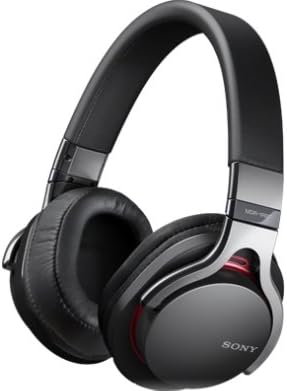
Image: A person holding the Sony MDR-1R headphones, showing how they fit over the ears.
5. Instrucións de funcionamento
5.1 Reprodución de audio
Once connected to your audio device, begin playback from your device. The headphones will reproduce the audio. Adjust the volume using your connected device's volume controls.
5.2 Using the In-line Remote and Microphone (for compatible devices)
The detachable cable includes an in-line remote and microphone, primarily designed for use with iPhone, iPod, and iPad devices. Functionality may vary with other smartphones or audio players.
- Reproducir/Pausa: Preme o botón central unha vez para reproducir ou pausar a música.
- Saltar pista: Press the center button twice quickly to skip to the next track.
- Pista anterior: Press the center button three times quickly to go to the previous track.
- Responder/Finalizar chamada: Prema o botón central unha vez para responder a unha chamada entrante ou finalizar unha chamada en curso.
- Rexeitar chamada: Press and hold the center button for approximately two seconds to decline an incoming call.
- Control de voz: Press and hold the center button to activate voice control features (e.g., Siri) on compatible devices.
Note: Volume control is typically managed directly on your connected device. The in-line remote does not feature dedicated volume buttons.
6. Mantemento
6.1 Limpeza
- Wipe the headphones, including earcups and headband, with a soft, dry cloth.
- Do not use alcohol, benzene, thinner, or other chemical solvents, as they may damage the finish or material.
- Regularly check the audio jack and cable for dust or debris and clean gently if necessary.
6.2 Almacenamento
- Cando non esteas en uso, garda os auriculares na bolsa de transporte proporcionada para protexelos do po e dos arañazos.
- Avoid wrapping the cable too tightly around the headphones to prevent damage to the cable or connectors.
- Non expoñas os auriculares a temperaturas extremas, humidade nin luz solar directa.
7 Solución de problemas
7.1 Sen son ou volume baixo
- Asegúrate de que o cable de son estea conectado correctamente tanto aos auriculares como ao dispositivo de son.
- Comprobe o nivel de volume do seu dispositivo de son e auménteo se é necesario.
- Test the headphones with a different audio device or a different cable (if available) to rule out device or cable issues.
- Ensure the audio source is playing correctly.
7.2 Poor Sound Quality (Distortion, Static)
- Verify that the audio cable is fully inserted and not loose.
- Reduce the volume on your audio device if distortion occurs at high levels.
- Asegúrate da fonte de son file é de boa calidade.
- Clean the audio jacks on both the headphones and your device if there is visible debris.
7.3 In-line Remote/Microphone Not Working
- Confirm that your device is compatible with the remote and microphone functions (primarily designed for iPhone, iPod, iPad).
- Asegúrese de que o cable estea ben conectado.
- Reinicia o teu dispositivo de son.
- Test with another compatible device if possible.
8. Especificacións
| Nome do modelo: | MDR-1R |
| Tipo de auriculares: | Closed-type, Dynamic |
| Conectividade: | Con cable |
| Cor: | Prata |
| Características do cable: | Detachable, with In-line Remote and Microphone |
| Peso: | Approx. 240 grams (excluding cable) |
| GTIN (Número de identificación comercial global): | 04905524891652 |
9. Garantía e soporte
Para obter información sobre a garantía, consulte a tarxeta de garantía incluída co produto ou visite o sitio web de asistencia oficial de Sony. website for your region. If you require technical assistance or have questions not covered in this manual, please contact Sony customer support.
Soporte de Sony Websitio: https://www.sony.com/electronics/support