
Introdución
The Roland Mobile-AC is a portable battery-powered acoustic guitar amplifier designed for musicians seeking versatility and convenience. This compact amplifier delivers clear, powerful stereo sound, optimized for acoustic guitars. It features built-in stereo chorus and reverb effects, and offers multiple input options for instruments, microphones, and external audio players. With extended battery life, the Mobile-AC is suitable for various settings, from home practice to outdoor performances.
Características clave
- Up to 15 hours of continuous use with six AA alkaline batteries.
- Five-watt (2.5W + 2.5W) stereo amplifier for acoustic guitar.
- Simple, intuitive control panel for easy operation.
- Integrated stereo chorus and reverb effects.
- Multiple input options: MIC jack, GUITAR jack, AUDIO jacks (stereo miniature type, RCA phono).
- Headphones output for private practice.
- Compact and lightweight design for maximum portability.
Configuración
Alimentación da Unidade
The Roland Mobile-AC can be powered by either an AC adapter (sold separately) or six AA batteries.
Instalación de baterías

Imaxe: Traseira view of the Roland Mobile-AC with the battery compartment open, revealing six AA batteries.
- Asegúrese de que o interruptor de alimentación estea na posición OFF.
- Abra a tapa do compartimento das baterías situada na parte traseira da unidade.
- Insert six AA batteries (alkaline or NiMH rechargeable are recommended), observing the correct polarity (+/-) as indicated inside the compartment.
- Pecha a tapa do compartimento da batería de forma segura.
Conexión de adaptador de CA

Image: Side panel of the Roland Mobile-AC, highlighting the DC IN jack and the power switch.
- Asegúrese de que o interruptor de alimentación estea na posición OFF.
- Connect the Roland PSB-1U AC adapter (sold separately) to the DC IN jack on the side of the unit.
- Conecte o adaptador de CA a unha toma eléctrica estándar.
Conexión de instrumentos e micrófonos

Image: Side panel of the Roland Mobile-AC, displaying the 1/4-inch MIC and GUITAR input jacks, and the stereo miniature and RCA phono AUDIO input jacks.
- Jack MIC: Connect a microphone using a 1/4-inch phone type cable. Adjust the 'MIC' volume knob on the control panel.
- GUITAR Jack: Connect your acoustic guitar using a 1/4-inch phone type cable. Adjust the 'GUITAR' volume knob on the control panel.
- AUDIO Jacks: Connect an external audio player (e.g., smartphone, MP3 player) using a stereo miniature type cable or RCA phono cables (L/R). Adjust the 'AUDIO' volume knob on the control panel.
Operando o Ampmáis vivo

Image: The top control panel of the Roland Mobile-AC, showing individual volume controls for Audio, Mic, and Guitar, along with Chorus, Wide, Tone (Lo/Hi), and Reverb (Off/On) knobs.
Panel de control rematadoview
- VOLUME Knobs (AUDIO, MIC, GUITAR): Adjust the individual input levels for each connected device.
- CHORUS Button: Activates the stereo chorus effect for the guitar input.
- WIDE Button: Engages a wider stereo sound field effect.
- TONE Knob (LO, HI): Adjusts the tonal characteristics (bass and treble) of the overall sound.
- REVERB Knob (OFF, ON): Controls the amount of reverb effect applied to the sound.
Operación básica
- Turn on the power using the POWER switch. The power indicator will light up.
- Connect your desired instrument(s) and/or microphone to the appropriate input jacks.
- Adjust the individual VOLUME knobs for each input to achieve a balanced mix.
- Experiment with the CHORUS, WIDE, TONE, and REVERB controls to shape your desired sound.
- For private practice, connect headphones to the PHONES jack on the side of the unit.
- When finished, turn off the power using the POWER switch.
Imaxes do produto


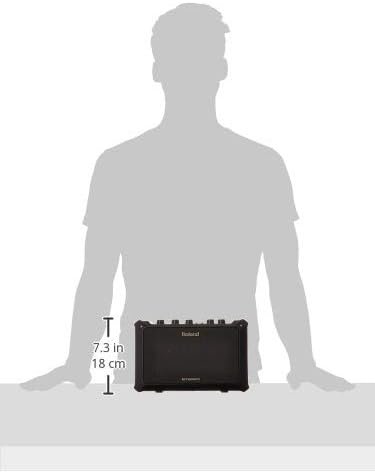

Especificacións
| Característica | Detalle |
|---|---|
| Peso do elemento | 7.04 libras |
| Dimensións do produto | 14 x 8 x 10 polgadas |
| Número de modelo do artigo | MOBILEAC |
| Baterías | 6 AA batteries required (NiMH recommended) |
| Potencia de saídatage | 5 Watts (2.5W + 2.5W Stereo) |
| Fonte de enerxía | Battery Powered / AC Adapter (DC IN jack) |
| Material | Plástico |
| Dispositivos compatibles | Guitar, Microphone, Audio Players |
| Tipos de conectores | MIC jack (1/4-inch phone type), GUITAR jack (1/4-inch phone type), AUDIO jacks (Stereo miniature type, RCA phono L/R), PHONES jack (Stereo miniature type), DC IN jack |
Mantemento
To ensure the longevity and optimal performance of your Roland Mobile-AC amplifer, siga estas pautas de mantemento:
- Limpeza: Wipe the unit with a soft, dry cloth. Avoid using abrasive cleaners, waxes, or solvents.
- Almacenamento: Almacenar o amplifier in a cool, dry place away from direct sunlight, extreme temperatures, and high humidity. If storing for an extended period, remove the batteries to prevent leakage.
- Coidado da batería: Replace batteries when the power indicator dims or the sound quality deteriorates. Always use fresh batteries of the same type.
- Manexo: Evite deixar caer a unidade ou sometela a impactos fortes.
Resolución de problemas
If you encounter any issues with your Roland Mobile-AC, refer to the following common troubleshooting steps:
- Sen enerxía: Check if the AC adapter is securely connected or if the batteries are correctly installed and not depleted.
- Sen son: Ensure all volume knobs (including individual input volumes and master volume) are turned up. Check all cable connections for instruments and microphones. Verify that the instrument/microphone is functioning correctly.
- Son distorsionado: Reduce the input volume levels to prevent clipping. Check the tone settings and adjust if necessary.
- Comentarios: If using a microphone, try repositioning the microphone or the amplifier to reduce feedback. Lower the microphone volume.
- Efectos que non funcionan: Ensure the CHORUS, WIDE, or REVERB knobs/buttons are engaged and set to an audible level.
If the problem persists after trying these steps, please contact Roland customer support for further assistance.
Garantía e Soporte
For detailed warranty information and customer support, please visit the official Roland website or refer to the warranty card included with your product. You can also find additional resources, FAQs, and service center locations on their websitio.
Recursos en liña: Visita a tenda Roland en Amazon