
Introdución
This manual provides detailed instructions for the safe and efficient operation, maintenance, and troubleshooting of your Carnation Mixed Denomination Bill Counter, model CR7. Please read this manual thoroughly before using the device to ensure proper functionality and to prevent damage.
Información importante de seguridade
- Conecte sempre o dispositivo a unha toma de corrente conectada a terra.
- Non opere o dispositivo coas mans molladas.
- Manteña o dispositivo lonxe da auga e da humidade elevada.
- Asegúrese de que haxa unha ventilación axeitada arredor da máquina durante o funcionamento.
- Desconecte o dispositivo antes de limpalo ou realizar calquera mantemento.
- Non intente abrir nin reparar o dispositivo vostede mesmo. Consulte persoal de servizo cualificado.
Contido do paquete
Verifica que todos os elementos estean presentes no paquete:
- Carnation CR7 Mixed Denomination Bill Counter
- Cable de alimentación
- Manual de usuario (este documento)
- Cleaning Brush (may be included)
Configuración
1. Desembalaxe e colocación
Carefully remove the bill counter from its packaging. Place the machine on a stable, flat, and level surface. Ensure there is adequate space around the unit for proper ventilation and operation.
2. Conexión de alimentación
- Connect the provided power cord to the power inlet on the rear of the bill counter.
- Conecte o outro extremo do cable de alimentación a unha toma de corrente axeitada con conexión a terra.
- Locate the power switch on the rear of the machine and turn it to the 'ON' position. The display should illuminate.

Imaxe: Traseira view of the Carnation CR7 bill counter, highlighting the power inlet and power switch for connection.
3. Inspección Inicial
Before first use, visually inspect the bill counter for any signs of damage. Ensure all moving parts, such as the hopper and stacker, operate smoothly.
Instrucións de funcionamento
1. Loading Bills
Fan out the bills and place them neatly into the hopper. Ensure the bills are aligned and not folded or creased. The machine will automatically start counting once bills are detected in the hopper.
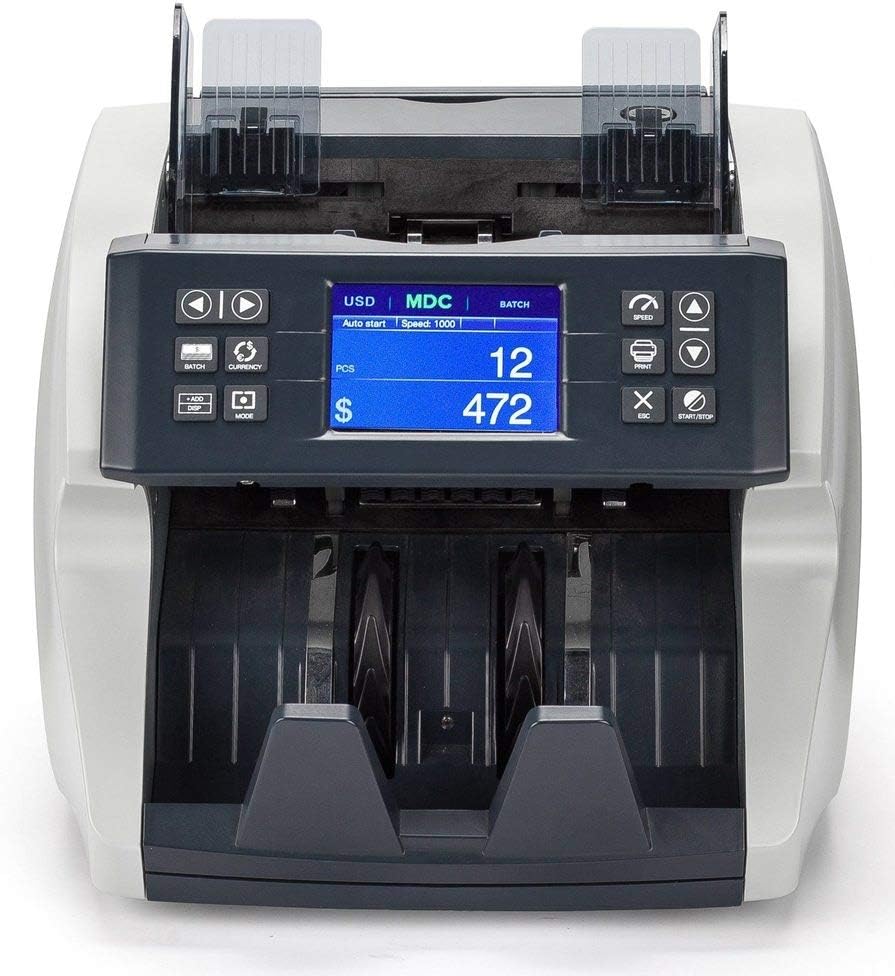
Imaxe: Fronte view of the Carnation CR7 bill counter, showing the hopper where bills are loaded and the display panel.
2. Basic Counting Modes
- Modo de conta: Counts the number of bills.
- Mixed Denomination Mode (MDC): Counts and calculates the total value of mixed denomination bills. Select this mode using the appropriate button on the control panel.
- Modo por lotes: Allows the machine to stop counting once a preset number of bills is reached. Use the 'BATCH' button to set the desired batch quantity.
- Engadir modo: Accumulates the total count from multiple counting operations. Activate 'ADD' mode to continuously sum counts.
3. Detección de falsificacións
The CR7 is equipped with multiple detection methods to identify counterfeit currency:
- UV (Ultraviolet) Detection: Checks for UV security features present in genuine banknotes.
- MG (Magnetic) Detection: Scans for magnetic ink patterns on bills.
- MT (Magnetic Thread) Detection: Detects the magnetic security thread embedded in currency.
- IR (Infrared) Detection: Verifies infrared security features and patterns.
If a suspicious bill is detected, the machine will typically stop, alert the user, and display an error code. Remove the suspect bill and press 'START/STOP' to resume counting.
Mantemento
Regular maintenance ensures the longevity and accuracy of your bill counter.
1. Limpeza
- Apagado: Apague e desconecte sempre a máquina antes de limpala.
- Eliminación de po: Use a soft brush or compressed air to remove dust and lint from the bill path, sensors, and rollers. Pay special attention to the detection sensors (UV, MG, IR) to ensure they are clear.
- Limpeza exterior: Limpe as superficies exteriores cun suave, damp pano. Non use produtos de limpeza ou disolventes abrasivos.
Frecuencia: Clean the machine regularly, especially if used frequently or in dusty environments. Dust accumulation can lead to miscounts or detection errors.
2. Almacenamento
When not in use, cover the bill counter with a dust cover (if provided or purchased separately) to protect it from dust and debris. Store in a cool, dry place.
Resolución de problemas
Esta sección aborda problemas comúns cos que podes atoparte. Para problemas que non aparecen na lista, ponte en contacto co servizo de atención ao cliente.
| Problema | Causa posible | Solución |
|---|---|---|
| A máquina non se acende. | Cable de alimentación non conectado; interruptor de alimentación apagado; non hai corrente na toma de corrente. | Ensure power cord is securely connected. Turn power switch ON. Check outlet with another device. |
| Miscounts or inaccurate counts. | Bills not properly aligned; dirty sensors; worn rollers; bills are too old/creased. | Align bills properly. Clean sensors and bill path (refer to Maintenance). Try new or less worn bills. |
| As facturas atascanse con frecuencia. | Overloaded hopper; bills are folded/creased; foreign objects in bill path; worn rollers. | Do not overload hopper. Straighten bills. Inspect bill path for obstructions. Clean rollers. |
| Erros na detección de falsificacións. | Dirty detection sensors; bills are extremely worn or damaged; incorrect currency settings. | Clean UV, MG, MT, IR sensors. Ensure bills are in good condition. Verify currency settings are correct for the bills being counted. |
Especificacións
| Número de modelo | CR7 |
| Marca | CARAVEL |
| Peso do elemento | 15.9 libras |
| Dimensións do produto (L x W x H) | 11.2 x 9.9 x 11.4 polgadas (285 mm x 252 mm x 289 mm) |
| Tipo de material | Metal, Plástico |
| Cor | Negro |
| Métodos de detección | UV, MG, MT, IR |
| Fabricante | Caravel |
Información da garantía
The Carnation CR7 Mixed Denomination Bill Counter is covered by a manufacturer's warranty. Specific warranty terms and duration may vary by region and purchase date. Please retain your proof of purchase for warranty claims.
For detailed warranty information, including coverage and how to make a claim, please refer to the warranty card included with your product or visit the official Carnation websitio.
Atención ao cliente
If you require assistance with your Carnation CR7 Bill Counter, have questions about its operation, or need technical support, please contact Carnation customer service.
- Soporte en liña: Visit the official Carnation websitio con preguntas frecuentes, recursos de asistencia e formularios de contacto.
- Soporte por correo electrónico: Consulte a embalaxe do produto ou a ficha oficial websitio para o enderezo de correo electrónico de atención ao cliente.
- Asistencia telefónica: Check the official Carnation websitio web con números de teléfono de atención ao cliente rexionais.
When contacting support, please have your model number (CR7) and purchase date available.