
1. Introdución e finalview
The Celestron Nature DX 8x42 binoculars are designed for outdoor enthusiasts, offering sharp, detailed views for activities such as birdwatching, hiking, and wildlife observation. These binoculars combine premium optical features with a rugged, field-ready construction, ensuring reliable performance in various conditions.
Key features include 8x magnification, 42mm objective lenses, fully multi-coated optics, and phase-coated BaK-4 prisms for bright, high-contrast, and color-accurate images. The rubber-armored polycarbonate body provides durability, while the waterproof and nitrogen-purged design prevents internal fogging.
With a close focus of 6.5 feet and a wide 7.4° field of view, these binoculars are versatile for both distant and nearby subjects. Twist-up eyecups ensure comfortable viewing for all users, including those wearing glasses. The binoculars are also tripod-adaptable for extended viewsesións de ing.
2. Que hai na caixa
Your Celestron Nature DX 8x42 Binoculars package includes the following items:
- Correa para o pescozo
- Tapas de obxectivos
- Rainguard (eyepiece cover)
- Maletín de transporte
- Pano para lentes
- Manual de instrucións
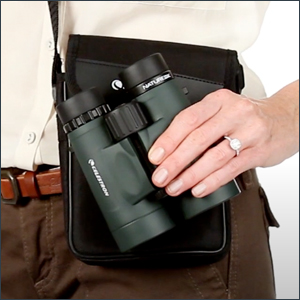
Image: Celestron Nature DX 8x42 Binoculars with included accessories.
3. Configuración
3.1 Fixación da correa do pescozo
Thread the ends of the neck strap through the strap lugs on the sides of the binocular body. Adjust the length to a comfortable position for carrying around your neck.
3.2 Axuste da distancia interpupilar (DPI)
The interpupillary distance is the distance between the centers of your pupils. To adjust, hold the binoculars up to your eyes and look through them. Move the two halves of the binoculars closer together or further apart until you see a single, clear circular field of view. Ensure both eyes are comfortable.
3.3 Axuste das oculares
The Nature DX binoculars feature twist-up eyecups. If you do not wear eyeglasses, twist the eyecups counter-clockwise until they are fully extended. This provides the optimal eye relief. If you wear eyeglasses, twist the eyecups clockwise until they are fully retracted. This allows you to see the full field of view without your glasses interfering.
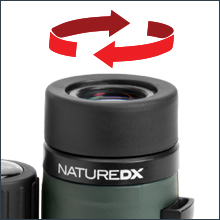
Image: Twist-up eyecups for comfortable viewcon ou sen lentes.
3.4 Focalización
To focus your binoculars:
- Choose an object about 50 feet away.
- Cover the right objective lens (front lens) with your hand.
- Look through the binoculars with your left eye and rotate the center focus wheel until the image is sharp.
- Uncover the right objective lens and cover the left objective lens.
- Look through the binoculars with your right eye and rotate the diopter adjustment ring (on the right eyepiece) until the image is sharp.
- Os teus prismáticos xa están axustados para os teus ollos. Para o futuro viewing, simply use the center focus wheel to focus on objects at varying distances.
4. En funcionamento
4.1 Uso xeral
Once properly set up and focused, the Nature DX 8x42 binoculars are ready for use. Hold them steady and bring them to your eyes. Use the center focus wheel to adjust for clarity on your desired subject. The 8x magnification provides a stable image, while the 42mm objective lenses ensure bright views.
4.2 Campo de View and Close Focus
These binoculars offer a wide 7.4° angular field of view, which is excellent for tracking moving subjects like birds in flight or scanning broad landscapes. The impressive close focus of just 6.5 feet allows for detailed observation of nearby objects such as insects or flowers.

Image: Observing with a wide field of view and close focus.
4.3 Tripod Adaptability
For prolonged viewing sessions or digiscoping, the Nature DX 8x42 binoculars are tripod-adaptable. A built-in adapter socket is located under a cap on the front hinge. To attach to a tripod, remove the cap and screw in a standard binocular tripod adapter (not included).

Image: Binoculars mounted on a tripod for stable viewing.
5. Mantemento
5.1 Cleaning the Optics
To clean the lenses, use the included lens cloth or a soft, lint-free cloth. For stubborn smudges or dirt, use a lens cleaning fluid specifically designed for optics. Apply a small amount to the cloth, not directly to the lens, and gently wipe in a circular motion. Avoid touching the lens surfaces with your fingers.
5.2 Limpeza do corpo
The rubber-armored body can be cleaned with a soft, damp pano. Evite o uso de produtos químicos agresivos ou produtos de limpeza abrasivos, xa que poden danar o acabado.
5.3 Almacenamento
When not in use, store your binoculars in the provided carrying case to protect them from dust, dirt, and impacts. Store in a cool, dry place. Avoid prolonged exposure to direct sunlight or extreme temperatures.
5.4 Waterproof and Fogproof Features
The Nature DX binoculars are waterproof and nitrogen-purged. This means they are sealed against moisture and filled with dry nitrogen gas to prevent internal fogging of the optics, even in humid conditions or during rapid temperature changes. While designed for rugged outdoor use, avoid submerging them in water for extended periods.

Image: Waterproof and fogproof design for all-weather use.
6 Solución de problemas
6.1 Imaxe borrosa
- Ensure the binoculars are properly focused using the center focus wheel.
- Verify the diopter adjustment is set correctly for your right eye (refer to Section 3.4).
- Check that the objective lenses and eyepieces are clean (refer to Section 5.1).
6.2 Double Image or Eye Strain
- Adjust the interpupillary distance (IPD) until you see a single, merged image (refer to Section 3.2).
- Ensure the eyecups are set correctly for your viewing preference (with or without glasses) to achieve proper eye relief (refer to Section 3.3).
6.3 Internal Fogging
While the binoculars are nitrogen-purged to prevent internal fogging, extreme and rapid temperature changes can sometimes cause temporary external condensation. Allow the binoculars to acclimate to the ambient temperature. If internal fogging persists, contact customer support.
7. Especificacións
| Característica | Especificación |
|---|---|
| Número de modelo | 71332-CGL |
| Ampliación máxima | 8x |
| Diámetro da lente obxectivo | 42 milímetros |
| Campo de View (Angular) | 7.4° |
| Campo de View (lineal) | 388 ft / 1000 yds (129m / 1000m) |
| Enfoque próximo | 6.5 pés |
| Tipo de prisma | BaK-4 Roof Prisms |
| Revestimentos de lentes | Totalmente multicapa |
| Impermeable / A proba de néboa | Yes (Nitrogen Purged) |
| Dimensións do produto | 5.3 x 2 x 4.9 polgadas |
| Peso do elemento | 1.75 libras |
| Fabricante | Celestron |

Image: Celestron Nature DX 8x42 Binoculars.
8. Garantía e soporte
8.1 Información da garantía
Your Celestron Nature DX 8x42 Binoculars come with a Celestron Limited Lifetime US Warranty. This warranty covers defects in materials and workmanship for the lifetime of the product. Please retain your proof of purchase for warranty claims.
8.2 Atención ao cliente
For technical assistance, warranty claims, or any questions regarding your binoculars, please contact Celestron's US-based expert tech support. Contact information can typically be found on the Celestron websitio web ou na tarxeta de garantía incluída co produto.
For returns, the product has a 30-day refund/replacement policy when purchased from Amazon.