
1. Introdución
This manual provides instructions for the OEM RMT-B119A remote control, designed as a replacement or secondary remote for various Sony Blu-ray player models. This remote offers full functionality for controlling your Blu-ray player's features.
Compatible Sony Blu-ray Player Models:
- BDP-BX59
- BDP-S390
- BDP-S590
- BDP-BX110
- BDP-S1100
- BDP-S3100
- BDP-BX310
2. Configuración
2.1 Instalación da batería
O mando a distancia require dúas (2) pilas AAA (non incluídas). Siga estes pasos para instalar as pilas:
- Localice a tapa do compartimento da batería na parte traseira do control remoto.
- Prema a lapela e deslice a tapa cara abaixo para abrir o compartimento.
- Insira dúas pilas AAA, asegurándose de que os terminais positivo (+) e negativo (-) estean aliñados correctamente coas marcas do interior do compartimento.
- Deslice a tapa do compartimento da batería de volta ao seu lugar ata que faga clic de forma segura.
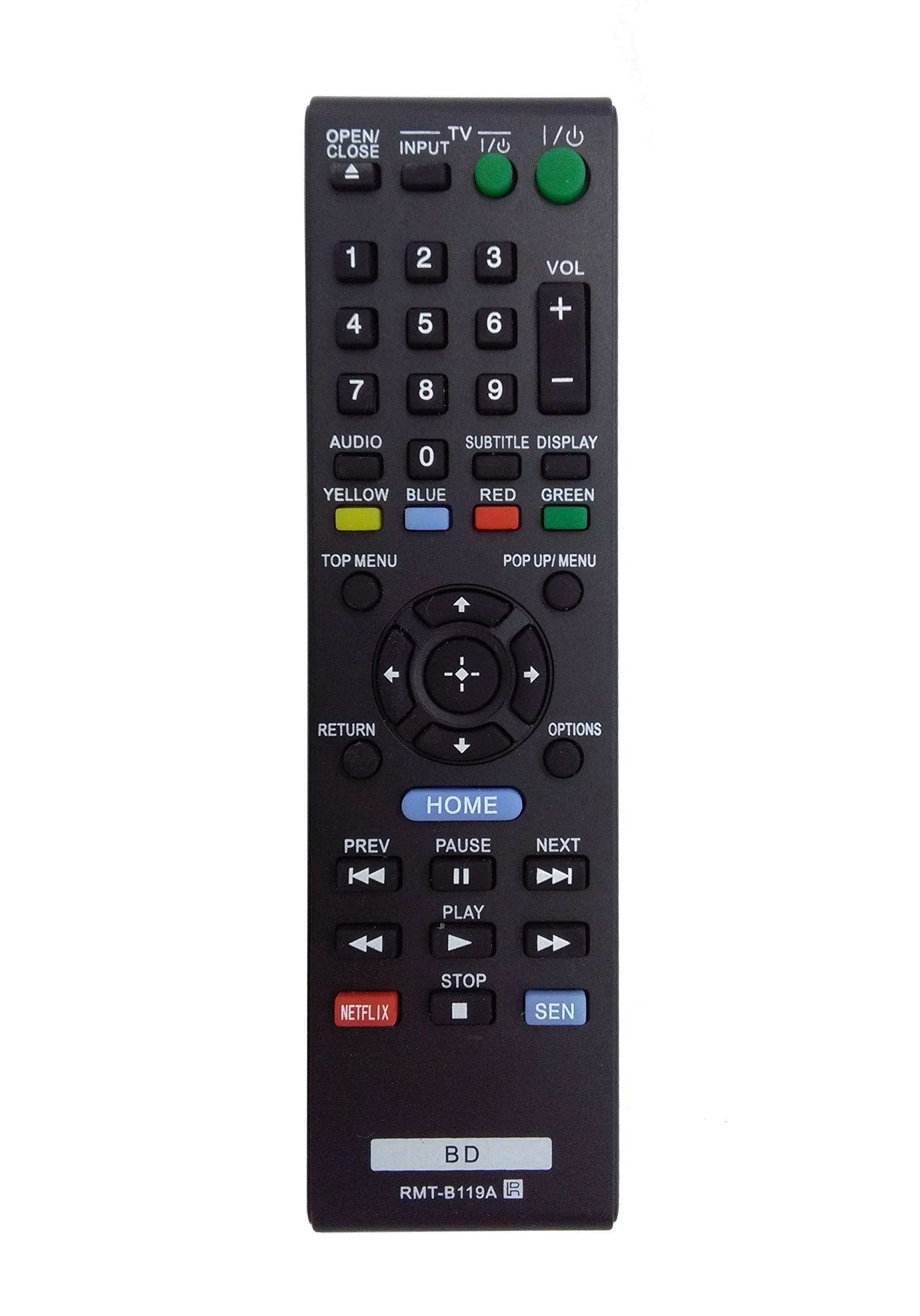
Image: The OEM RMT-B119A remote control, showing the full button layout on the front and a partial view of the open battery compartment on the back, revealing the battery terminals.
3. Instrucións de funcionamento
3.1 Remote Control Layout and Button Functions
Familiarize yourself with the buttons on your RMT-B119A remote control. Below is a description of each button's primary function.
Image: The OEM RMT-B119A remote control, displaying all buttons and their labels.
- Alimentación (E/S): Turns the Blu-ray player on or off.
- OPEN/CLOSE (▲): Abre ou pecha a bandexa do disco.
- ENTRADA: Switches the input source on the connected TV (if programmed).
- TV: Switches the remote to TV control mode (if programmed).
- Teclado numérico (0-9): Used for direct track selection, chapter selection, or entering numerical data.
- VOL (+/-): Adjusts the volume level (typically for the connected TV, if programmed).
- AUDIO: Changes the audio track or language during playback.
- SUBTITLE DISPLAY: Toggles subtitle display on or off, or cycles through available subtitle languages.
- YELLOW, BLUE, RED, GREEN: Color-coded function buttons, typically used for specific features within menus or interactive content. Their function varies depending on the disc or menu.
- MENÚ PRINCIPAL: Accesses the main menu of the Blu-ray disc.
- POP UP/MENU: Displays the pop-up menu during disc playback.
- Directional Pad (↑↓←→): Navega polos menús e opcións.
- Center Button (Enter/Select): Confirma unha selección ou introduce un elemento do menú.
- DEVOLUCIÓN: Volta á pantalla ou ao menú anterior.
- OPCIÓNS: Displays context-sensitive options or settings.
- INICIO: Accesses the Blu-ray player's home menu.
- ANTERIOR (◀◀): Skips to the beginning of the current track/chapter or the previous track/chapter.
- PAUSE (▌▌): Pon en pausa a reprodución.
- SEGUINTE (▶▶): Skips to the next track or chapter.
- PLAY (▶): Inicia ou retoma a reprodución.
- PARAR (■): Detén a reprodución.
- NETFLIX: Direct access button for the Netflix streaming service.
- SEN: Direct access button for the Sony Entertainment Network (now PlayStation Video/Music).
- BD: Likely a dedicated button for Blu-ray Disc functions or to switch to Blu-ray mode.
4. Mantemento
Para garantir a lonxevidade e o correcto funcionamento do seu mando a distancia, siga estas pautas de mantemento:
- Limpeza: Limpe o mando a distancia cun pano suave e seco. Para a sucidade persistente, limpe lixeiramenteampEnxágüe o pano con auga ou un limpador suave e non abrasivo. Evite o uso de produtos químicos agresivos ou solventes.
- Substitución da batería: Substitúa as pilas cando a resposta do mando a distancia sexa lenta ou deixe de funcionar. Substitúa sempre as dúas pilas ao mesmo tempo por unhas novas do mesmo tipo.
- Almacenamento: Store the remote in a cool, dry place away from direct sunlight, extreme temperatures, and high humidity. If the remote will not be used for an extended period, remove the batteries to prevent leakage.
- Evita gotas: Protexa o mando a distancia de impactos físicos, xa que as caídas poden danar os compoñentes internos.
5 Solución de problemas
If you experience issues with your remote control, refer to the following table for common problems and solutions:
| Problema | Causa posible | Solución |
|---|---|---|
| O control remoto non funciona. | Pilas gastadas ou inseridas incorrectamente. | Substitúa as pilas por outras novas, asegurándose de manter a polaridade correcta (+/-). |
| O control remoto funciona de forma intermitente. | Batería baixa ou obstrución. | Replace batteries. Ensure no objects are blocking the remote's signal path to the Blu-ray player. |
| Remote does not control the TV. | Remote not programmed for TV or TV mode not selected. | This remote is primarily for Blu-ray players. TV control functionality may require specific programming not covered by this manual, or may not be supported by this OEM model. |
| Os botóns non responden ou están pegañentos. | Suciedade ou residuos debaixo dos botóns. | Clean the remote control surface. Avoid spilling liquids on the remote. |
6. Especificacións
- Marca: OEM
- Número de modelo: RMT-B119A
- Tecnoloxía de conectividade: Infravermello (IR)
- Dispositivos compatibles: Sony Blu-ray Players (specific models listed in Introduction)
- Fonte de enerxía: 2 pilas AAA (non incluídas)
- Rango máximo: Aproximadamente 10 metros (33 pés)
- Característica especial: Deseño ergonómico
7. Garantía e soporte
This OEM RMT-B119A remote control comes with a Garantía de 30 días desde a data de compra, cubrindo defectos de fabricación. Conserve o comprobante de compra para reclamacións de garantía.
For technical support or warranty inquiries, please contact the retailer or manufacturer directly. Refer to your purchase documentation for specific contact information.