
Introdución
This manual provides detailed instructions for the installation, operation, and maintenance of your VTech VTCS6619 DECT 6.0 Expandable Speakerphone with Caller ID. Please read this manual thoroughly before using your new telephone system to ensure proper functionality and to take full advantage das súas características.
Contido do paquete
Verifique que o seu paquete conteña os seguintes elementos:
- Cordless Phone with Caller ID/Call Waiting
- Telephone Base Unit
- Adaptador de alimentación de CA.
- Cable de Liña Telefónica
- Rechargeable Battery for Handset
- Handset Cover
Configuración
Follow these steps to set up your VTech VTCS6619 telephone system.
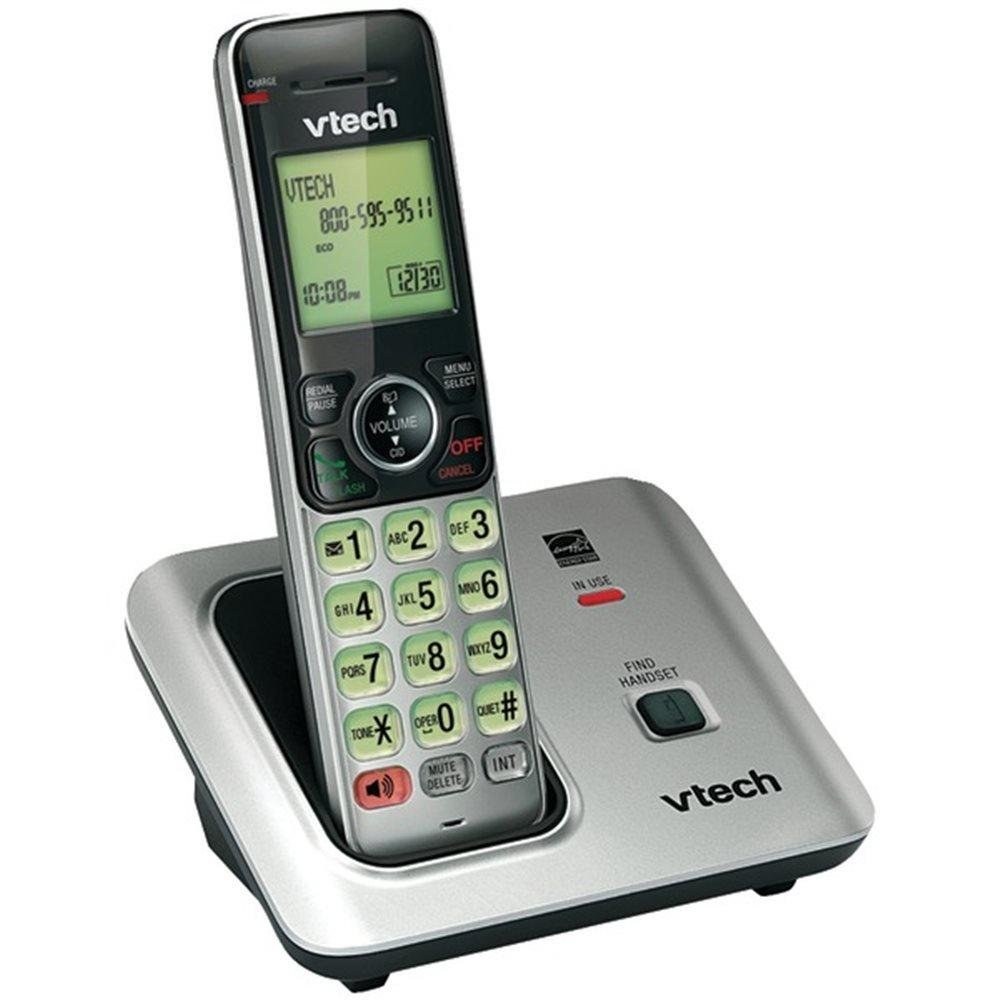
Image: The VTech VTCS6619 DECT 6.0 Cordless Speakerphone with Caller ID, showing the black handset and base unit.
1. Instalación da batería
- Abra a tapa do compartimento da batería na parte traseira do auricular.
- Conecte a ficha da batería firmemente na toma do interior do compartimento.
- Coloque a batería coa etiqueta ARRIBA e meta os cables con coidado dentro do compartimento.
- Pecha a tapa do compartimento da batería.
2. Conexión da unidade base
- Plug the small end of the AC power adapter into the power jack on the back of the telephone base.
- Plug the large end of the AC power adapter into a wall outlet not controlled by a wall switch.
- Conecte un extremo do cable da liña telefónica á toma TEL LINE na parte traseira da base do teléfono.
- Conecte o outro extremo do cable da liña telefónica a unha toma de teléfono da parede.
3. Handset Charging
Once the battery is installed and the base unit is connected, place the handset on the telephone base. The CHARGE light on the handset will illuminate, indicating that the battery is charging. Allow the handset to charge for at least 10 hours before initial use.
Instrucións de funcionamento
This section details the basic functions and features of your VTech VTCS6619 phone.
Realización e recepción de chamadas
- Para facer unha chamada: Preme FALA / FLASH or ORADORe, a seguir, marque o número de teléfono.
- Para responder unha chamada: Cando soa o teléfono, prema FALA / FLASH or ORADOR.
- Para finalizar unha chamada: Preme OFF/BORRAR or place the handset back on the telephone base.
Función de altofalante
Para activar o altofalante durante unha chamada, prema a tecla ORADOR button. Press it again to switch back to the handset earpiece.
Identificación de chamada e chamada en espera
The phone displays the caller's name and number (if available) before you answer. If you subscribe to Call Waiting service, the phone will alert you to an incoming call while you are on another call. Press FLASH para cambiar entre chamadas.
Conferencia telefónica
The VTech VTCS6619 supports 3-way conference calls. While on a call, you can add a third party by pressing the FLASH button, dialing the new number, and then pressing FLASH again to connect all parties.
Sistema de resposta dixital
The integrated digital answering system records incoming messages when you are unavailable. Access messages by pressing the REPRODUCIR/PARAR button on the base or through the handset menu. Refer to the full user guide for detailed instructions on setting up your outgoing message and managing messages.
Mantemento
Proper care ensures the longevity of your telephone system.
Limpeza
Clean the telephone and base unit with a soft, damp cloth. Do not use cleaning sprays or liquid cleaners, as they may damage the finish or electrical components.
Coidado da batería
To maintain optimal battery performance, avoid exposing the handset to extreme temperatures. If the phone will not be used for an extended period, remove the battery to prevent leakage.
Resolución de problemas
If you experience any issues with your phone, refer to the following common problems and solutions:
| Problema | Solución |
|---|---|
| Sen ton de marcación | Ensure the telephone line cord is securely plugged into both the base unit and the wall jack. Check if the AC power adapter is properly connected. |
| Mala calidade de son | Move the handset closer to the base unit. Check for interference from other electronic devices. Ensure the battery is fully charged. |
| O teléfono non carga | Verify the handset is correctly placed on the base unit. Clean the charging contacts on both the handset and base with a dry cloth. Check the power connection to the base unit. |
| Non se mostra o ID de chamada | Ensure you have subscribed to Caller ID service from your telephone service provider. The feature may not work if the caller has blocked their number. |
Especificacións
- Marca: VTech
- Modelo: VTCS6619
- Tipo de teléfono: Sen fíos
- Cor: Negro
- Número de baterías: 1 pilas AAA necesarias (incluídas)
- Material: Plástico
- Fonte de enerxía: Alimentado por batería
- Tipo de marcador: Ton
- Dimensións do artigo (L x W x H): 6.9 x 5.2 x 6.7 polgadas
- Tipo de contestador automático: Dixital
- Peso do artigo: 1 libra
- Dispositivos compatibles: VTech CS6619 handsets, basic answering machines
- Capacidade de chamada de conferencia: 3 vías
- Operación multiliña: Operación en liña única
- Tempo de espera do teléfono: minutos 7200
- Identificador de chamada: Si
Garantía e Soporte
Your VTech VTCS6619 telephone system is covered by a Garantía limitada de 1 anos from the date of purchase. This warranty covers defects in material and workmanship under normal use. For warranty service or technical support, please refer to the contact information provided in your product packaging or visit the official VTech websitio para obter detalles de atención ao cliente.
Conserve o recibo de compra como xustificante de compra para reclamacións de garantía.