
1. Introdución
This manual provides essential information for the proper installation, operation, and maintenance of your Maxcom KXT480 landline telephone. Please read these instructions carefully before using the device to ensure optimal performance and longevity. The Maxcom KXT480 is a corded landline telephone designed for reliable communication in a home or office environment.
2. Contido do paquete
Verifica que todos os elementos estean presentes no paquete:
- Maxcom KXT480 Telephone Unit
- Auricular
- Cable en espiral do auricular
- Cable de Liña Telefónica
- Manual de usuario (este documento)
3. Produto rematadoview
The Maxcom KXT480 is a corded telephone featuring a clear keypad, a comfortable handset, and essential functions for daily communication. It is designed for ease of use and durability.
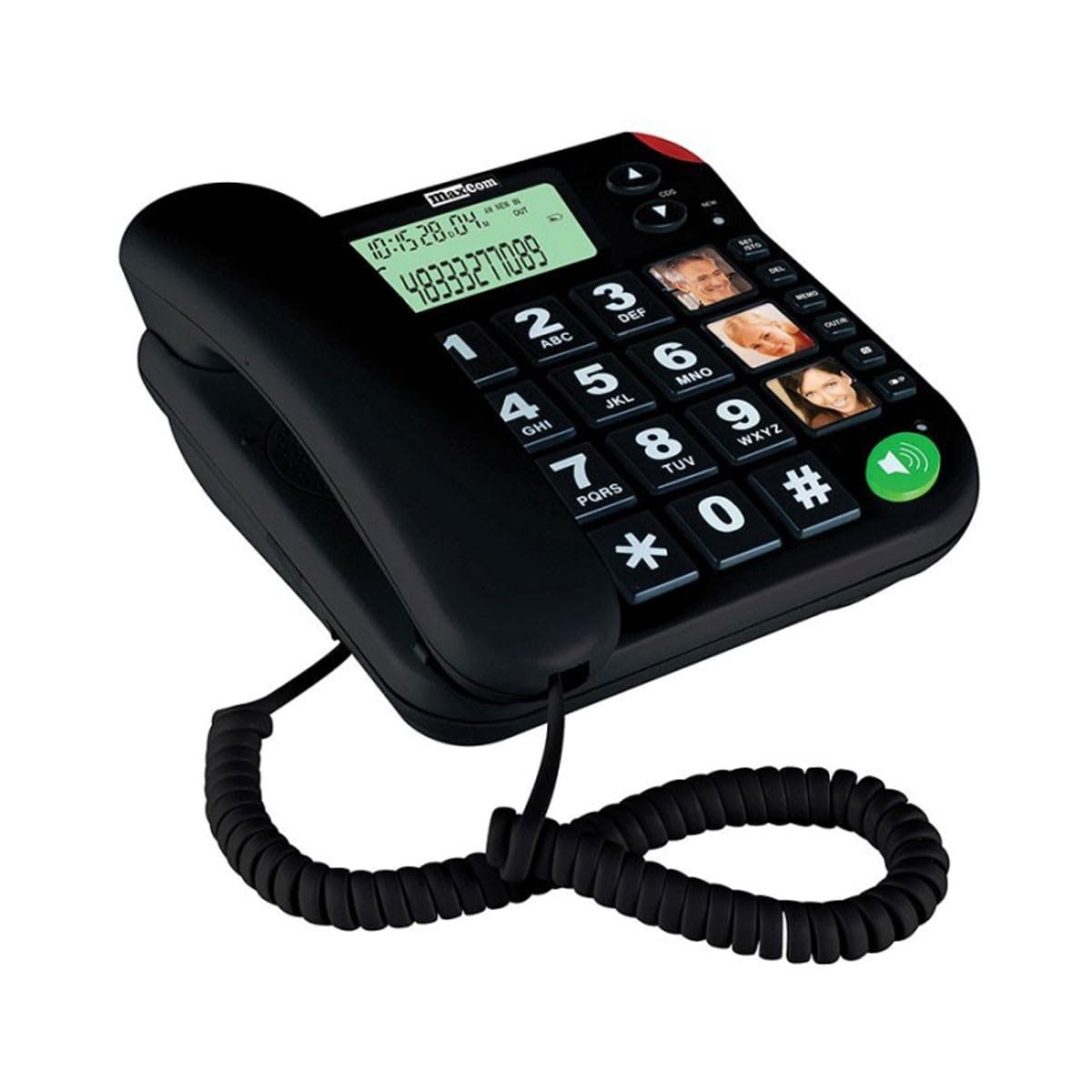
Image of the Maxcom KXT480 landline telephone, showing its black color, keypad, and handset.
As características principais inclúen:
- Corded telephone for reliable connection
- Caller ID functionality
- Speakerphone function (requires batteries for full functionality)
- Basic conference call capability
- Memory storage for frequently dialed numbers
4. Configuración
4.1 Connecting the Telephone
- Connect one end of the coiled handset cord to the handset and the other end to the handset jack on the side of the telephone base.
- Connect one end of the telephone line cord to the LINE jack on the back of the telephone base.
- Connect the other end of the telephone line cord to your wall telephone socket.
4.2 Battery Installation (Optional but Recommended)
The Maxcom KXT480 requires 1 Lithium-Ion battery (included) for certain advanced features such as the display and speakerphone functionality. While the basic telephone functions work without batteries, installing them is recommended for full feature access.
- Locate the battery compartment on the underside of the telephone base.
- Abra a tapa do compartimento da batería.
- Insert the Lithium-Ion battery, ensuring correct polarity (+ and -).
- Pecha a tapa do compartimento da batería de forma segura.
5. Instrucións de funcionamento
5.1 Facer unha chamada
- Levante o auricular ou prema Altavoz button (if batteries are installed).
- Marque o número de teléfono desexado usando o teclado numérico.
- Agarda a que se conecte a chamada.
- Para finalizar a chamada, colgue o auricular ou prema a tecla Altavoz botón de novo.
5.2 Recepción dunha chamada
- When the telephone rings, lift the handset or press the Altavoz botón para responder.
- Para finalizar a chamada, colgue o auricular ou prema a tecla Altavoz botón de novo.
5.3 Identificación da chamada
The telephone supports Caller ID functionality. When an incoming call is received, the caller's number will be displayed on the screen (if batteries are installed and Caller ID service is subscribed through your telephone provider).
5.4 Función de altofalante
To use the speakerphone function, press the dedicated Altavoz button. This allows hands-free communication. Ensure batteries are installed for this feature to work correctly.
5.5 Marcación por memoria
The Maxcom KXT480 allows you to store frequently used numbers for quick dialing. Refer to the on-screen prompts or specific buttons on your device for programming memory slots. Typically, this involves pressing a 'Store' or 'Memory' button, entering the number, and then selecting a memory location.
5.6 Conference Calling
The telephone supports basic conference call functionality. Consult your telephone service provider for details on how to initiate a three-way call, as this often depends on network services.
6. Mantemento
6.1 Limpeza
To clean the telephone, use a soft, damp cloth. Do not use abrasive cleaners or solvents, as these can damage the surface. Ensure the telephone is disconnected from the wall socket before cleaning.
6.2 Almacenamento
If storing the telephone for an extended period, disconnect it from the telephone line and remove any installed batteries. Store in a cool, dry place away from direct sunlight.
7 Solución de problemas
If you encounter issues with your Maxcom KXT480 telephone, please refer to the following common problems and solutions:
| Problema | Causa posible | Solución |
|---|---|---|
| Sen ton de marcación | O cable da liña telefónica está desconectado ou avariado. | Check all cable connections. Try connecting another phone to the wall socket to verify line functionality. |
| O teléfono non soa | Ringer volume is set to off or too low. | Adjust the ringer volume. Ensure the telephone line is active. |
| No display or speakerphone not working | As baterías non están instaladas ou están esgotadas. | Install fresh batteries or check battery polarity. |
| Cannot hear caller or caller cannot hear me | Handset or speakerphone volume too low; faulty connection. | Adjust volume. Check handset cord connection. If using speakerphone, ensure you are close to the microphone. |
8. Especificacións
Detailed technical specifications for the Maxcom KXT480 telephone:
| Característica | Especificación |
|---|---|
| Marca | Maxcom |
| Número de modelo | KXT480 |
| Cor | Negro |
| Tipo de teléfono | Con cordo |
| Material | Plástico |
| Fonte de enerxía | AC/DC (Line Powered) |
| Requisito da batería | 1 Lithium-Ion battery (included) for display/speakerphone |
| Dimensións do artigo (LxWxH) | 20.6 x 16.4 x 9.1 cm |
| Dispositivos compatibles | Fixed networks |
| Tipo de marcador | Teclado único |
| Operación multilínea | Liña única |
| Identificación do chamador | Si |
| Conference Call Functionality | Básico |
| GTIN | 05908235972039 |
| País de Orixe | Portugal |
9. Garantía e soporte
Maxcom products are designed for reliability and performance. For warranty information, please refer to the warranty card included with your purchase or contact your retailer. For technical support or further assistance, please visit the official Maxcom websitio web ou póñase en contacto co seu departamento de atención ao cliente. Garde o recibo da compra como proba de compra para reclamacións de garantía.