
1. Introdución
This manual provides instructions for the APEX LD200RM remote control, designed for use with various APEX LCD and LED television models. This remote control offers full functionality for your compatible APEX television, ensuring convenient operation of all features.
Compatible APEX TV Models:
- LD3249
- LD3288, LD3288T, LD3288M
- LD4077, LE4077M
- LD4088
- LD4688
- LE3212, LE3212D
- LE4012
- LE4612
- LE3242
- LE3942
- LE40B12
- LE4243
- LE4643
- LE5043
2. Configuración
2.1 Instalación da batería
The APEX LD200RM remote control requires two (2) AA batteries for operation. Follow these steps to install the batteries:
- Localice a tapa do compartimento da batería na parte traseira do control remoto.
- Prema a pestana e deslice a tapa para retirala.
- Insira dúas pilas AA, asegurándose de que os terminais positivo (+) e negativo (-) estean aliñados correctamente coas marcas do interior do compartimento.
- Deslice a tapa do compartimento da batería de volta ao seu lugar ata que faga clic de forma segura.
Nota: Substitúa sempre as dúas pilas ao mesmo tempo. Non mesture pilas vellas e novas, nin pilas de diferentes tipos.
2.2 Uso inicial
The APEX LD200RM remote control is an original replacement and typically does not require any programming or pairing. Once batteries are installed, point the remote control towards your compatible APEX television and begin operation.
3. Instrucións de funcionamento
This section details the functions of the buttons on your APEX LD200RM remote control.
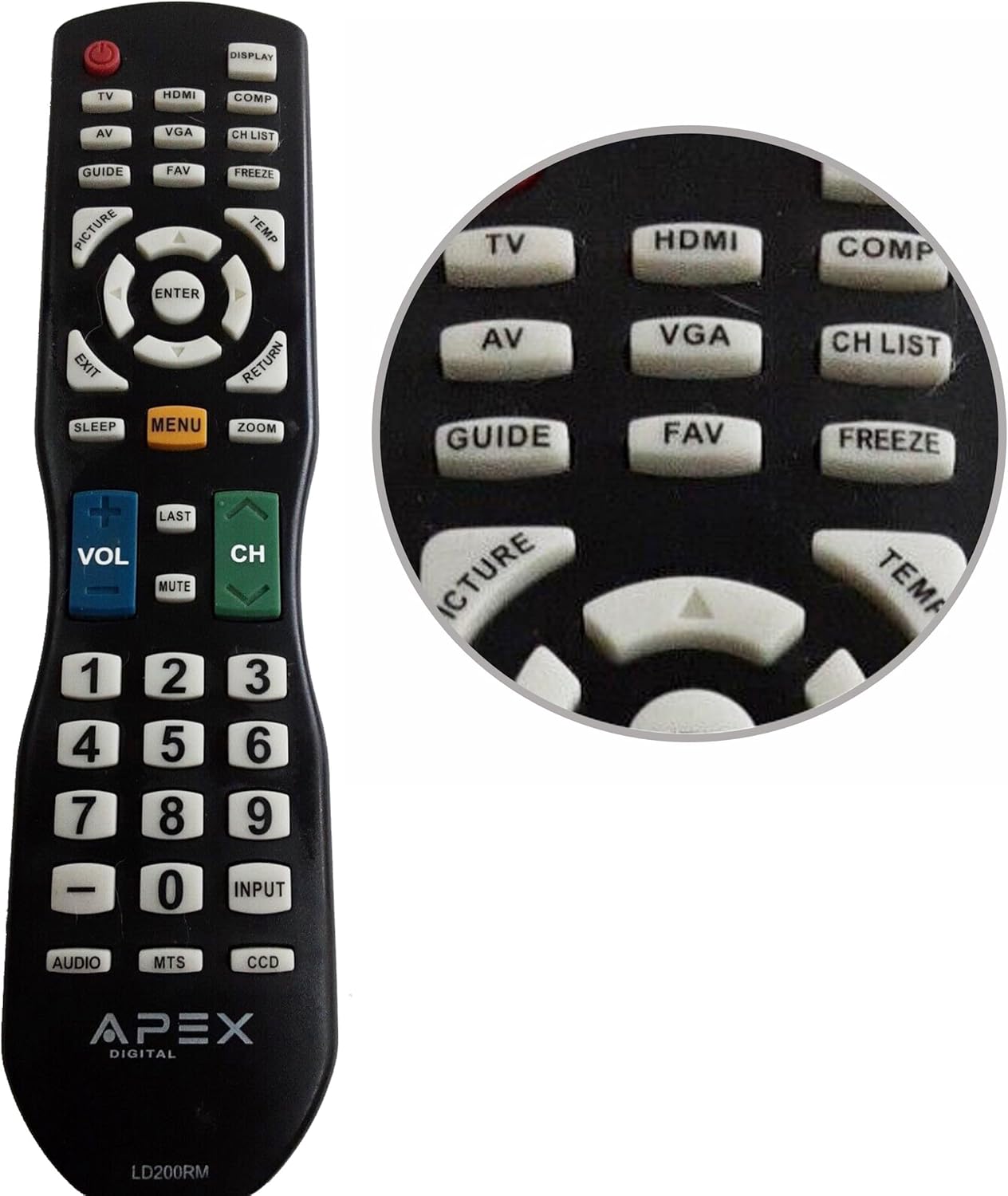
Figure 1: APEX LD200RM Remote Control Layout. This image displays the entire remote control, highlighting the arrangement of its various function buttons, including power, input selection, navigation, volume, channel, and numeric keypad.

Figure 2: Close-up of APEX LD200RM Remote Control Top Buttons. This image provides a detailed view of the upper section of the remote, focusing on buttons such as TV, HDMI, AV, VGA, COMP, CH LIST, DISPLAY, GUIDE, FAV, FREEZE, PICTURE, TEMP, MENU, ENTER, EXIT, RETURN, SLEEP, and ZOOM.
3.1 Power and Input Selection
- POWER (botón vermello): Acende ou apaga a televisión.
- TV: Selects the TV tuner input.
- HDMI: Selects the HDMI input.
- DE: Selects the Audio/Video input.
- VGA: Selects the VGA input.
- COMP: Selects the Component video input.
- MOSTRA: Mostra información na pantalla.
3.2 Control de canles e volume
- VOL (+/-): Aumenta ou diminúe o nivel de volume.
- CH (Arriba/Abaixo): Cambia a canle de televisión cara arriba ou cara abaixo.
- ÚLTIMO: Volve ao anterior viewcanle ed.
- MUTO: Silencia ou activa o audio da televisión.
- LISTA CH: Mostra a lista de canles.
3.3 Menú e navegación
- MENÚ: Abre o menú principal do televisor.
- ENTRAR: Confirms a selection within the menu.
- Botóns de frecha (Arriba/Abaixo/Esquerda/Dereita): Navega polas opcións do menú e axusta a configuración.
- SAÍDA: Sae do menú ou da visualización en pantalla actual.
- DEVOLUCIÓN: Volve ao menú ou pantalla anterior.
3.4 Numeric Keypad and Special Functions
- 0-9 (Numeric Buttons): Introduce directamente os números de canle.
- ENTRADA: Percorre ciclicamente as fontes de entrada dispoñibles.
- GUÍA: Mostra a guía electrónica de programas (se está dispoñible).
- FAV: Accede ás canles favoritas.
- XEAR: Freezes the current image on the screen.
- IMAXE: Axusta a configuración da imaxe.
- TEMP: (Function may vary by model, often related to picture temperature or a specific mode).
- DURMIR: Define o temporizador de sono.
- ZOOM: Axusta o nivel de zoom da pantalla.
- AUDIO: Selects audio modes or tracks.
- MTS: Multi-channel Television Sound (stereo/SAP).
- DCC: Closed Captioning Display.
4. Mantemento
4.1 Substitución da batería
When the remote control's performance degrades or it stops responding, it is likely time to replace the batteries. Refer to Section 2.1 for detailed battery installation instructions. Always use fresh AA batteries.
4.2 Limpeza
Para limpar o mando a distancia, use un pano suave e seco. Para a sucidade persistente, dóreo lixeiramente.ampEnxágüe o pano con auga ou un limpador suave e non abrasivo. Evite o uso de produtos químicos agresivos ou materiais abrasivos, xa que poden danar a superficie ou os compoñentes internos do mando a distancia.
4.3 Almacenamento
Garda o mando a distancia nun lugar fresco e seco, lonxe da luz solar directa e de temperaturas extremas. Se o mando a distancia non se vai usar durante un período prolongado, é recomendable retirar as pilas para evitar fugas e posibles danos.
5 Solución de problemas
- O control remoto non responde:
- Asegúrese de que as baterías estean instaladas correctamente coa polaridade correcta (+/-).
- Substitúa as pilas vellas por pilas AA novas.
- Comprobe se hai algunha obstrución entre o mando a distancia e o sensor de infravermellos do televisor.
- Ensure you are within the effective range of the television's IR receiver.
- Some buttons are not working:
- Isto podería indicar que a batería está baixa. Substitúa as baterías.
- Ensure the remote is clean and there is no debris lodged under the buttons.
- Verify that the button function is applicable to your specific TV model. Some functions may not be supported by all compatible TVs.
- Television is not turning on/off:
- Confirm the television is plugged into a working power outlet.
- Try using the power button directly on the television to rule out a TV issue.
6. Especificacións
| Característica | Detalle |
|---|---|
| Número de modelo | LD200RM |
| Marca | Apex |
| Dispositivos compatibles | APEX LCD & LED Televisions |
| Fonte de enerxía | 2 pilas AA (non incluídas) |
| Dimensións do produto | 10 x 6 x 2 polgadas (aproximadamente) |
| Peso do elemento | 3.2 onzas (aproximadamente) |
| Cor | Negro |
| Característica especial | Deseño ergonómico |
7. Información da garantía
This APEX LD200RM remote control typically comes with a 30-day warranty from the date of purchase. This warranty covers manufacturing defects. For specific details regarding warranty claims, returns, or replacements, please refer to your purchase documentation or contact the seller directly.
8. Apoio
If you encounter issues not covered in this manual or require further assistance, please contact the retailer or the manufacturer's customer support. When contacting support, please have your product model number (LD200RM) and your television model number readily available.