

1. Introdución
This manual provides instructions for the safe and efficient use of your Brennenstuhl Secure-Tec 8-Outlet Power Strip, Model 1159490936. This power strip features surge protection and an intelligent Main-Follow function, designed to manage power to connected devices automatically.
Lea este manual detidamente antes de operar o dispositivo e gárdeo para futuras consultas.
2. Instrucións de seguridade
- Do not exceed the maximum total power rating of 3500W (16A).
- Ensure the power strip is connected to a properly grounded outlet.
- Non use en húmido ou damp condicións.
- Do not open or modify the device. Refer all servicing to qualified personnel.
- Manter fóra do alcance dos nenos.
- Avoid covering the power strip to prevent overheating.
3. Produto rematadoview
The Brennenstuhl Secure-Tec power strip is equipped with 8 outlets, a 3-meter cable, and an illuminated safety switch. It integrates surge protection up to 19,500A and a Main-Follow automatic control system.
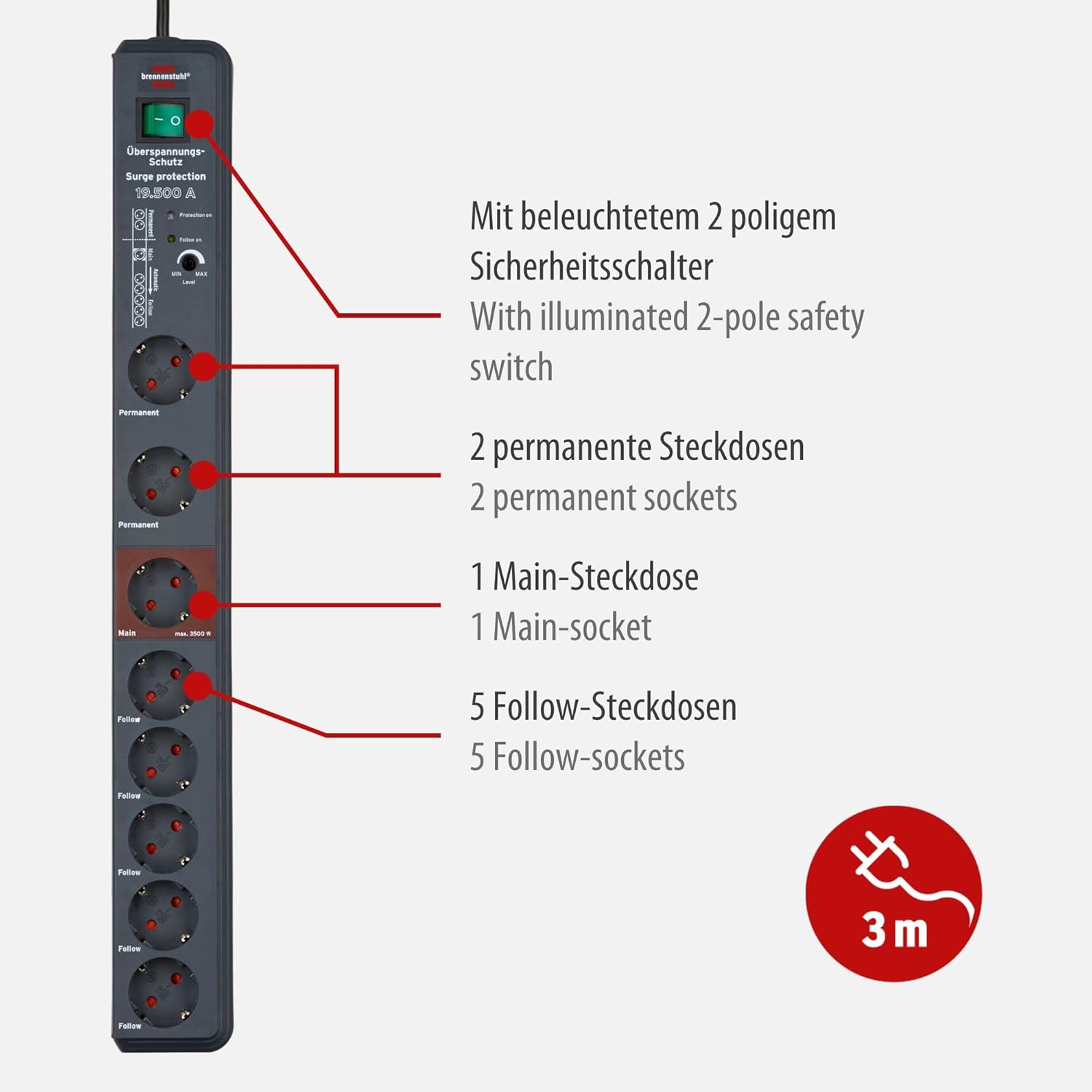
Image: Labeled diagram illustrating the components of the power strip, including the illuminated 2-pole safety switch, 2 permanent sockets, 1 Main socket, and 5 Follow sockets. Also indicates the 3m cable length.
- Illuminated Safety Switch: Controls power to all Main and Follow sockets.
- Indicador de protección contra sobretensións: A light indicating active surge protection.
- Permanent Sockets (x2): These two sockets are always powered when the safety switch is ON, independent of the Main-Follow function.
- Main Socket (x1): Connect your primary device here. Its power state controls the Follow sockets.
- Follow Sockets (x5): These sockets are automatically switched on or off based on the power state of the device connected to the Main socket.
- Adjustable Switching Threshold: Allows adjustment of the power consumption level (8 to 80W) in the Main socket that triggers the Follow sockets.
4. Configuración
- Desembalaxe: Carefully remove the power strip from its packaging. Inspect for any visible damage.
- Colocación: Position the power strip on a stable, dry surface, away from direct sunlight, heat sources, and moisture. Ensure the 3-meter cable can reach your wall outlet without tension.
- Conexión inicial: Plug the power strip's main plug into a grounded wall outlet.
- Encendido: Press the illuminated safety switch to the 'ON' position. The switch will light up, and the surge protection indicator light should also be on, confirming active protection.
5. Instrucións de funcionamento
5.1. Using Permanent Sockets
The two permanent sockets provide continuous power when the power strip's main switch is on. These are suitable for devices that require constant power, such as routers, modems, or chargers.
- Plug devices requiring constant power into the sockets labeled "Permanent".
5.2. Main-Follow Function
The Main-Follow function allows you to control multiple devices (Follow sockets) by switching on or off a single primary device (Main socket).

Image: Diagram explaining the Main-Follow function. When the device in the Main socket (e.g., computer) is switched on, devices in the Follow sockets (e.g., monitor, speakers, printer) are automatically activated. When the Main device is switched off, Follow devices are also switched off.
- Connect Main Device: Plug your primary device (e.g., computer, TV) into the socket labeled "Main". This device should have a power consumption between 8W and 80W when active.
- Connect Follow Devices: Plug secondary devices (e.g., monitor, speakers, printer, scanner) into the sockets labeled "Follow".
- Operación:
- When the device in the Main socket is switched on and draws power above the set threshold, the Follow sockets will automatically activate.
- When the device in the Main socket is switched off or draws power below the set threshold (e.g., in standby mode), the Follow sockets will automatically deactivate.
- Adjusting Switching Threshold: Use the "MIN/MAX Level" rotary switch located near the Main socket to adjust the power threshold (8W to 80W) at which the Follow sockets activate. Turn towards "MIN" for lower power devices, and "MAX" for higher power devices. Test the setting by switching your Main device on and off.
5.3. Protección contra sobretensiones
The power strip provides surge protection up to 19,500A, safeguarding connected devices from voltage spikes. The "Protection On" indicator light confirms that the surge protection is active. If this light goes out, the surge protection has been triggered and absorbed a significant surge. The power strip may still function as a standard power strip, but its surge protection capability is compromised. In such a case, it is recommended to replace the power strip to ensure continued protection.
6. Mantemento
- Limpeza: Disconnect the power strip from the wall outlet before cleaning. Use a dry, soft cloth to wipe the surface. Do not use liquid cleaners or abrasive materials.
- Inspección: Periodically inspect the power strip and its cable for any signs of damage, such as cuts, fraying, or discoloration. If damage is found, discontinue use immediately and replace the unit.
7 Solución de problemas
| Problema | Causa posible | Solución |
|---|---|---|
| No power to any outlets. | Power strip switch is off; wall outlet has no power; circuit breaker tripped. | Ensure safety switch is ON. Check wall outlet with another device. Reset building's circuit breaker if tripped. |
| Follow sockets do not activate/deactivate with Main device. | Main device power consumption is outside the threshold (8-80W); switching threshold is incorrectly set. | Verify Main device power consumption. Adjust the "MIN/MAX Level" rotary switch. Ensure Main device is fully on/off, not in standby. |
| Surge protection indicator light is off. | Surge protection has been activated and absorbed a power surge. | The power strip's surge protection is no longer active. Replace the power strip for continued surge protection. |
| Sobrecarga. | Total power consumption of connected devices exceeds 3500W (16A). | Unplug some devices to reduce the load. The power strip may have an internal overload protection that needs to reset (unplug from wall for a few minutes). |
8. Especificacións
| Característica | Detalle |
|---|---|
| Número de modelo | 1159490936 |
| Total de tomas de corrente | 8 (2 Permanent, 1 Main, 5 Follow) |
| Voltage | 230 voltios |
| Corrente nominal | 16A |
| Total Power Max. | 3500 W |
| Surge Protection Max. Leakage Current | 19,500A |
| Lonxitude do cable | 3 metros |
| Main-Follow Switching Threshold | Axustable de 8W a 80W |
| Dimensións do produto | 2.56 x 4.13 x 0.1 polgadas |
| Peso do elemento | 2.11 libras |
| Cor | Antracita |
| Fabricante | Brennenstuhl |
9. Garantía e soporte
Brennenstuhl products are manufactured to high-quality standards. For information regarding warranty terms and conditions, please refer to the documentation included with your purchase or visit the official Brennenstuhl websitio.
For technical support or inquiries, please contact Brennenstuhl customer service through their official channels.