
Introdución
The Arctic-Pro Tower Fan with Remote Control is designed to provide wide-range air distribution for your home or office. Standing 42 inches high, its modern design and minimal footprint ensure it fits seamlessly into most environments without occupying excessive space. Engineered for efficient airflow with reduced noise, this fan features 80-degree oscillation to circulate air effectively. It includes a convenient remote control and a digital screen for easy operation.

Figure 1: Arctic-Pro Digital Screen Oscillating Tower Fan with visible airflow and remote control.
Instrucións de seguridade
- Desconecte sempre o ventilador da toma de corrente antes de limpalo, realizando tarefas de mantemento ou movelo.
- Non fagas funcionar o ventilador cun cable ou enchufe danados. Se o cable ou o enchufe están danados, ponte en contacto co servizo de atención ao cliente.
- Keep fingers, hair, and loose clothing away from the fan blades and openings during operation.
- Non mergullo o ventilador en auga ou outros líquidos.
- Asegúrate de colocar o ventilador sobre unha superficie estable e nivelada para evitar que se volque.
- Non use o ventilador en lugares húmidos ou damp lugares como baños ou zonas de lavandería.
- Este aparello non está pensado para o seu uso por persoas (incluídos nenos) con capacidades físicas, sensoriais ou mentais reducidas, ou con falta de experiencia e coñecementos, a menos que teñan supervisión ou instrucións sobre o uso do aparello por unha persoa responsable da súa seguridade.
Contido do paquete
Please ensure all parts are present before assembly. Open both ends of the box to locate all components.
- Unidade de ventilador de torre
- Pedestal (for 42-inch configuration)
- Base (2 halves)
- Control remoto
- Parafusos para o conxunto da base
- Cable de alimentación
Configuración e montaxe
Assembly typically takes 6-9 minutes.
- Desembale con coidado todos os compoñentes da caixa.
- Assemble the two halves of the base by aligning them and pressing firmly until they snap together.
- Choose your desired height configuration:
- 42-Inch Configuration: Attach the pedestal to the assembled base, then secure the tower fan unit onto the pedestal.
- 32-Inch Configuration: Attach the tower fan unit directly to the assembled base.
- Secure the fan unit to the base/pedestal using the provided screws.
- Enchufe o cable de alimentación nunha toma eléctrica estándar.

Figure 2: The Arctic-Pro Tower Fan can be configured at two different heights.
Instrucións de funcionamento
The Arctic-Pro Tower Fan can be operated using the control panel on the unit or the included remote control.
Panel de control e funcións remotas
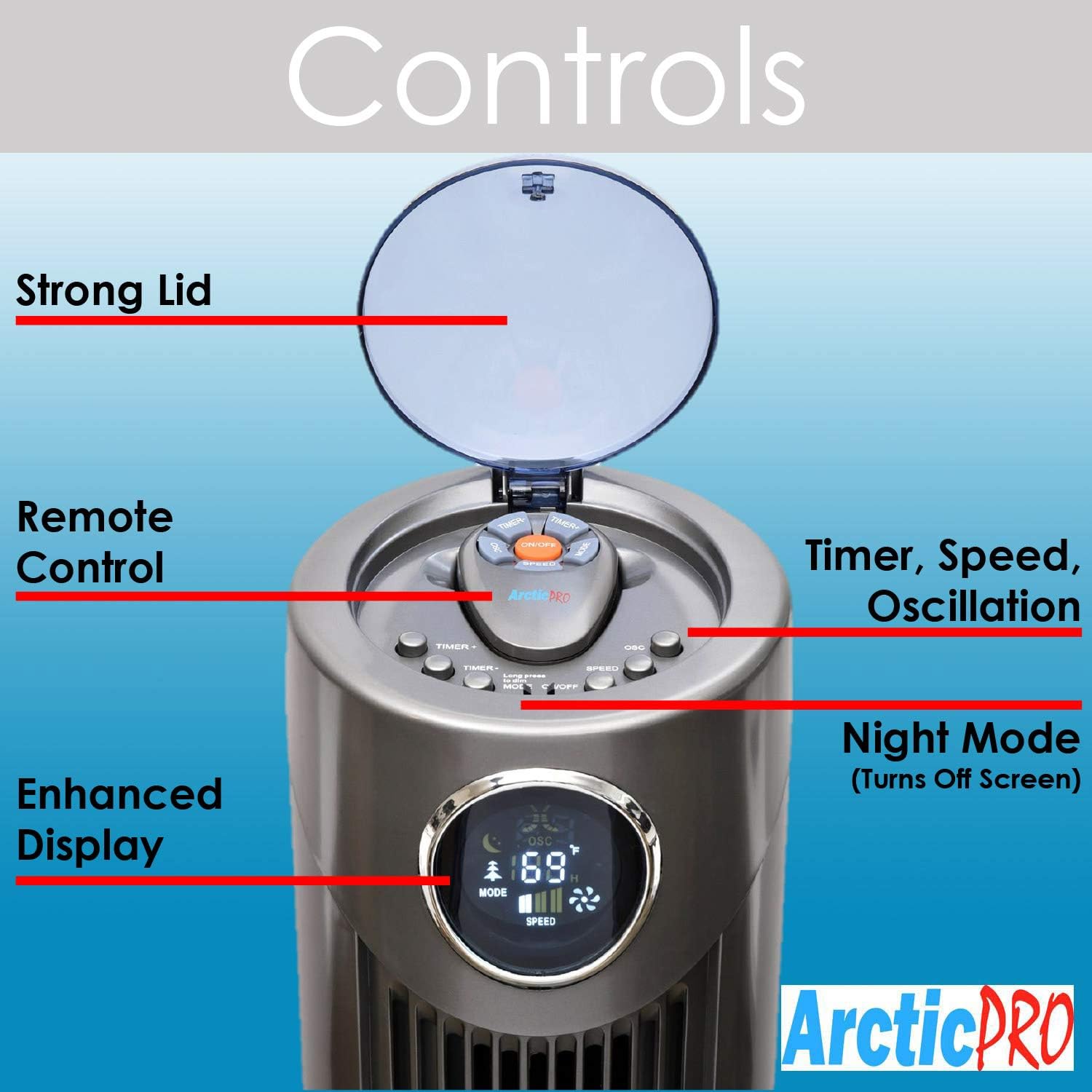
Figura 3: detallada view of the fan's control panel.
- Encendido/apagado: Press the power button on the control panel or remote to turn the fan on or off.
- Configuración de velocidade: The fan features 3 speed settings. Press the Speed button to cycle through Low, Medium, and High.
- Modos: The fan offers Sleep, Nature Wind, and Normal Wind modes. Press the Mode button to switch between these settings.
- Oscilación: Press the Oscillation button to activate or deactivate the 80-degree oscillation feature, circulating air throughout the room.
- Modo nocturno: To turn off the digital screen for sensitive sleepers, hold down the Mode button for 5 seconds. To illuminate the screen again, press the Mode button once.
- Función de temporizador: Activate the timer function to automatically shut off the fan after a set period, up to 12 hours. Press the Timer button to cycle through available time increments.
Control remoto
The convenient remote control allows you to operate all fan functions from a distance. It can be stored on top of the fan for easy access.

Figure 4: The fan's remote control and integrated handle.
Mantemento
Unha limpeza regular garante un rendemento óptimo e unha maior duración do teu ventilador.
- Limpeza exterior: Wipe down the exterior surfaces of the fan with a soft, damp pano. Non use produtos de limpeza ou disolventes abrasivos.
- Limpeza de interiores: For deeper cleaning, there is a screw on the back that holds the back plate. Remove the screw, take off the back plate, and gently clean the internal components with a soft brush or vacuum cleaner attachment to remove dust buildup. Ensure the fan is completely dry before reassembling and operating.
- Desenchufe sempre o ventilador antes de realizar calquera limpeza ou mantemento.
Resolución de problemas
- O ventilador non se acende:
- Asegúrate de que o cable de alimentación estea conectado correctamente a unha toma de corrente que funcione.
- Comprobe se a toma de corrente recibe corrente conectando outro dispositivo.
- Verify that the power button on the unit or remote has been pressed.
- Fluxo de aire débil:
- Aumenta a configuración da velocidade do ventilador.
- Clean the fan's air intake and exhaust vents to remove any dust or obstructions.
- Ruído inusual:
- Ensure the fan is placed on a stable, flat surface.
- Check for any foreign objects that may have fallen into the fan's vents.
- Perform interior cleaning to remove dust buildup that might cause rattling.
- O control remoto non funciona:
- Replace the batteries (requires 2 AAA batteries).
- Ensure there are no obstructions between the remote and the fan's sensor.
Especificacións
| Característica | Detalle |
|---|---|
| Marca | Arctic-Pro |
| Nome do modelo | 2103 |
| Cor | Gris |
| Dimensións do produto | 12" D x 12" W x 42" H |
| Peso do elemento | 9.85 libras |
| Fonte de enerxía | Eléctrico con cable |
| Número de niveis de potencia | 3 |
| Oscilación | 80 graos |
| Características especiais | Adjustable Height, Lightweight, Oscillating, Remote Controlled, Timer |
| Compoñentes incluídos | Mando a distancia |
| Pilas necesarias | 2 pilas AAA (para o mando a distancia) |

Figure 5: Dimensions of the Arctic-Pro Tower Fan.
Garantía e soporte
This Arctic-Pro fan comes with a Limited Warranty of 120 Days from the date of purchase.
For any questions or support needs, please contact the manufacturer at: popshopcs@gmail.com
Recursos adicionais
Produto Review Vídeo
Vídeo 1: Unha resposta honestaview of the Arctic-Pro Digital Screen Oscillating Fan, provided by a seller. This video demonstrates various features and user experience.