
Introdución
This manual provides detailed instructions for the operation and maintenance of your Calypso K5609/3 Digital Quartz Watch. Please read this manual thoroughly before using your watch to ensure proper function and longevity. Keep this manual for future reference.
Información de seguridade
- Avoid exposing the watch to extreme temperatures (hot or cold) for extended periods.
- Do not attempt to open the watch case or replace the battery yourself, as this may void the warranty and compromise water resistance. Contact a qualified technician.
- Clean the watch with a soft, dry cloth. Avoid using chemical cleaners.
- While the watch is water-resistant up to 100 meters, avoid operating buttons underwater to prevent water ingress.
Contido do paquete
- Calypso K5609/3 Digital Quartz Watch
- Manual de usuario (este documento)
Vixíaview
Your Calypso K5609/3 watch features a digital display with various functions. Familiarize yourself with the buttons and display layout.
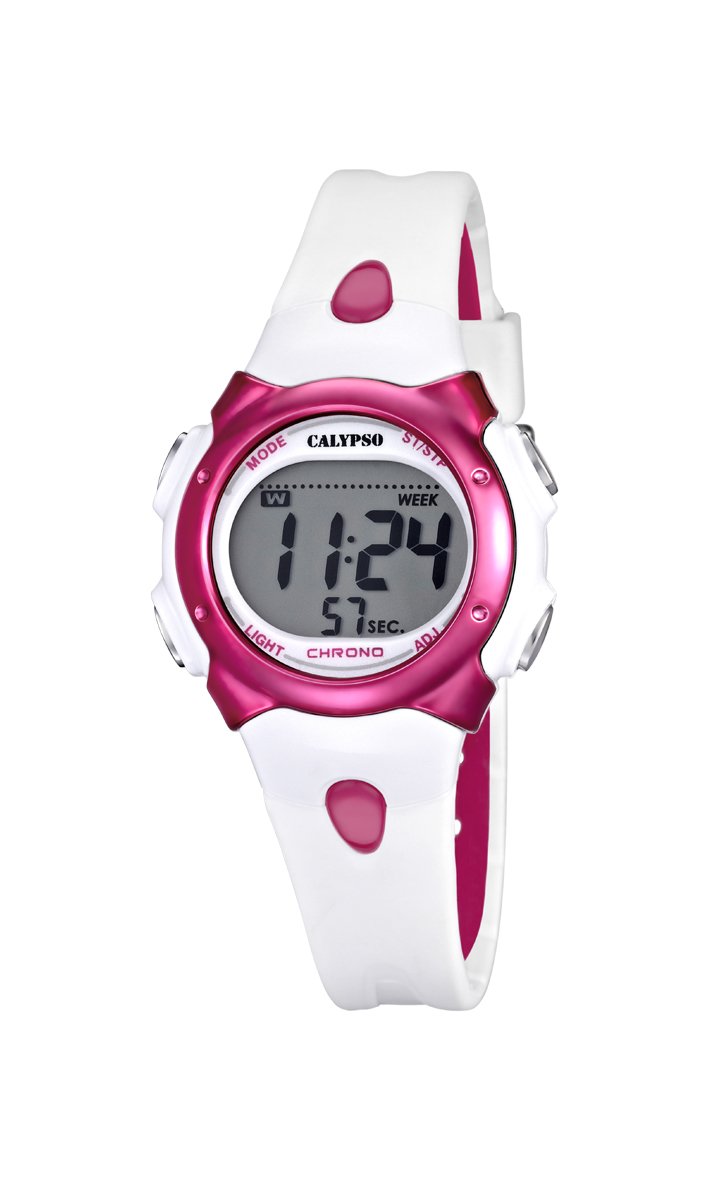
Figura 1: Fronte view of the Calypso K5609/3 Digital Quartz Watch. This image shows the watch face with its digital display and the overall design of the watch, including the white plastic strap.

Figura 2: En ángulo view of the Calypso K5609/3 Digital Quartz Watch. This image provides a different perspective of the watch, highlighting its round case shape and the texture of the plastic strap.
Button Functions (Typical Digital Watch Layout)
While specific button labels may vary, most digital watches follow a similar pattern:
- Botón MODE: Cycles through different modes (Time, Alarm, Chronograph).
- SET/ADJUST Button: Used to enter setting mode and confirm selections.
- Botón START/STOP: Used to start/stop chronograph, adjust values upwards.
- Botón LUZ: Activa a retroiluminación para a iluminación.
Refer to the markings on your specific watch for exact button identification.
Configuración
Axuste da hora e da data
- Preme o MODO botón repetidamente ata que a pantalla da hora comece a parpadear ou entre no modo de axuste da hora.
- Preme o AXUSTAR/CONFIGURAR para seleccionar o díxito que desexa cambiar (por exemplo, horas, minutos, ano, mes, día).
- Usa o INICIAR/PARAR botón para aumentar o valor seleccionado. Manteña premido para un axuste máis rápido.
- Continúa presionando AXUSTAR/CONFIGURAR e INICIAR/PARAR until all time and date settings are correct.
- Preme o MODO botón para saír do modo de configuración e volver á visualización normal da hora.
Configuración da alarma
- Preme o MODO botón ata chegar ao modo de alarma (que adoita indicarse con "AL" ou unha icona de campá).
- Preme o AXUSTAR/CONFIGURAR button to select the alarm hour.
- Usa o INICIAR/PARAR botón para axustar a hora de alarma desexada.
- Preme AXUSTAR/CONFIGURAR again to select the alarm minute.
- Usa o INICIAR/PARAR botón para axustar o minuto de alarma desexado.
- Preme MODO para saír do modo de configuración da alarma.
- Para activar/desactivar a alarma, normalmente prema o botón INICIAR/PARAR botón mentres está no modo de alarma. Aparecerá/desaparecerá unha icona de alarma na pantalla.
En funcionamento
Uso do cronógrafo (reloxo)
- Preme o MODO button until you reach the Chronograph mode (often indicated by "ST" or "CH"). The display should show "00:00:00".
- Preme o INICIAR/PARAR botón para iniciar o cronógrafo.
- Preme o INICIAR/PARAR button again to stop the chronograph.
- Para reiniciar o cronógrafo, prema o botón AXUSTAR/CONFIGURAR button while the chronograph is stopped.
- Preme MODO to exit the chronograph mode.
Función de contraluz
Para iluminar a pantalla en condicións de pouca luz, prema o botón LUZ button. The backlight will typically stay on for a few seconds.
Resistencia á auga
Your Calypso K5609/3 watch is water-resistant up to 100 meters (10 ATM). This means it is suitable for swimming and snorkeling. However, it is not recommended for scuba diving. Do not operate any buttons while the watch is submerged in water, xa que isto pode comprometer o selo de auga.
Mantemento
Limpar o reloxo
Regularly clean your watch to maintain its appearance and function. Use a soft, slightly damp cloth to wipe the case and strap. For the plastic strap, mild soap and water can be used, but ensure no soap residue remains. Avoid harsh chemicals or abrasive materials.
Substitución da batería
The watch is powered by a quartz battery. When the display becomes dim or the watch stops functioning, the battery may need replacement. Battery life varies depending on usage, especially backlight and alarm functions. It is recommended to have the battery replaced by a qualified watch technician to ensure the water resistance seal is properly maintained.
Resolución de problemas
| Problema | Causa posible | Solución |
|---|---|---|
| A pantalla do reloxo está en branco ou escura. | Batería baixa ou esgotada. | Substitúa a batería (recomendado por un profesional). |
| A hora é incorrecta. | A hora non foi axustada correctamente ou foi axustada accidentalmente. | Refer to "Setting Time and Date" section to reset the time. |
| Non soa a alarma. | A alarma non está activada ou está configurada incorrectamente. | Ensure alarm is activated and set to the correct time. |
| Auga dentro do reloxo. | Buttons operated underwater or seal compromised. | Leve o reloxo inmediatamente a un profesional para que o inspeccione e o repare e evite máis danos. |
Especificacións
- Modelo: K5609/3
- Marca: Calipso
- Tipo de visualización: Dixital
- Movemento: Cuarzo
- Material da caixa: Plástico
- Diámetro da caixa: 33 mm
- Espesor da caixa: 8 mm
- Material da banda: Plástico
- Ancho de banda: 14 mm
- Tipo de peche: Pin Buckle (Boucle Ardillon)
- Material da xanela de marcación: Acrílico
- Resistencia á auga: 100 metros (10 caixeiros automáticos)
- Características especiais: Alarm, Chronograph, Day-Date-Month Calendar
- Fonte de enerxía: Alimentado por batería
- Dimensións do produto: 20 x 20 x 20 cm; 50 grams (packaging dimensions, watch itself is smaller)
Garantía e Soporte
For warranty information and customer support, please refer to the official Calypso websitio web ou póñase en contacto co seu distribuidor autorizado. Garde o recibo de compra como proba de compra para reclamacións de garantía.
Para obter máis axuda, visite: www.calypsowatches.com