
1. Introdución
This manual provides detailed instructions for the installation, operation, and maintenance of the Simplex E-Plex 5700 Cylindrical Prox Lock, model E5731BWL-626-41. This advanced electronic lock offers secure access control through proximity card/fob and keypad entry, featuring robust audit trail capabilities. Please read this manual thoroughly before installation and use to ensure proper function and longevity of your lock.
2. Información de seguridade
Always follow basic safety precautions to reduce the risk of injury or damage. This lock is designed for indoor use unless otherwise specified. Do not expose the lock to extreme temperatures, moisture, or corrosive substances. Only use specified components and tools for installation. Unauthorized modifications may void the warranty and compromise security.
3. Contido do paquete
Comprobe que todos os compoñentes estean presentes antes de comezar a instalación:
- Simplex E-Plex 5700 Cylindrical Prox Lock Assembly
- Kit de hardware de montaxe
- Modelo de instalación
- Manual de usuario (este documento)
- Guía de programación
- SFIC Cylinder Prep (less core)
4. Configuración e instalación
4.1 Comprobacións previas á instalación
Ensure the door is suitable for a cylindrical lock. The door thickness should be between 1-3/8" (35mm) and 2-1/4" (57mm). Verify the backset measurement is 2-3/4" (70mm).
4.2 Instalación mecánica
- Prepara a porta: Use the provided template to mark and drill holes for the lockset and latch assembly.
- Instalar o pestillo: Insert the latch into the door edge and secure it with screws. Ensure the latch bolt operates smoothly.
- Install Outside Housing: Feed the cable from the outside housing through the door hole. Position the outside housing flush against the door.
- Install Inside Housing: Connect the cable from the outside housing to the inside housing. Align the inside housing with the mounting posts and secure it with screws.
- Insert SFIC Core: If using an SFIC core, insert it into the cylinder housing.
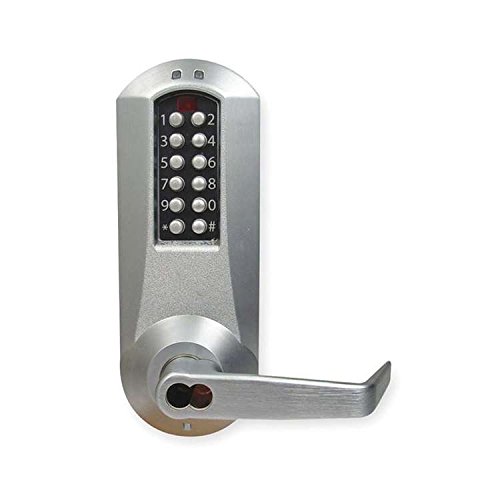
Image 1: Simplex E-Plex 5700 Cylindrical Prox Lock. This image displays the front view of the lock, highlighting its keypad and proximity reader area, along with the cylindrical design for door installation.
4.3 Programación inicial
Upon first power-up, the lock will require a Master Code to be set. Refer to the separate Programming Guide for detailed steps on setting the Master Code, adding/deleting user codes, and enrolling proximity cards/fobs.
5. Instrucións de funcionamento
5.1 Unlocking with Proximity Card/Fob
Present an enrolled proximity card or fob to the reader area on the outside housing. The lock will emit an audible signal and the LED will illuminate green, indicating successful access. Turn the lever to open the door.
5.2 Unlocking with Code
Enter a valid user code on the keypad, followed by the # key. The lock will emit an audible signal and the LED will illuminate green, indicating successful access. Turn the lever to open the door.
5.3 Mecanismo de bloqueo
The lock automatically re-locks after a preset time (typically 5 seconds) once the door is closed or the lever is released. No action is required to re-lock the door.
5.4 Audit Trail Retrieval
The E-Plex 5700 stores up to 30,000 audit events. To retrieve audit trail data, specialized software and a data transfer device (sold separately) are required. Consult the Programming Guide for detailed instructions on audit trail management.
6. Mantemento
6.1 Substitución da batería
The lock is powered by batteries (typically AA alkaline, quantity varies by model). When the batteries are low, the lock will provide a low battery warning (e.g., specific LED flash or audible tone) upon entry. Replace all batteries simultaneously with new, high-quality alkaline batteries. Refer to the Programming Guide for specific battery compartment access.
6.2 Limpeza
Limpar o exterior da fechadura cun pano suave eamp cloth. Do not use abrasive cleaners, solvents, or chemical sprays, as these can damage the finish and electronic components.
7 Solución de problemas
- O peche non responde: Check battery levels. Replace batteries if necessary. Ensure the cable connection between the inside and outside housings is secure.
- Código non funciona: Verify the code is entered correctly, followed by the # key. Ensure the code is active and has not expired. Check if the lock is in a lockout or passage mode.
- Proximity Card Not Recognized: Ensure the card is enrolled in the lock's memory. Present the card firmly and directly to the reader. Check for interference from other RFID devices.
- Lever Does Not Turn: Check for any obstructions in the door or latch mechanism. Ensure the lock is receiving power and is not in a locked state.
- Funcionamento intermitente: This may indicate low batteries or a loose connection. Replace batteries or re-check wiring.
8. Especificacións
| Característica | Detalle |
|---|---|
| Número de modelo | E5731BWL-626-41 |
| Tipo de bloqueo | Cylindrical Prox Lock |
| Códigos de acceso | Ata 3,000 |
| Auditoría de eventos | Ata 30,000 |
| Cylinder Prep | 6/7-Pin SFIC Prep (Less Core) |
| Retroceso | 2-3/4" (70 mm) |
| Lanzamento do pestillo | 1/2" (13 mm) |
| Remate | Cromo satinado |
| Fonte de enerxía | Battery Operated (Type and quantity not specified, typically AA) |
9. Información da garantía
Simplex products are backed by a manufacturer's warranty against defects in materials and workmanship. The specific terms and duration of the warranty may vary. Please retain your proof of purchase. For detailed warranty information, refer to the documentation included with your product or visit the official Simplex websitio.
10. Apoio
For technical assistance, troubleshooting, or further inquiries regarding your Simplex E-Plex 5700 lock, please contact Simplex customer support. Contact information can typically be found on the manufacturer's websitio web ou na embalaxe do produto.
Recursos en liña: www.simplex.com