
1. Introdución
Thank you for choosing the HOMCOM A2-0054 High Back Vibration Massage Office Chair. This manual provides essential information for the safe assembly, operation, and maintenance of your new office chair. Please read these instructions thoroughly before use and retain them for future reference.
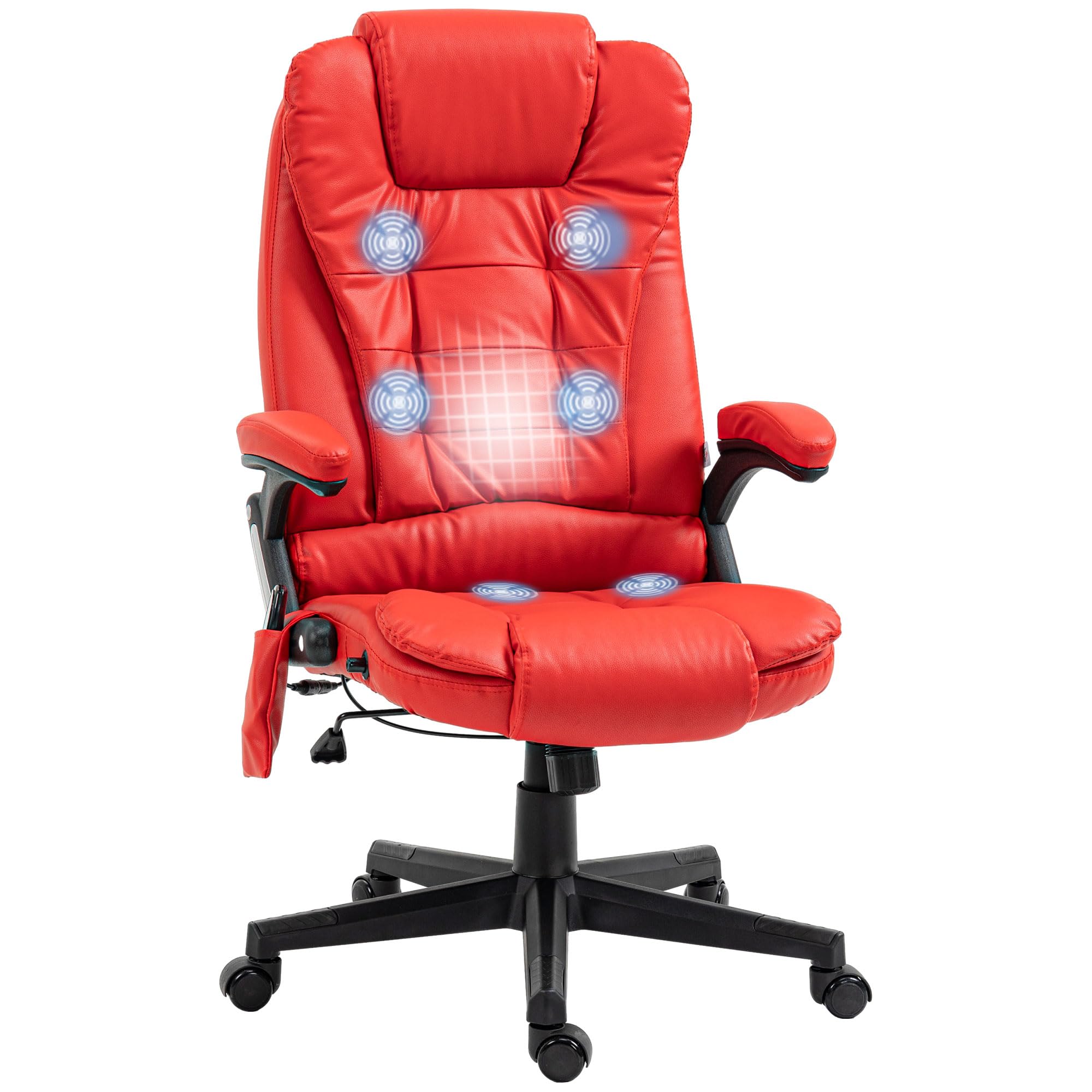
Image 1.1: HOMCOM A2-0054 High Back Vibration Massage Office Chair in Red.
2. Instrucións de seguridade
- Asegúrate de que todos os compoñentes estean presentes e non estean danados antes da montaxe. Non o uses se falta algunha peza ou está rota.
- Follow assembly instructions carefully. Incorrect assembly can lead to instability and injury.
- Do not stand on the chair. Use it only for sitting.
- Non exceda a capacidade de peso máxima de 265 lb (120 kg).
- Manteña os nenos e as mascotas lonxe da cadeira durante a montaxe e o funcionamento.
- Evite colocar a cadeira preto de fontes de calor ou baixo a luz solar directa durante períodos prolongados para evitar a degradación do material.
- Disconnect the power adapter for the massage and heating functions when not in use or before cleaning.
- Do not attempt to repair or modify the electrical components of the massage function. Contact qualified service personnel if issues arise.
3. Contido do paquete
Verify that all parts are included in the package before beginning assembly. Refer to the separate assembly instructions provided with your chair for a detailed list of components and hardware.

Image 3.1: The chair is delivered in one package.
4. Instrucións de montaxe
Detailed assembly instructions, including a list of all parts and step-by-step diagrams, are provided in a separate document within your product packaging. Please follow these instructions carefully to ensure proper and safe assembly of your HOMCOM office chair. Assembly typically requires basic tools and can be completed by one person.
5. Instrucións de funcionamento
5.1. Axuste de altura
To adjust the chair's height, locate the lever on the right side, beneath the seat. While seated, pull the lever upwards to lower the chair. To raise the chair, stand up slightly to relieve weight from the seat, then pull the lever upwards. Release the lever at the desired height to lock it in place.

Image 5.1: Height adjustment lever operation.
5.2. Función reclinable
The chair features a 120-degree reclining function. To recline, push your back against the backrest. The chair will recline smoothly. To return to an upright position, lean forward. The chair does not have a locking recline mechanism; it relies on body weight for position.

Image 5.2: Chair reclining function.
5.3. Vibration Massage and Heating
The chair is equipped with a six-point vibration massage system and a lumbar heating function, controlled by a remote. Connect the chair's power adapter to a suitable electrical outlet. The remote control allows you to:
- Encendido/apagado: Usa o botón de acendido/apagado do mando a distancia.
- Modos de masaxe: Select from various vibration patterns (M1, M2, M3, M4, M5) or an automatic cycle (AUTO).
- Intensidade: Adjust vibration intensity (Hi/Lo).
- Áreas de destino: Select specific massage zones (BACK, LUMBAR, THIGH).
- Función de calor: Activate or deactivate the lumbar heating.
- Temporizador: Set the operating duration (15, 30, or 60 minutes).
Store the remote control in the convenient side pocket when not in use.

Image 5.3: Vibration massage and heating points with remote control.

Image 5.4: Remote control in side pocket.
6. Mantemento
To ensure the longevity and appearance of your HOMCOM office chair, follow these maintenance guidelines:
- Limpeza: Limpa co anuncioamp pano. Evita produtos químicos agresivos ou produtos de limpeza abrasivos, que poden danar a imitación de coiro.
- Inspección: Comprobe periodicamente todos os parafusos e tornillos para asegurarse de que estean ben axustados. Volva apertalos se é necesario.
- Rodízios: Manteña as rodas libres de residuos para garantir un rodamento suave.
- Almacenamento: Store the chair in a cool, dry place away from direct sunlight when not in regular use.
7 Solución de problemas
If you encounter issues with your chair, refer to the following common troubleshooting tips:
- A cadeira non se axusta á altura: Ensure the height adjustment lever is fully engaged. Check if the gas lift cylinder is damaged.
- A cadeira é inestable/bambea: Verify that all assembly bolts are securely tightened. Ensure the chair is on a flat, even surface.
- A función de masaxe/calor non funciona: Check if the power adapter is securely plugged into both the chair and the electrical outlet. Ensure the outlet is functional. Check the remote control batteries.
- As rodas non xiran con suavidade: Inspect casters for hair, dust, or other debris and clean them if necessary.
Para problemas persistentes que non se resolven con estes pasos, póñase en contacto co servizo de atención ao cliente.
8. Especificacións
| Característica | Detalle |
|---|---|
| Número de modelo | A2-0054 |
| Marca | HOMCOM |
| Cor | Vermello |
| Material | Faux Leather, Foam |
| Dimensións xerais | 25.5" de ancho x 28" de fondo x 43.25" - 47.25" de alto |
| Dimensións do asento | 20.5" de ancho x 19.75" de fondo |
| Altura do asento | 17.75" - 21.75" de alto |
| Estilo de costas | Coxín de respaldo |
| Características especiais | Adjustable Height, Heated, High Back, Reclining, Rolling, Vibration Massage |
| Capacidade máxima de peso | 265 libras |
| Peso do elemento | 39 libras |
| UPC | 700729271087 |

Image 8.1: Detailed dimensions of the office chair.
9. Garantía e soporte
For warranty information or technical support, please refer to the documentation included with your purchase or contact HOMCOM customer service directly. Keep your purchase receipt as proof of purchase for any warranty claims.