
1. Introdución
This manual provides instructions for the setup, operation, and maintenance of your Uniden AS7412 Corded Phone. Please read this manual thoroughly before using your new phone.
The Uniden AS7412 is a corded telephone featuring a large LCD display and a speakerphone function, designed for clear communication and ease of use.
2. Produto rematadoview
Características principais:
- FSK/DTMF Caller ID Display
- Large LCD Display with Clock and Call Timer
- Función de altofalante
- Pre-Dial Function and Last Number Redial
- Función antirroubo
- Memory for 50 Incoming Calls and 15 Outgoing Calls
- 8 One-Touch Memory and 10 Two-Touch Memory Functions
- IDD Code and PABX Dial Out Code Setting
- Adjustable LCD Contrast
- Música en espera
- Adjustable Flash Timing (90/95/100/120/180/300/600/1000mS)
Phone Components:
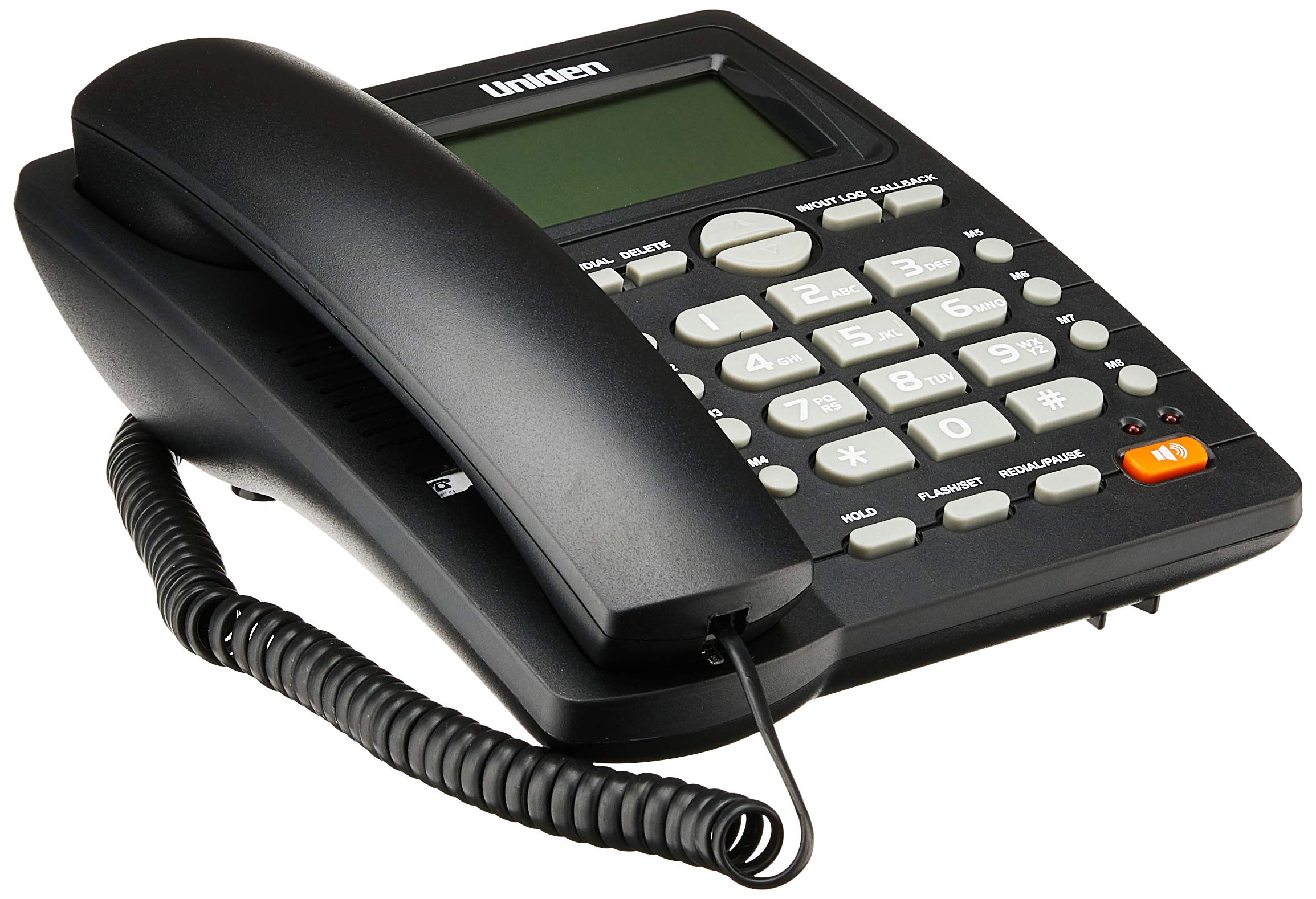
The phone features a standard handset, a numeric keypad, dedicated function buttons, and a large LCD display for caller information and settings. A prominent speakerphone button allows for hands-free communication.

On the rear of the unit, you will find the telephone line input port and a switch for adjusting the ringer volume.
3. Configuración
- Conecta o teléfono: Plug one end of the coiled cord into the handset and the other end into the handset jack on the side of the phone base unit.
- Conectar a liña telefónica: Plug one end of the telephone line cord into the "LINE" jack on the rear of the phone base unit (refer to Figure 2). Plug the other end into your telephone wall jack.
- Conexión de alimentación: The phone is powered by the telephone line. No external power adapter is required for basic operation.
- Pantalla inicial: Upon connection, the LCD display should illuminate and show the current time or a default standby screen.
4. Instrucións de funcionamento
Facendo unha chamada:
- Usando o auricular: Lift the handset, wait for a dial tone, then dial the desired number using the keypad.
- Usando o altofalante: Preme o ALTAVOZ button, wait for a dial tone, then dial the desired number. To end the call, press the ALTAVOZ botón de novo.
- Marcación previa: Dial the number first, then lift the handset or press the ALTAVOZ botón para iniciar a chamada.
Recibindo unha chamada:
- Cando soe o teléfono, levante o auricular ou prema a tecla ALTAVOZ botón para responder.
Remarcando o último número:
- Levante o auricular ou prema ALTAVOZ botón e, a continuación, prema o botón REMARCACIÓN/PAUSA botón.
Caller ID Function:
- When a call comes in, the caller's number (and name, if available and subscribed to service) will be displayed on the LCD screen.
- Usa o IN/OUT LOG buttons (up/down arrows) to scroll through the incoming call history.
- To call back a number from the call log, select the number and press the CALLBACK botón.
Memory Dialing (One-Touch and Two-Touch):
- Almacenamento de números:
- Preme STORE/DIAL.
- Marque o número de teléfono que desexe gardar.
- Preme STORE/DIAL de novo.
- Press the desired memory button (M1-M8 for one-touch, or a numeric key for two-touch).
- Dialing from Memory:
- One-Touch: Levante o auricular ou prema ALTAVOZ, then press the desired memory button (M1-M8).
- Two-Touch: Levante o auricular ou prema ALTAVOZe, a continuación, prema STORE/DIAL followed by the numeric key where the number is stored.
Adjusting LCD Contrast:
- Refer to the on-screen menu or specific button combination (often involving FLASH/SET or similar) to access display settings and adjust contrast for optimal readability.
5. Mantemento
- Limpeza: Limpe o teléfono cun pano suaveamp pano. Non use produtos químicos agresivos ou produtos de limpeza abrasivos.
- Localización: Place the phone on a stable surface, away from direct sunlight, heat sources, and moisture.
- Cordóns: Ensure all cords are securely connected and not tangled or pinched.
6 Solución de problemas
| Problema | Causa posible | Solución |
|---|---|---|
| Sen ton de marcación | O cable da liña telefónica está desconectado ou avariado. | Check the telephone line connection at both the phone and the wall jack. Try a different line cord if available. |
| A pantalla LCD está en branco ou escura | Contrast setting is too low or phone line power issue. | Adjust the LCD contrast setting. Ensure the phone line is active. |
| Non se poden facer nin recibir chamadas | Incorrect line connection or service issue. | Verify all connections. Contact your telephone service provider if the issue persists. |
| Ringer does not sound | Ringer volume is set to OFF. | Adjust the ringer volume switch on the rear of the phone to LOW or HI (refer to Figure 2). |
7. Especificacións
| Característica | Detalle |
|---|---|
| Marca | Uniden |
| Modelo | AS7412 |
| Cor | Negro |
| Tipo de teléfono | Con cordo |
| Material | Plástico |
| Fonte de enerxía | Cable eléctrico (alimentación por liña) |
| Dialler Type | Teclado único |
| Dimensións (L x W x H) | 21.8 x 7 x 22 centímetros |
| Peso do elemento | 650 gramos |
| Operación multilínea | Operación en liña única |
| Identificación do chamador | Yes (FSK/DTMF) |
| Fabricante | UNIDEN |
8. Garantía e soporte
For warranty information and technical support, please refer to the warranty card included with your product or visit the official Uniden websitio. Garde o recibo da compra como xustificante da mesma.
Nota: As especificacións e as características do produto están suxeitas a cambios sen previo aviso.


