
Introdución
This manual provides detailed instructions for the safe and efficient operation of your Ozeri 360 Oscillation Micro-Blade Noise Reduction Technology Tower Fan, Model OZF5. Please read all instructions carefully before use and retain this manual for future reference.
Información de seguridade
Para reducir o risco de incendio, descarga eléctrica ou lesións, siga sempre estas precaucións de seguridade básicas:
- Asegúrate de colocar o ventilador sobre unha superficie estable e nivelada para evitar que se volque.
- Non introduza os dedos nin obxectos estraños en ningunha das aberturas do ventilador.
- Keep the fan away from water or moist areas.
- Desconecte o ventilador da toma de corrente antes de limpalo ou realizar calquera mantemento.
- Non faga funcionar o ventilador cun cable ou enchufe danados.
- Este aparello só é para uso interior.
Contido do paquete
Verifica que estean presentes todos os compoñentes:
- Ozeri 360 Oscillation Tower Fan Unit
- Fan Base (2 halves)
- Control remoto
- Screws for Base Assembly (3 pieces)
- Manual de usuario
Configuración
Follow these steps to assemble your Ozeri Tower Fan:
- Carefully remove all packaging materials from the fan unit and its components.
- Connect the two halves of the fan base. Ensure they fit together securely.
- Align the assembled base with the bottom of the fan unit.
- Secure the base to the fan unit using the 3 provided screws. Hand assembly is sufficient; no special tools are required.
- Coloque o ventilador sobre unha superficie firme e nivelada.
- Enchufe o cable de alimentación nunha toma eléctrica estándar.
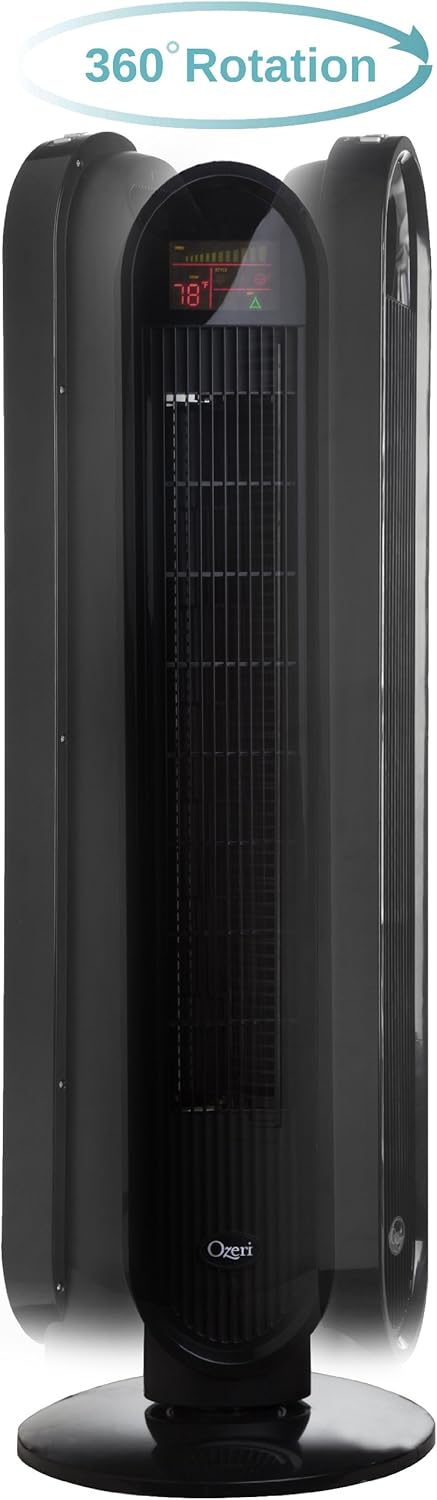
Instrucións de funcionamento
Your Ozeri Tower Fan can be operated using the control panel on top of the unit or the included remote control.
Funcións do panel de control:

- Botón de encendido: Acende ou apaga o ventilador.
- Botón de velocidade: Cycles through 3 whisper-quiet speed settings. The LCD display will show the current speed level.
- Botón de modo: Selects between 3 preprogrammed airflow patterns (e.g., normal, natural, sleep).
- Oscillation (OSC) Button: Activates or deactivates the oscillation feature. You can select oscillation angles of 60, 90, 120, or 360 degrees for partial to complete air circulation.
- Botón do temporizador: Sets the 8-hour programmable timer in 30-minute increments.
- Botón automático: Engages the auto mode, which adjusts fan speed based on room temperature.
Pantalla LCD:

The multi-colored LCD displays all active fan functions and the current room temperature, allowing for easy monitoring and control.
Control remoto:
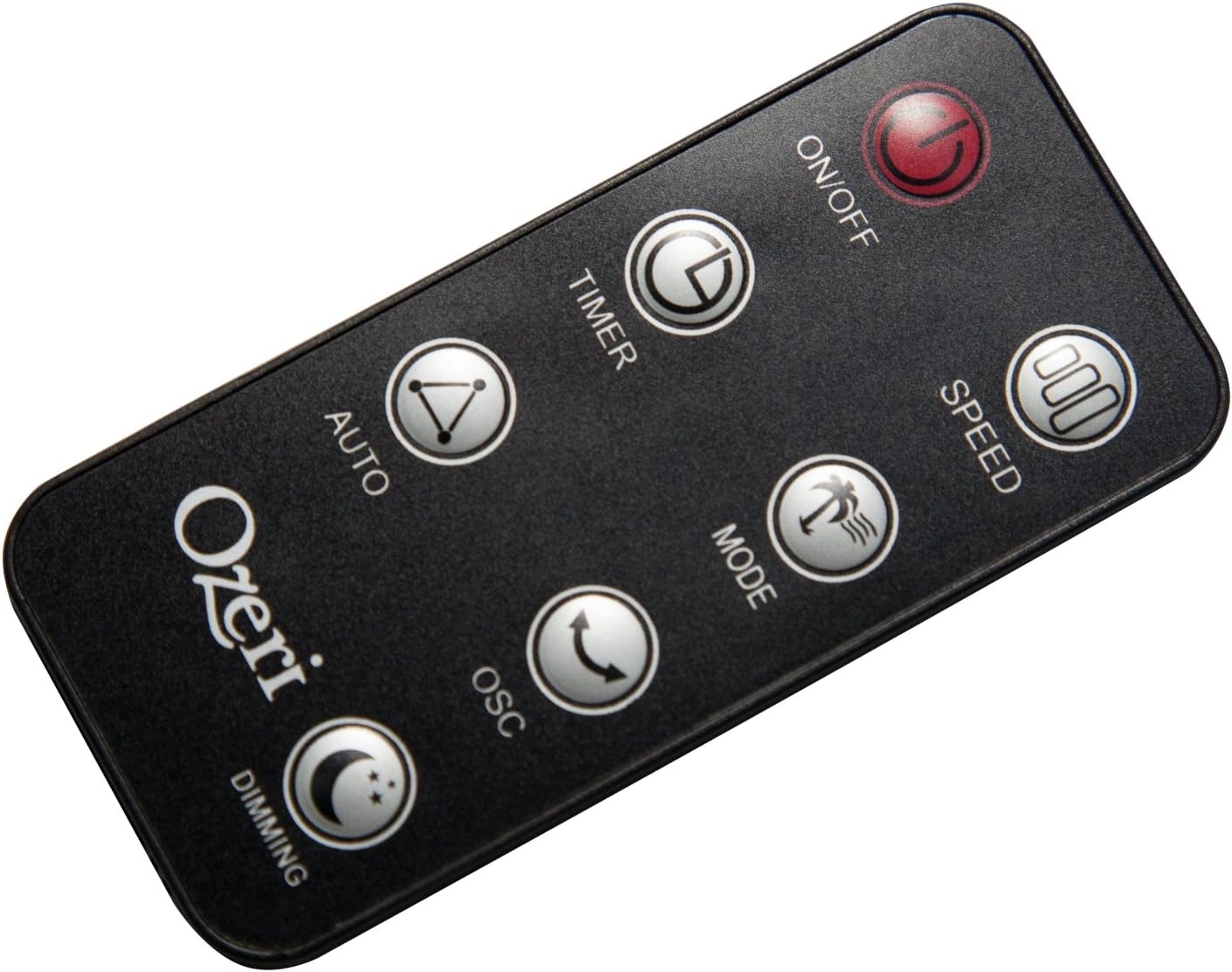
The extended-range remote control provides convenient access to all fan features from a distance. It includes buttons for On/Off, Speed, Timer, Mode, Auto, Oscillation, and Dimming (for the LCD display). The remote can be stored in a dedicated slot on the fan unit.

Vídeo oficial do produto:
Video: This official product video demonstrates the Ozeri 360 Oscillation Tower Fan, highlighting its micro-blade noise reduction technology and various features.
Mantemento
Regular cleaning ensures optimal performance and longevity of your fan:
- Desenchufe sempre o ventilador antes de limpar.
- Use un suave, damp pano para limpar as superficies exteriores. Non empregue produtos de limpeza abrasivos nin disolventes.
- Use unha aspiradora cun accesorio de cepillo para eliminar con coidado o po das reixas de entrada e saída de aire.
- Non mergullo o ventilador na auga nin deixe que gotee a auga na carcasa do motor.
- Garda o ventilador nun lugar fresco e seco cando non estea en uso.
Resolución de problemas
Se tes problemas co teu ventilador, consulta os seguintes problemas e solucións comúns:
- O ventilador non se acende: Ensure the power cord is securely plugged into a working outlet. Check if the power button on the fan or remote has been pressed.
- Fluxo de aire débil: Check the fan speed setting and increase it if necessary. Ensure the air intake and exhaust grilles are not obstructed by dust or other objects.
- Fan makes unusual noise: Turn off and unplug the fan. Inspect for any foreign objects caught in the grilles or internal components. If the noise persists after clearing any obstructions, contact customer support.
- O control remoto non funciona: Ensure the remote control batteries are correctly installed and not depleted. Point the remote directly at the fan's receiver.
Especificacións
| Característica | Detalle |
|---|---|
| Marca | Ozeri |
| Número de modelo | OZF5 |
| Cor | Negro |
| Deseño de ventiladores eléctricos | Ventilador de chan |
| Fonte de enerxía | Eléctrico con cable |
| Característica especial | Oscillating (60, 90, 120, 360 degrees) |
| Número de velocidades | 3 |
| Wattage | 60 vatios |
| Capacidade de caudal de aire | 5000 pés cúbicos por minuto |
| Voltage | 127 voltios |
| Método de control | Remote Control, Electronic Touch Controls |
| Material | Plástico |
| Peso do elemento | 9 libras |
Garantía e Soporte
This Ozeri Tower Fan comes with a 1-year no questions asked warranty. For warranty claims, technical support, or any inquiries, please refer to the contact information provided on the Ozeri official websitio web ou a documentación da súa compra.