
APEX AL-A300ATX
Manual do usuario da fonte de alimentación APEX AL-A300ATX de 300 W ATX de 12 V
Model: AL-A300ATX
1. Introdución
This manual provides essential information for the safe and efficient installation, operation, and maintenance of your APEX AL-A300ATX 300W ATX12V Power Supply. Please read this manual thoroughly before installation and retain it for future reference.
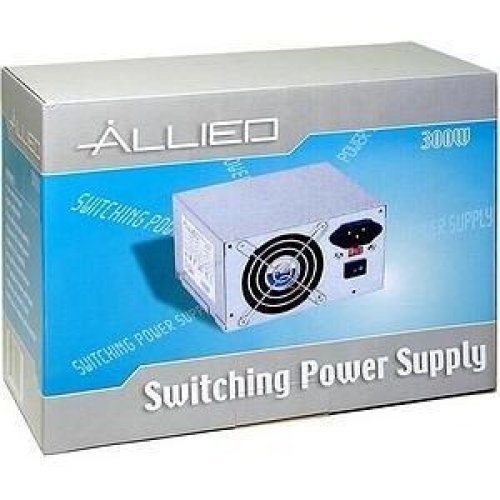
Image: The AL-A300ATX 300W ATX12V Power Supply shown in its retail packaging, indicating it is a "Switching Power Supply" from "ALLIED".
2. Información de seguridade
Always observe the following safety precautions to prevent injury or damage to the power supply or other components:
- Ensure the power supply is disconnected from the AC outlet before installation or removal.
- Non abra a fonte de alimentación casing. Alto volumetages are present inside, even when disconnected. There are no user-serviceable parts.
- Install the power supply in a well-ventilated area. Do not block ventilation openings.
- Evite expoñer a fonte de alimentación á humidade ou a temperaturas extremas.
- Use only the cables provided or approved for use with this power supply.
- If the power supply is damaged or malfunctioning, discontinue use immediately and contact support.
3. Contido do paquete
Verifica que todos os elementos estean presentes no paquete:
- APEX AL-A300ATX 300W ATX12V Power Supply Unit
- AC Power Cord (may vary by region)
- Parafusos de montaxe
- Manual de usuario (este documento)
4. Configuración e instalación
Follow these steps to install the power supply into your computer system:
- Preparación:
- Apague o ordenador e desconecte o cable de alimentación CA da toma de corrente.
- Open your computer case. Refer to your computer case manual for specific instructions.
- If replacing an existing power supply, disconnect all cables from the old PSU and remove it from the case.
- Montaxe da fonte de alimentación:
- Carefully slide the AL-A300ATX power supply into the designated PSU bay in your computer case.
- Align the screw holes on the power supply with those on the case.
- Asegure a fonte de alimentación usando os parafusos de montaxe proporcionados.
- Cables de conexión:
- 24-Pin ATX Main Power Connector: Connect this large connector to the corresponding port on your motherboard. Ensure it clicks into place.
- CPU Power Connector (4-pin or 8-pin): Connect the appropriate CPU power cable to the CPU power port on your motherboard.
- Conectores de alimentación SATA: Connect these flat connectors to your SATA hard drives, SSDs, and optical drives.
- Conectores Molex (periféricos): Connect these 4-pin connectors to older drives or case fans if needed.
- PCI-E Power Connectors (if applicable): If your graphics card requires additional power, connect the appropriate PCI-E power cable from the PSU to the graphics card. This model is listed with a "24 Pin" PCI-Express Connector Configuration, implying the main ATX connector.
- Xestión de cables Pasa os cables con coidado para mellorar a circulación do aire e a estética dentro da túa carcasa.
- Verificación final: Comprobe todas as conexións para asegurarse de que están seguras.
- Pechar caso: Close your computer case and secure it.
5. Instrucións de funcionamento
After successful installation, follow these steps to power on your system:
- Conectar alimentación de CA: Plug the AC power cord into the power supply's inlet and then into a grounded wall outlet or surge protector.
- Interruptor de alimentación: Locate the power switch on the back of the power supply (usually a rocker switch labeled "I" for ON and "O" for OFF). Ensure it is in the "ON" (I) position.
- Acender o ordenador: Press the power button on your computer case. The system should now power on.
To turn off your computer, always use the operating system's shutdown procedure. Do not use the power supply's switch for regular shutdowns, as this can lead to data loss or system instability.
6. Mantemento
Un mantemento axeitado axuda a garantir a lonxevidade e o rendemento óptimo da súa fonte de alimentación:
- Limpeza do po: Periodically (every 3-6 months, depending on environment) clean dust from the power supply's fan and ventilation grilles using compressed air. Ensure the computer is powered off and unplugged before cleaning.
- Fluxo de aire: Ensure that the computer case has adequate airflow and that the power supply's fan is not obstructed.
- Xestión de cables Maintain tidy cable routing to prevent obstruction of airflow.
7 Solución de problemas
Se tes problemas coa fonte de alimentación, consulta os seguintes problemas e solucións comúns:
| Problema | Causa posible | Solución |
|---|---|---|
| O ordenador non se acende. |
|
|
| O sistema acéndese pero apágase inmediatamente. |
|
|
| Fan is noisy or not spinning. |
|
|
If the problem persists after attempting these solutions, contact APEX customer support or a qualified technician.
8. Especificacións
| Característica | Detalle |
|---|---|
| Nome do modelo | AL-A300ATX |
| Marca | APEX |
| Potencia de saídatage | 300 vatios |
| Factor de forma | ATX12V |
| Dispositivos compatibles | Ordenador persoal |
| Tipo de conector | ATX (24 Pin PCI-Express Connector Configuration) |
| Método de arrefriamento | Aire |
| Vol. de entrada mínimotage | 110 voltios (CA) |
| Peso do elemento | 3.64 libras |
| Dimensións do paquete | 9.6 x 7.2 x 4.1 polgadas |
| Data de primeira dispoñibilidade | 22 de abril de 2014 |
9. Garantía e soporte
For information regarding warranty coverage, technical support, or service, please refer to the official APEX websitio web ou póñase en contacto directamente co servizo de atención ao cliente. Garde o recibo da compra como proba de compra.
APEX Contact Information: Please visit the official APEX websitio para obter os datos de contacto e os recursos de asistencia máis actuais.
Ask a question about this manual
Ask about setup, troubleshooting, compatibility, parts, safety, or missing instructions. Manuals+ will review the question and use this page’s manual context to help answer it.