
1. Introdución
This manual provides instructions for the installation, configuration, and operation of the D-Link DGS-1210-28P Web Smart 24-Port Gigabit PoE Switch. This device is designed to provide a high-performance, cost-effective solution for small to medium-sized businesses, offering advanced management features and Power over Ethernet (PoE) capabilities.
2. Información de seguridade
- Asegure unha ventilación adecuada ao redor do interruptor para evitar o sobreenriquecido.
- Do not place the switch in areas with high humidity or extreme temperatures.
- Use só o adaptador de alimentación que se proporciona co dispositivo.
- Desconecte a alimentación antes de limpar ou realizar mantemento.
- This device should be installed by qualified personnel in accordance with all local and national electrical codes.
3. Contido do paquete
Verifique que o seu paquete conteña os seguintes elementos:
- DGS-1210-28P Web Smart 24-Port Gigabit PoE Switch
- Cable de alimentación
- Kit de montaxe en rack (soportes e parafusos)
- Patas de goma (para instalación de escritorio)
- Cable de consola (RJ-45 a DB-9)
- Guía de instalación rápida
- CD-ROM (containing product documentation)
Se falta algún elemento ou está danado, póñase en contacto co seu distribuidor local de D-Link para obter axuda.
4. Physical Description and Hardware Overview
The DGS-1210-28P switch features 24 Gigabit Ethernet ports with PoE support and 4 SFP slots for fiber optic connections. Below are diagrams illustrating the front and rear panels of the device.
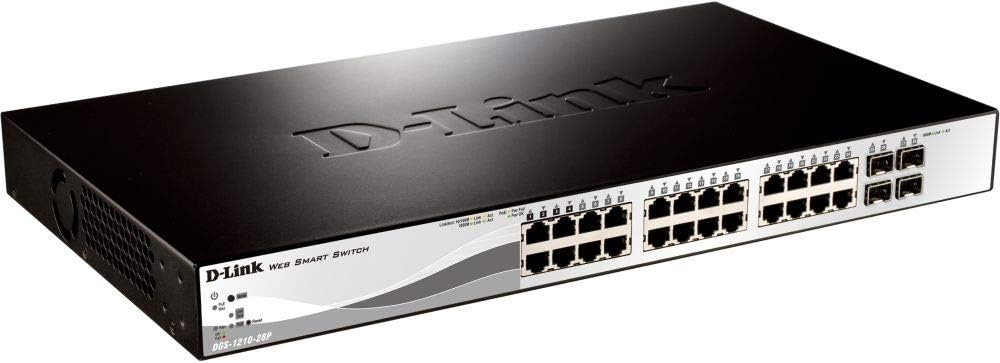
Figura 4.1: Panel frontal View
This image displays the front panel of the DGS-1210-28P switch, showing 24 RJ-45 Gigabit Ethernet ports, each with LED indicators for link/activity and PoE status. To the right, there are 4 SFP (Small Form-Factor Pluggable) slots for fiber optic transceivers. The D-Link logo and model number are visible on the left side of the panel.

Figura 4.2: Panel traseiro View
This image shows the rear panel of the DGS-1210-28P switch. The primary feature visible is the AC power input connector on the right side, labeled "AC LINE" with voltage and current specifications (100-240VAC, 50/60Hz, 0.5 A MAX). The D-Link brand name is embossed on the top surface of the switch casing.
4.1 Indicadores do panel frontal
- LED de alimentación: Indica o estado de alimentación do interruptor.
- LED do sistema: Indica o estado do sistema.
- LED de enlace/acción (por porto): Green for Gigabit link/activity, Amber for 10/100 Mbps link/activity.
- PoE Status LEDs (per PoE port): Indica o estado de entrega de enerxía PoE.
4.2 conectores do panel traseiro
- Entrada de enerxía CA: Connects to the provided power cord.
5. Configuración
5.1 Instalación de escritorio
- Fixe os pés de goma incluídos na parte inferior do interruptor.
- Coloque o interruptor sobre unha superficie plana e estable con ventilación axeitada.
5.2 Instalación en rack
- Attach the two rack-mounting brackets to the side grooves of the switch using the provided screws.
- Fixe o conmutador nun rack de equipos estándar de 19 polgadas usando os parafusos de rack axeitados (non incluídos).
5.3 Conexión do interruptor
- Connect your network devices (computers, servers, access points, IP cameras) to the RJ-45 ports on the front panel using standard Ethernet cables.
- For fiber optic connections, insert compatible SFP transceivers into the SFP slots and connect fiber optic cables.
- Connect the power cord to the AC power input on the rear panel of the switch and then to a suitable power outlet.
- Verify that the Power LED on the front panel illuminates.
6. Funcionamento do interruptor
6.1 Acceso inicial a WebXestión baseada
The DGS-1210-28P is a Web Smart switch, meaning it can be configured and managed via a web navegador.
- Ensure your computer is connected to one of the switch's Ethernet ports.
- By default, the switch has a pre-configured IP address (e.g., 192.168.0.1). Refer to the Quick Installation Guide or product documentation for the exact default IP address.
- Configure your computer's IP address to be in the same subnet as the switch (e.g., if the switch is 192.168.0.1, set your computer to 192.168.0.10 with subnet mask 255.255.255.0).
- Abrir a web browser (e.g., Chrome, Firefox, Edge) and enter the switch's default IP address in the address bar.
- You will be prompted for a username and password. The default credentials are typically "admin" for both username and password. Refer to the documentation for specific defaults.
- Upon successful login, you will access the switch's web management interface, where you can configure various network settings, VLANs, QoS, PoE settings, and more.
Importante: For security reasons, it is highly recommended to change the default password immediately after initial login.
6.2 Funcionalidade de alimentación a través de Ethernet (PoE)
The DGS-1210-28P supports PoE, allowing it to deliver power to compatible devices (e.g., IP phones, wireless access points, IP cameras) over the Ethernet cable. This eliminates the need for separate power outlets for these devices.
- Connect PoE-compatible devices to any of the 24 Gigabit Ethernet ports.
- The switch will automatically detect and provide power to compliant devices.
- Monitor PoE status via the port LEDs or the web interface de xestión.
- The total power budget for the switch is 193 Watts. Ensure the total power consumption of connected PoE devices does not exceed this limit.
7. Mantemento
- Limpeza: Usa un pano suave e seco para limpar o exterior do interruptor. Non empregues produtos de limpeza líquidos nin en aerosol.
- Actualizacións de firmware: Comprobe periodicamente a compatibilidade con D-Link website for firmware updates to ensure optimal performance and security. Follow the instructions provided with the firmware update package.
- Ventilación: Ensure that the ventilation openings on the switch are not blocked to prevent overheating.
- Configuración de copia de seguridade: Regularly back up your switch configuration settings through the web management interface to facilitate quick recovery in case of a reset or failure.
8 Solución de problemas
| Problema | Causa posible | Solución |
|---|---|---|
| Sen indicación LED de alimentación | Cable de alimentación non conectado ou problema coa toma de corrente. | Verify power cord connection to the switch and power outlet. Test the outlet with another device. |
| No Link/Act LED on a connected port | Faulty cable, incorrect cable type, or device not powered on. | Check the Ethernet cable for damage. Ensure the connected device is powered on and functioning correctly. Try a different port or cable. |
| Non se pode acceder web interface de xestión | Incorrect IP address, subnet mismatch, or browser issue. | Verify the switch's IP address and your computer's IP settings. Ensure they are in the same subnet. Clear browser cache or try a different browser. Reset the switch to factory defaults if necessary (refer to documentation for procedure). |
| O dispositivo PoE non recibe enerxía | Device not PoE compliant, cable issue, or power budget exceeded. | Ensure the device is PoE compliant. Check the Ethernet cable. Verify the total PoE power consumption in the web interface and ensure it does not exceed 193 Watts. |
9. Especificacións
| Modelo | DGS-1210-28P |
| Portos | 24 x 10/100/1000BASE-T PoE Ports, 4 x Gigabit SFP Ports |
| Estándar PoE | IEEE 802.3af / at |
| Orzamento total de potencia PoE | 193 vatios |
| Capacidade de conmutación | 56 Gbps |
| Taxa de reenvío | 41.67 Mpps |
| Tamaño da táboa de enderezos MAC | 16K entradas |
| Marco jumbo | 10,000 bytes |
| Dimensións (ancho x profundo x alto) | 440 x 210 x 44 mm (17.32 x 8.27 x 1.73 polgadas) |
| Peso | 3.63 kg (8 lb) |
| Entrada de enerxía | 100-240 VAC, 50/60 Hz Internal Universal Power Supply |
| Temperatura de funcionamento | 0 °C a 50 °C (32 °F a 122 °F) |
| Temperatura de almacenamento | -20 °C a 70 °C (-4 °F a 158 °F) |
| Humidade de funcionamento | 0% a 95% sen condensación |
10. Garantía e soporte
D-Link provides a limited warranty for this product. For detailed warranty information, please refer to the warranty card included with your product or visit the official D-Link websitio.
For technical support, product documentation, and firmware updates, please visit the D-Link support portal:
You can also find additional resources and community forums on the D-Link websitio.