
1. User Guide & Product Overview
The Valcom VC-V-400 is an omni-directional dynamic desktop microphone designed for clear audio capture in various applications. It features a low impedance design and includes a push-to-talk switch with a locking bar for convenient operation. This manual provides essential information for setting up, operating, and maintaining your Valcom VC-V-400 microphone.
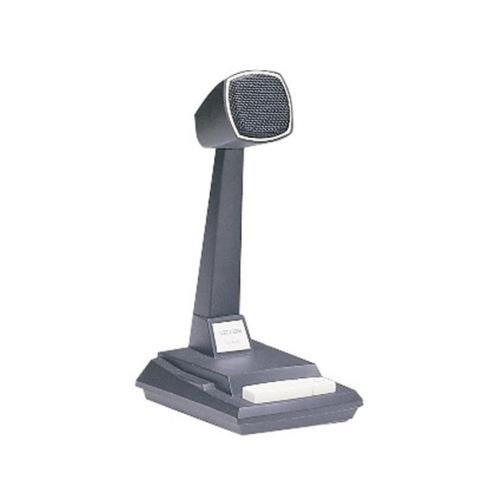
Figure 1: Valcom VC-V-400 Dynamic Desktop Microphone. An image showing the Valcom VC-V-400 Dynamic Desktop Microphone, featuring a dark grey base with a white push-to-talk bar, and a tall stand supporting the microphone head with a metallic grille.
2. Instrucións de configuración
To ensure proper functionality, the Valcom VC-V-400 microphone requires the Valcom V-9939B Microphone Adapter (sold separately) for connection to your system.
2.1 Desembalaxe
- Retire con coidado o micrófono da súa embalaxe.
- Verify that all components are present: Valcom VC-V-400 Microphone.
2.2 Conexión
- Ensure your audio system or device is powered off before making connections.
- Connect the XLR connector of the Valcom VC-V-400 microphone to the appropriate input on the Valcom V-9939B Microphone Adapter.
- Connect the Valcom V-9939B Microphone Adapter to your audio system or PC as per the adapter's instructions.
- Once all connections are secure, you may power on your audio system.
3. Instrucións de funcionamento
The Valcom VC-V-400 microphone is designed for ease of use with its integrated push-to-talk functionality.
3.1 Funcionamento de Premer para Falar (PTT)
- To activate the microphone for speaking, press and hold the white push-to-talk bar located on the base of the microphone.
- Release the bar to mute the microphone.
3.2 Locking Bar Feature
- For continuous microphone activation, push the white push-to-talk bar down and slide the locking bar (if present and functional on your model) to hold it in the depressed position.
- To disengage, slide the locking bar back and allow the push-to-talk bar to return to its original position.
3.3 Colocación do micrófono
As an omni-directional microphone, the VC-V-400 picks up sound equally from all directions. Position the microphone centrally within the desired speaking area for optimal audio capture.
4. Mantemento
Proper care and maintenance will extend the life of your Valcom VC-V-400 microphone.
- Limpeza: Use a soft, dry cloth to wipe the exterior of the microphone. Do not use liquid cleaners or abrasive materials.
- Almacenamento: Cando non o use, garde o micrófono nun lugar limpo e seco, lonxe de temperaturas e humidade extremas.
- Manexo: Evite deixar caer o micrófono ou sometelo a impactos fortes, xa que isto pode danar os compoñentes internos.
5 Solución de problemas
If you encounter issues with your Valcom VC-V-400 microphone, refer to the following common problems and solutions:
| Problema | Causa posible | Solución |
|---|---|---|
| Sen saída de audio |
|
|
| Poor audio quality (e.g., static, low volume) |
|
|
6. Especificacións
| Característica | Detalle |
|---|---|
| Marca | Valcom |
| Nome do modelo | VC-V-400 |
| Factor de forma do micrófono | Matriz de táboa |
| Patrón polar | Omnidireccional |
| Tecnoloxía de conectividade | XLR |
| Tipo de conector | XLR |
| Característica especial | Push-to-talk with locking bar, Lift-to-talk mode |
| Dispositivos compatibles | Personal Computer (requires V-9939B adapter) |
| Cor | White (microphone base) |
| Compoñentes incluídos | Micrófono |
| Peso do elemento | 3.4 libras (aprox. 1.54 kg) |
| Fonte de enerxía | Corded Electric (via adapter) |
| Relación sinal-ruído | 60 dB |
| Número de canles | 1 |
| Resposta en frecuencia | 15 kHz |
| Fabricante | VALCOM |
| UPC | 809390045079, 807035655225 |
| Data de primeira dispoñibilidade | 11 de xuño de 2014 |
7. Información da garantía
Specific warranty details for the Valcom VC-V-400 Dynamic Desktop Microphone are not provided in this document. Please refer to the product packaging or contact Valcom directly for comprehensive warranty information.
8. Apoio
For technical assistance, product inquiries, or further support regarding your Valcom VC-V-400 microphone, please contact Valcom customer service. Contact information can typically be found on the manufacturer's official websitio ou embalaxe do produto.


