
Introdución
Thank you for choosing the Mount-It! MI-863 3-in-1 TV Stand. This product is designed to provide a stable and stylish solution for mounting your flat-screen television and organizing your audio/video components. This manual contains important information regarding the safe assembly, operation, and maintenance of your new TV stand. Please read these instructions thoroughly before beginning assembly and retain them for future reference.

Figure 1: Mount-It! MI-863 3-in-1 TV Stand with Mount and Glass Shelves
Información de seguridade
Please observe the following safety precautions to prevent injury or damage to your product:
- Le todas as instrucións: Ensure you understand all assembly steps before proceeding. If you have questions, contact Mount-It! customer support.
- Capacidade de peso: Do not exceed the maximum weight capacity for the TV mount or glass shelves. Refer to the Specifications section for details.
- Ferramentas adecuadas: Use the correct tools as specified in the assembly instructions.
- Asemblea de dúas persoas: For safety, it is recommended that two people assemble this product, especially when handling the TV and glass shelves.
- Superficie nivelada: Coloque sempre o soporte da TV sobre unha superficie plana, nivelada e estable para evitar que se volque.
- Xestión de cables Route all cables carefully to avoid tripping hazards and to prevent cables from being pinched or damaged.
- Nenos e animais: Keep children and pets away from the assembly area. Do not allow children to climb on or play with the TV stand.
- Vidro temperado: Handle glass shelves with care. Avoid impacts to the edges of the glass.
Contido do paquete
Verify that all components are present and undamaged before beginning assembly. If any parts are missing or damaged, do not proceed with assembly and contact Mount-It! customer support.
- Columna de apoio principal
- Soporte de montaxe para TV (compatible con VESA)
- Three (3) Tempered Glass Shelves
- Placa base
- Support Pillars for Glass Shelves
- Hardware Kit (screws, washers, spacers for assembly and TV attachment)
- Ferramentas de montaxe (por exemplo, chave Allen)

Figura 2: Máisview of TV Stand components
Instrucións de configuración e montaxe
Follow these steps carefully for proper assembly. It is recommended to have a second person assist with assembly.
- Preparar a base: Place the base plate on a clean, flat surface. Attach the main support column to the base plate using the provided screws and tools. Ensure it is securely fastened.
- Install Lower Glass Shelves: Attach the support pillars for the lower shelves to the main support column and the base plate. Carefully place the bottom tempered glass shelf onto these pillars, securing it with the appropriate hardware. Repeat for the middle shelf.
- Install Top Glass Shelf: Attach the remaining support pillars for the top shelf. Carefully place the top tempered glass shelf onto these pillars, securing it.
- Fixar o soporte de montaxe do televisor: Secure the TV mounting bracket to the top of the main support column using the designated screws. Ensure the bracket is oriented correctly and tightened firmly.
- Preparación do televisor para a montaxe: Identify the VESA mounting holes on the back of your television. Attach the vertical TV brackets (part of the mounting bracket assembly) to your TV using the appropriate screws, washers, and spacers from the hardware kit. Ensure the brackets are centered and securely fastened to your TV.
- Montar o televisor: With assistance, carefully lift your television and hook the attached vertical TV brackets onto the horizontal bar of the TV mounting bracket on the stand. Once hooked, gently lower the TV into place. Secure the TV to the stand by tightening the safety screws located at the bottom of the vertical TV brackets. This prevents accidental lifting or movement.
- Xestión de cables Utilize the integrated cable management channels within the main support column to route and conceal your TV and component cables for a clean and organized appearance.

Figure 3: Detail of glass shelf and support pillar connection
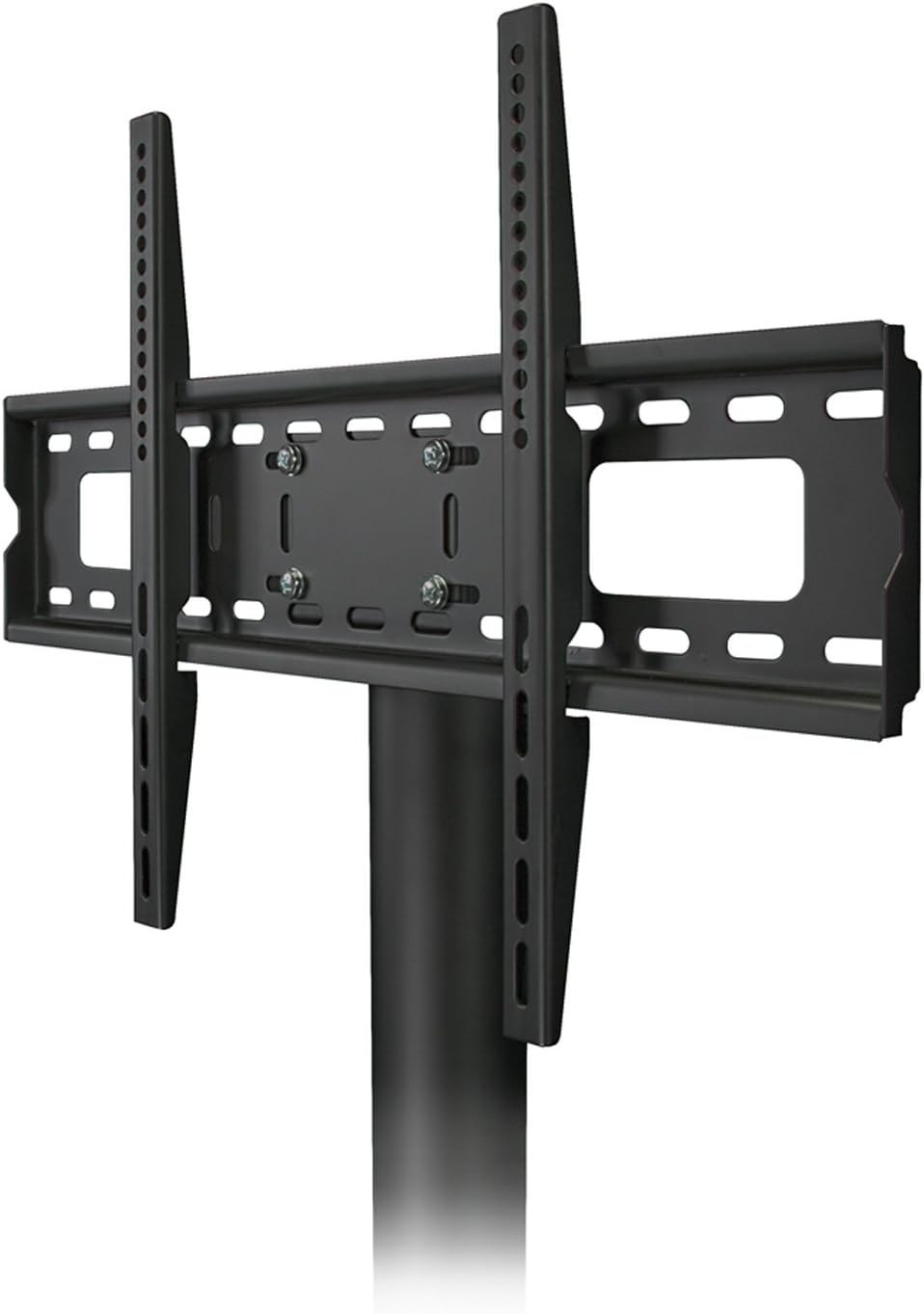
Figure 4: TV mounting bracket detail

Figure 5: Television mounted on the stand
Instrucións de funcionamento
The Mount-It! MI-863 TV Stand is designed for straightforward use.
- Colocación de TV: Ensure your TV is securely attached to the mounting bracket as per the assembly instructions. The mount allows for slight height adjustments during installation.
- Colocación de compoñentes: Place your cable box, DVD player, gaming consoles, and other AV components on the tempered glass shelves. Distribute weight evenly across the shelves.
- Funcionalidade xiratoria: The TV mount may offer a limited swivel range. Gently rotate the TV to achieve your desired viewing angle. Do not force the TV beyond its intended swivel limits.
Mantemento
Un mantemento regular axudará a prolongar a vida útil e o aspecto do teu soporte para TV.
- Limpeza: Use un suave, damp cloth to clean the steel frame. For the tempered glass shelves, use a glass cleaner and a microfiber cloth to avoid streaks. Avoid abrasive cleaners or harsh chemicals.
- Verificación de hardware: Comprobe periodicamente todos os parafusos e bulóns para asegurarse de que seguen axustados. Aperte de novo se é necesario, pero non os aperte demasiado.
- Inspección: Inspect the glass shelves for any chips or cracks. If damage is found, contact customer support for replacement options.
Resolución de problemas
If you encounter issues with your Mount-It! MI-863 TV Stand, refer to the following common solutions:
- O soporte é inestable:
- Asegúrate de que o soporte estea sobre unha superficie plana e nivelada.
- Comprobe que todos os parafusos de montaxe estean ben axustados.
- Verify that the TV weight does not exceed the stand's capacity.
- TV fóra de nivel:
- Adjust the vertical TV brackets on the back of your television before mounting.
- Ensure the main support column is straight and securely attached to the base.
- Cables are Visible/Messy:
- Utilize the cable management channels in the main support column.
- Consider using cable ties or sleeves to bundle cables neatly.
If these solutions do not resolve your issue, please contact Mount-It! customer support for further assistance.
Especificacións
| Característica | Detalle |
|---|---|
| Número de modelo | MI-863 |
| Dimensións (L x W x H) | 52 x 21 x 8 polgadas (montado) |
| Peso do elemento | 58 libras |
| Material | Vidro temperado, aceiro |
| Cor | Negro |
| Compatibilidade VESA | 75x75, 100x100, 200x100, 200x200, 300x300, 400x200, 400x300, 400x400, 600x200, 600x400 mm |
| Compatibilidade do tamaño da TV | Most flat panel TVs from 32" to 55" |
| Dimensións do andel | 47.2 inches wide, 15.75 inches deep |
| Número de estantes | 3 |
| Tipo de movemento | Fixed (with limited swivel capability) |
| UPC | 852669498885 |
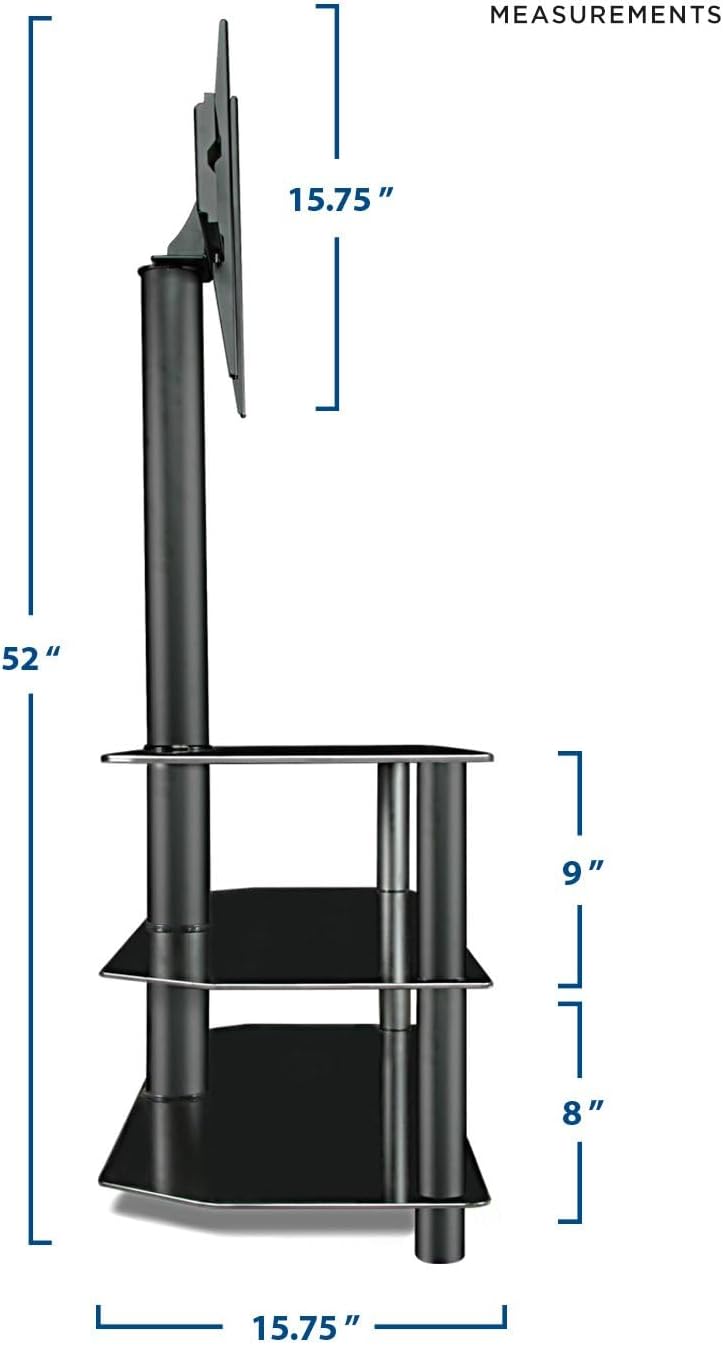
Figura 6: Dimensións do produto
Garantía e Soporte
Mount-It! stands behind its products. For warranty information, technical assistance, or any questions regarding your MI-863 TV Stand, please contact our US-Based Customer Support team. Contact details can typically be found on the Mount-It! official websitio web ou na embalaxe do produto.