
1. Introdución
The Kaito KA29 is a compact and versatile world receiver designed for global radio reception and multimedia playback. It features AM, FM, and Shortwave (SW) radio bands, an integrated MP3 player, and a recording function for both radio broadcasts and voice. This manual provides detailed instructions for the proper setup, operation, and maintenance of your device.

Figura 1: Fronte view of the Kaito KA29 World Receiver.
2. Características do produto
- World Band Radio: Receives AM, FM, and Shortwave (SW) frequencies.
- Procesamento de sinal dixital (DSP): Enhances reception and audio clarity.
- Reprodutor mp3: Supports playback from Micro-USB and USB 2.0 ports.
- Voice and Radio Recorder: Records audio from radio broadcasts or the built-in microphone to external storage.
- E-Book Reader & Calendar App: Additional utility functions.
- Alarm Clock & Sleep Mode: Programmable functions for convenience.
- Batería recargable: Integrated lithium-ion battery for portable use.
- Conectividade: Micro-USB, USB 2.0 ports, Aux input, Earphone jack.
3. Configuración
3.1. Desembalaxe e inspección
Retire con coidado todos os compoñentes da embalaxe. Comprobe que todos os elementos listados na sección "Contido da caixa" estean presentes e non estean danados.
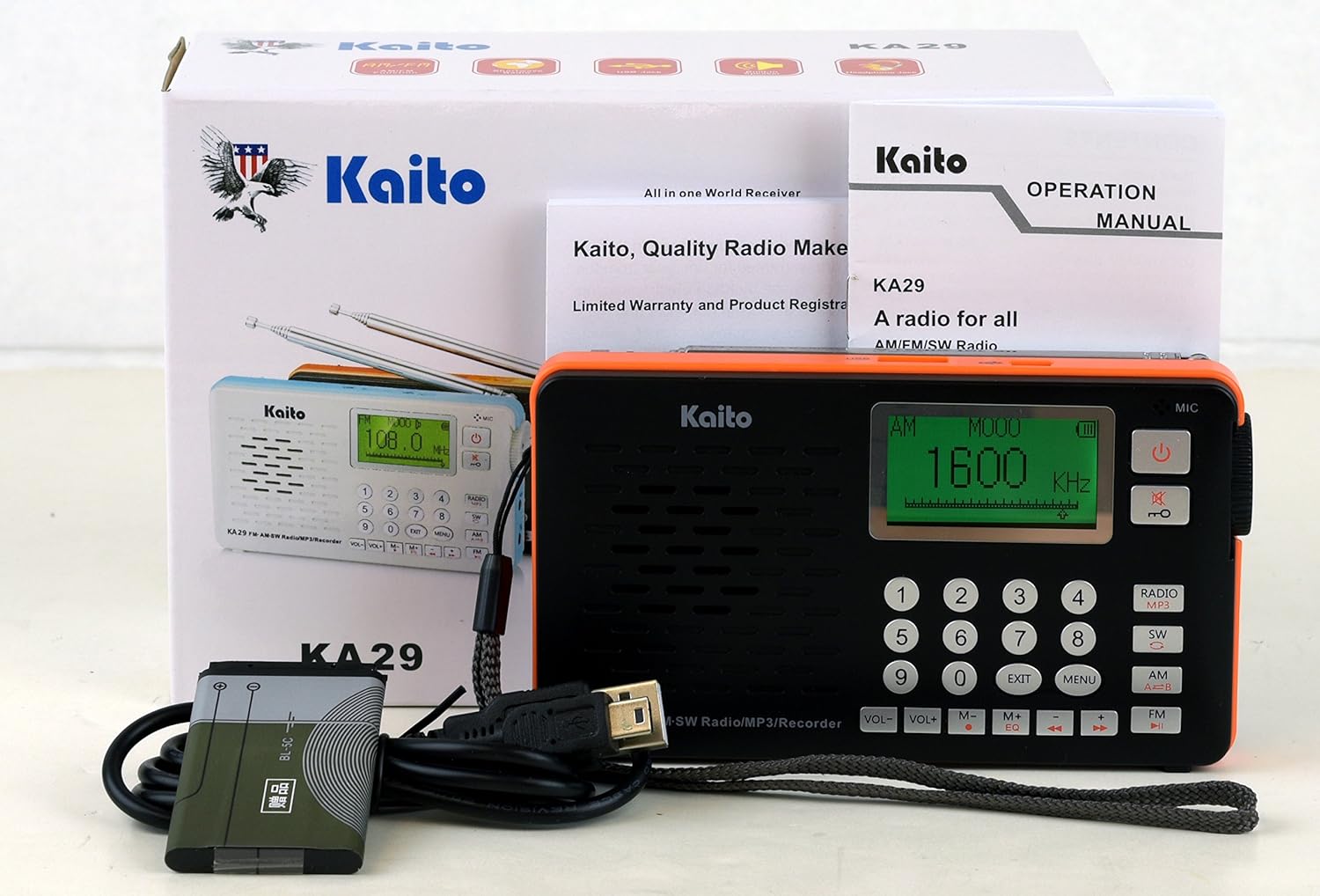
Figure 2: Kaito KA29 packaging and included accessories.
3.2. Instalación e carga da batería
- Localiza o compartimento da batería na parte traseira da radio.
- Abra a tapa do compartimento.
- Insira a batería de ións de litio subministrada, asegurándose de manter a polaridade correcta.
- Pecha a tapa do compartimento da batería de forma segura.
- Connect the radio to a USB power source (e.g., computer, USB wall adapter) using the supplied Micro-USB cable to charge the battery. The charging indicator will illuminate.
- Deixe que a batería se cargue completamente antes do primeiro uso.

Figura 3: Atrás view of the Kaito KA29, showing the battery compartment.
3.3. Antenna Extension
For optimal FM and Shortwave reception, fully extend the telescopic antenna. For AM reception, the internal ferrite bar antenna is used, and antenna orientation may improve signal.
4. Instrucións de funcionamento
4.1. Acendido/apagado
Manteña premido o Botón de acendido () located on the top right of the front panel to turn the radio on or off.
4.2. Radio Operation (AM/FM/SW)
- Seleccionar banda: Preme o RADIO/MP3 button repeatedly to cycle through FM, AM, and SW bands. The selected band will be displayed on the screen.
- Afinación:
- Sintonización manual: Use the number keypad to directly enter a frequency, then press OK or wait a few seconds. Alternatively, use the botón de afinación on the side of the unit for fine-tuning.
- Escaneo automático: Manteña premido o REPRODUCIR/PAUSA button (►▮) to automatically scan and store available stations.
- Control de volume: Axuste o volume empregando o VOL+ e VOL- buttons on the front panel, or the rotary volume knob on the side.

Figura 4: Lateral view with volume control, AUX input, and headphone jack.
4.3. MP3 Player Operation
The KA29 supports MP3, WMA, and WAV audio formats.
- Insert Storage: Insert a USB flash drive into the USB 2.0 port or a Micro SD card into the dedicated slot.
- Select MP3 Mode: Preme o RADIO/MP3 button until "MP3" mode is displayed.
- Reprodución: Usa o REPRODUCIR/PAUSA (►▮), Anterior (◀◀), and A continuación (►►) buttons to control playback.
- Equalizer: Preme o EQ button to cycle through available equalizer presets.

Figura 5: Arriba view with USB and Micro-USB ports for MP3 playback and charging.
4.4. Función de gravación
The KA29 can record from the radio or its built-in microphone to a connected USB drive or Micro SD card.
- Ensure a USB drive or Micro SD card is inserted.
- Gravación de radio: Tune to the desired radio station. Press the REC button (often indicated by a red dot or specific icon) to start recording. Press again to stop.
- Gravación de voz: Switch to a mode that allows voice recording (refer to on-screen prompts if available). Press the REC button to start recording via the built-in microphone. Press again to stop.
4.5. Alarm Clock and Sleep Mode
Refer to the on-screen menu options for setting the alarm time and activating the sleep timer. The sleep timer allows the radio to automatically turn off after a set duration.
4.6. E-Book Reader and Calendar
Access these functions through the main menu. The E-Book reader supports text files (e.g., .TXT) stored on your external memory. The calendar app provides basic date and time information.
5. Mantemento
5.1. Limpeza
Wipe the radio with a soft, dry cloth. Do not use liquid cleaners or abrasive materials, as they may damage the surface or internal components.
5.2. Coidado da batería
To prolong battery life, avoid fully discharging the battery frequently. Charge the battery regularly, even if the radio is not in use for extended periods.
5.3. Almacenamento
Store the radio in a cool, dry place away from direct sunlight and extreme temperatures. If storing for a long time, remove the battery if possible, or ensure it is partially charged.
6 Solución de problemas
- Sen enerxía: Ensure the battery is correctly installed and charged. Connect to a USB power source to check if it powers on.
- Mala recepción de radio: Fully extend the telescopic antenna. Try repositioning the radio. For AM, rotate the unit for better signal. Check for local interference sources.
- Problemas de reprodución de MP3: Ensure the USB drive or Micro SD card is properly inserted and contains supported audio files (MP3, WMA, WAV). Check if the storage device is formatted correctly.
- A gravación non funciona: Verify that a compatible USB drive or Micro SD card with sufficient free space is inserted.
- Language Changed to Non-English: If a factory reset was performed, the language might revert to an Asian language. Navigate through the menu options to find the language settings and select English.
- Alarm/Sleep Timer Not Functioning: Double-check the settings for the alarm time and sleep duration. Ensure they are correctly activated.
7. Especificacións
| Característica | Especificación |
|---|---|
| Marca | Kaito |
| Modelo | KA29 |
| Bandas de radio admitidas | AM, FM, Shortwave (SW) |
| Rango de frecuencia FM | 64.0/87.0-108 MHz |
| Rango de frecuencia AM | 520-1710KHz |
| Rango de frecuencia SW | 3.20-21.85 MHz |
| Tecnoloxía de conectividade | USB (Micro-USB, USB 2.0) |
| Fonte de enerxía | Rechargeable Lithium-ion Battery (5V === 500mA) |
| Dimensións do produto (LxWxH) | 5.25" x 3" x 0.9" (13.3 cm x 7.6 cm x 2.3 cm) |
| Material | Plástico |
| Compoñentes incluídos | Micro-USB cable, USB 2.0 Ports, Aux input, Telescopic Antenna, Earphone |
8. Garantía e soporte
8.1. Información da garantía
This product is covered by a limited manufacturer's warranty. Please refer to the warranty card included in your product packaging or visit the official Kaito websitio web para obter termos e condicións detallados da garantía. Garde o recibo de compra como proba de compra para reclamacións de garantía.
8.2. Atención ao cliente
For technical assistance, troubleshooting not covered in this manual, or service inquiries, please contact Kaito customer support. Contact information can typically be found on the official Kaito websitio web ou na embalaxe do produto.