
1. Introdución
The D-Link DCS-6100LHV2 Full HD Wi-Fi Compact Camera is designed for indoor home monitoring, offering 1080p resolution, night vision, and two-way audio. This manual provides essential information for setting up, operating, and maintaining your camera, ensuring optimal performance and security.
2. Contido do paquete
Verifica que todos os elementos estean presentes no teu paquete:
- DCS-6100LHV2 Full HD Compact Wi-Fi Camera
- Adaptador de corrente micro USB
- Guía de instalación rápida
- Kit de montaxe en parede
3. Produto rematadoview
Familiarízate cos compoñentes da cámara.
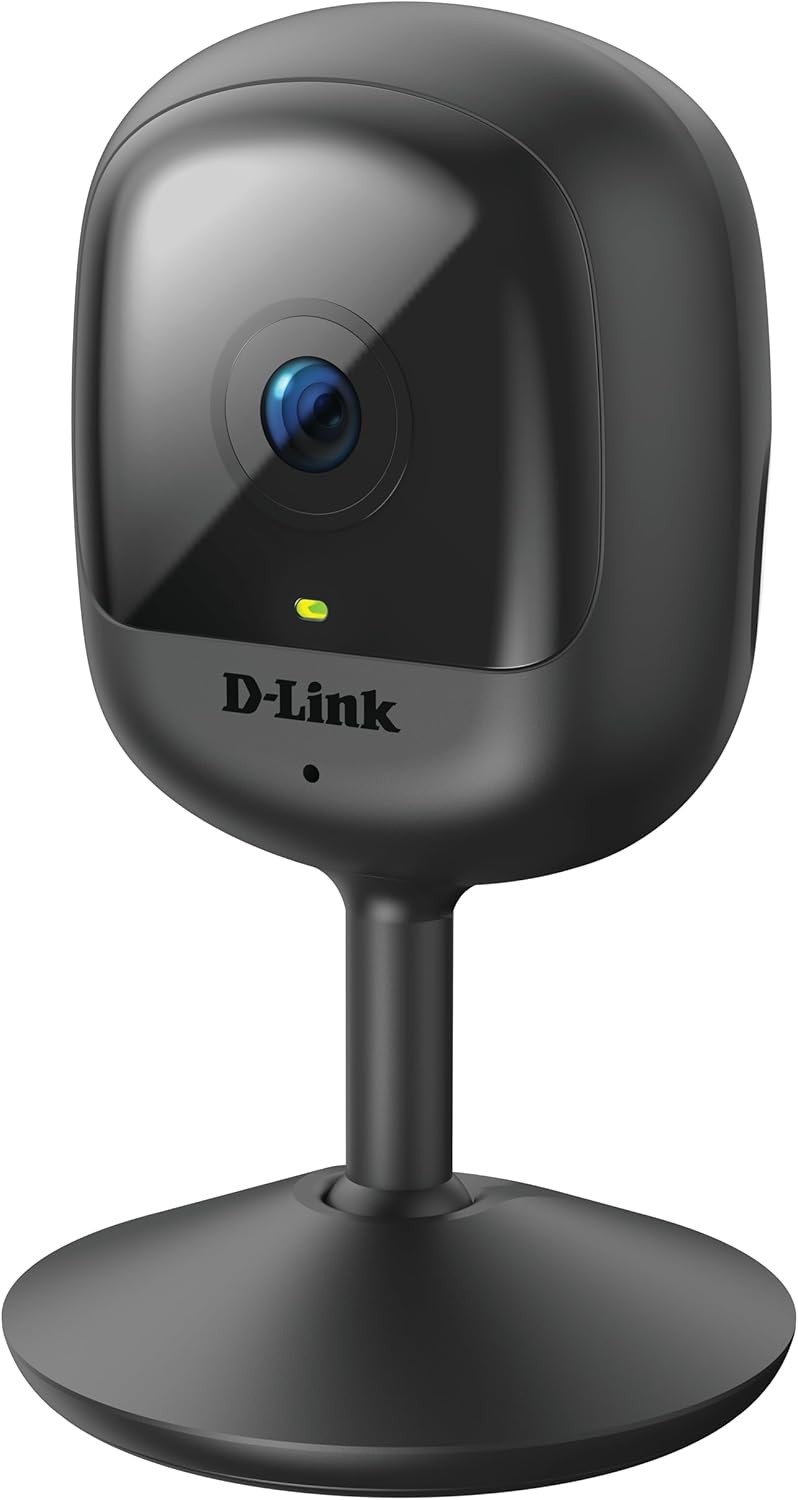
Figura 3.1: Fronte view of the D-Link DCS-6100LHV2 camera, showing the lens and status LED.

Figura 3.2: Traseira view of the D-Link DCS-6100LHV2 camera, highlighting the speaker, reset button, and power port.
Compoñentes clave:
- Lente da cámara: Captures Full HD 1080p video.
- LED de estado: Indicates camera status (e.g., power, connection).
- Micrófono: Para entrada de audio e comunicación bidireccional.
- Relator: Para saída de audio e comunicación bidireccional.
- Botón de reinicio: Úsase para restaurar a configuración predeterminada de fábrica.
- Porto de alimentación micro USB: Conéctase ao adaptador de alimentación.
- Ranura para tarxetas MicroSD: For local video storage (supports up to 128 GB).
4. Configuración
4.1. Instalación da aplicación
- Descarga o mydlink aplicación desde a App Store (iOS) ou Google Play Store (Android).
- Instala a aplicación no teu smartphone ou tableta.
- Inicia a aplicación mydlink e crea unha conta nova ou inicia sesión cunha xa existente.
4.2. Powering On and Wi-Fi Connection
- Connect the micro USB power adapter to the camera's power port and plug it into a power outlet.
- Wait for the camera's status LED to blink orange, indicating it is ready for setup.
- In the mydlink app, tap the "Add a Device" icon and follow the on-screen instructions to connect your camera to your Wi-Fi network. Ensure your Wi-Fi network is 2.4 GHz.
- Unha vez conectado, o LED de estado acenderase en verde fixo.
4.3. Montaxe da cámara
A cámara pódese colocar sobre unha superficie plana ou montar nunha parede.
- Colocación de mesa: Simplemente coloca a cámara sobre unha superficie estable e plana dentro do alcance do sinal wifi e dunha toma de corrente.
- Montaxe na parede: Use the provided wall mount kit. Secure the mount to the desired location on the wall using screws, then attach the camera to the mount. Adjust the camera angle as needed.

Figura 4.1: The D-Link DCS-6100LHV2 camera discreetly placed in a home environment.
5. Instrucións de funcionamento
5.1. En directo View
Open the mydlink app and select your camera from the device list to view the live video feed. You can pinch to zoom and pan across the image.
5.2. Recording Options (MicroSD & Cloud)
- Gravación en tarxeta MicroSD: Insert a microSD card (up to 128 GB, not included) into the camera's slot for local storage of recorded events. Configure recording settings (e.g., continuous, event-based) via the mydlink app.
- mydlink Cloud Recording: The camera supports cloud recording. A 1-year free mydlink cloud subscription is included, allowing remote storage and access to video clips. Manage cloud recording settings and view stored videos through the mydlink app.
5.3. Detección de movemento e son
The camera features integrated motion and sound detection. When motion or sound is detected, the camera can automatically start recording and send push notifications to your mobile device. Sensitivity levels and detection zones can be customized in the mydlink app settings.
5.4. Audio bidireccional
Utilize the camera's built-in microphone and speaker for two-way audio communication. From the live view in the mydlink app, tap the microphone icon to speak through the camera, and listen to audio from the camera's location.
5.5. Visión nocturna
The camera automatically switches to night vision mode in low-light conditions, providing clear black-and-white video up to 5 meters (16 feet) in complete darkness.
5.6. Integración do fogar intelixente
The D-Link DCS-6100LHV2 is compatible with Amazon Alexa and Google Assistant. Follow the instructions in the mydlink app or your smart home assistant's app to link your camera and enable voice control for features like viewing the live feed on compatible smart displays.
6. Mantemento
6.1. Limpeza
To clean the camera, gently wipe the exterior with a soft, dry cloth. Do not use liquid cleaners or aerosols, as they may damage the device. Ensure the lens is free of dust and smudges for optimal image clarity.
6.2. Actualizacións de firmware
Regularly check for and install firmware updates via the mydlink app. Firmware updates often include performance improvements, new features, and security enhancements.
7 Solución de problemas
7.1. A cámara non se conecta á wifi
- Asegúrate de que a túa rede wifi sexa de 2.4 GHz. A cámara non admite redes de 5 GHz.
- Verify that the camera is within range of your Wi-Fi router.
- Comproba que o contrasinal da túa wifi sexa correcto.
- Try restarting your Wi-Fi router and the camera.
- If issues persist, perform a factory reset on the camera by pressing and holding the reset button for 10 seconds, then attempt setup again.
7.2. No Video Recording
- For microSD recording, ensure a compatible microSD card is inserted and properly formatted via the mydlink app.
- Check recording schedules and event detection settings in the mydlink app.
- For cloud recording, verify your mydlink cloud subscription status.
7.3. Mala calidade de imaxe
- Ensure the camera lens is clean and free of obstructions.
- Comproba a velocidade da túa conexión a internet. Necesítase unha conexión estable e rápida para unha transmisión óptima.
- Adjust the camera's position to avoid glare or strong backlighting.
7.4. Problemas de audio bidireccional
- Asegúrate de que o micrófono e o altofalante da cámara non estean obstruídos.
- Check the volume settings on your mobile device and within the mydlink app.
- Verify that your internet connection is stable, as audio streaming requires consistent bandwidth.
8. Especificacións
| Característica | Detalle |
|---|---|
| Nome do modelo | DCS-6100LHV2 |
| Resolución de vídeo | Full HD 1080p |
| Viewángulo ing | 120 graos |
| Range de visión nocturna | Ata 5 metros (16 pés) |
| Conectividade | Wi-Fi (2.4 GHz) |
| Opcións de almacenamento | MicroSD card (up to 128 GB), mydlink Cloud Recording |
| Audio | Two-Way Audio (Built-in Microphone and Speaker) |
| Detección | Motion Detection, Sound Detection |
| Compatibilidade do fogar intelixente | Amazon Alexa, Asistente de Google |
| Entrada de enerxía | Micro USB, 220V, 4W |
| Dimensións (L x W x H) | 6 x 6 x 10.4 cm |
| Peso | 65 gramos |
| Material | Plástico |
| Entorno operativo | Uso en interiores |
9. Información da garantía
The D-Link DCS-6100LHV2 camera comes with a 2 ano de garantía from the date of purchase. This warranty covers defects in materials and workmanship under normal use. Please retain your proof of purchase for warranty claims. The warranty does not cover damage caused by misuse, accidents, unauthorized modifications, or external factors.
10. Apoio
For further assistance, technical support, or to access additional resources, please visit the official D-Link support website or contact their customer service. Refer to the Quick Installation Guide included in your package for specific contact details for your region.